Customer Onboarding Specialist Resume Examples: free
Accelerate Time-to-Value with a Customer Onboarding Specialist Resume
By Mustafa Tarabya, founder of CVBooster · Published · Updated
Create a customer onboarding specialist resume showcasing your ability to guide new customers from signup to success with structured implementation programs.
Sample resumes for a customer onboarding specialist
The same customer onboarding specialist content laid out in three CVBooster templates, so you can see what the finished document looks like before you write a word.
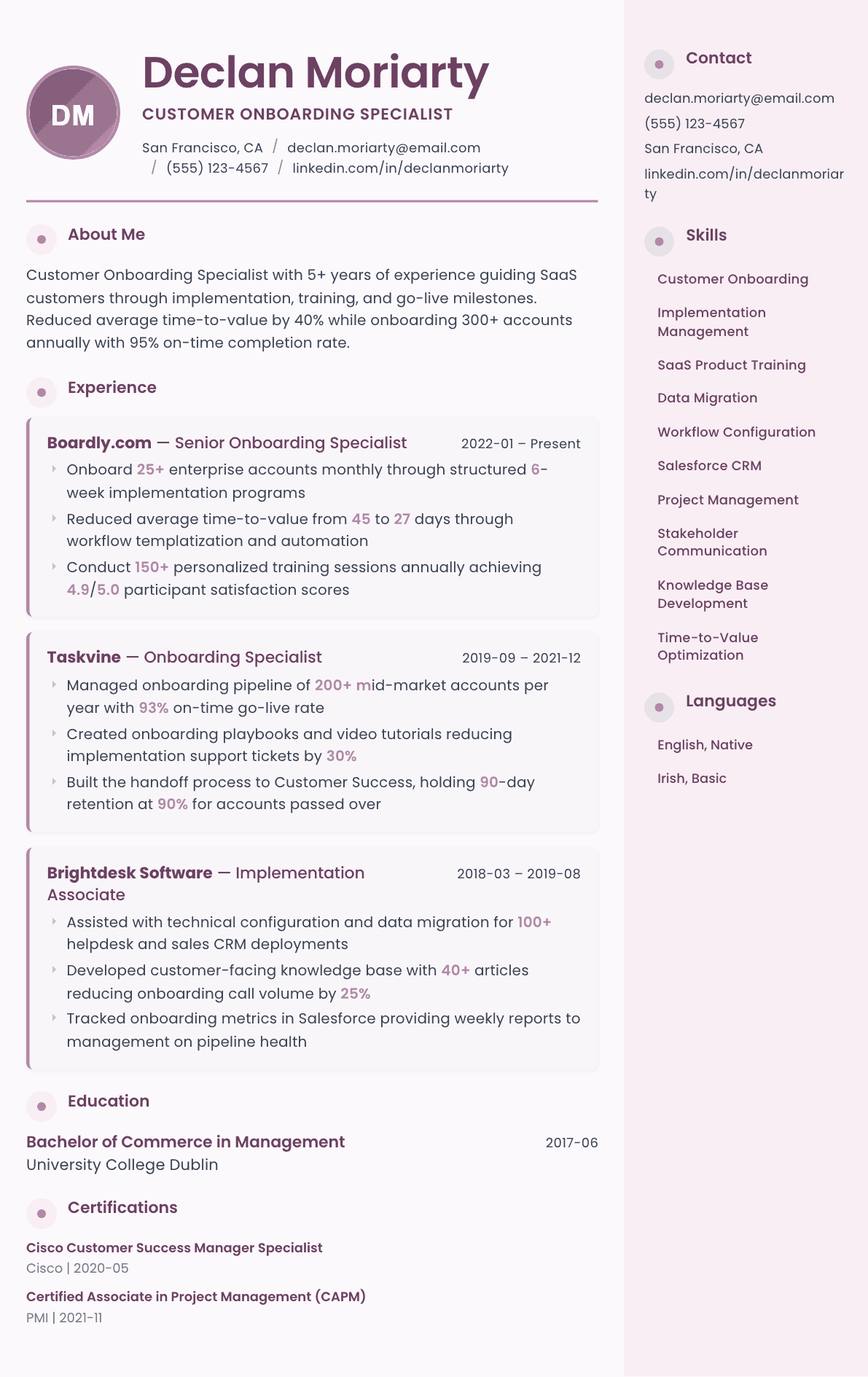
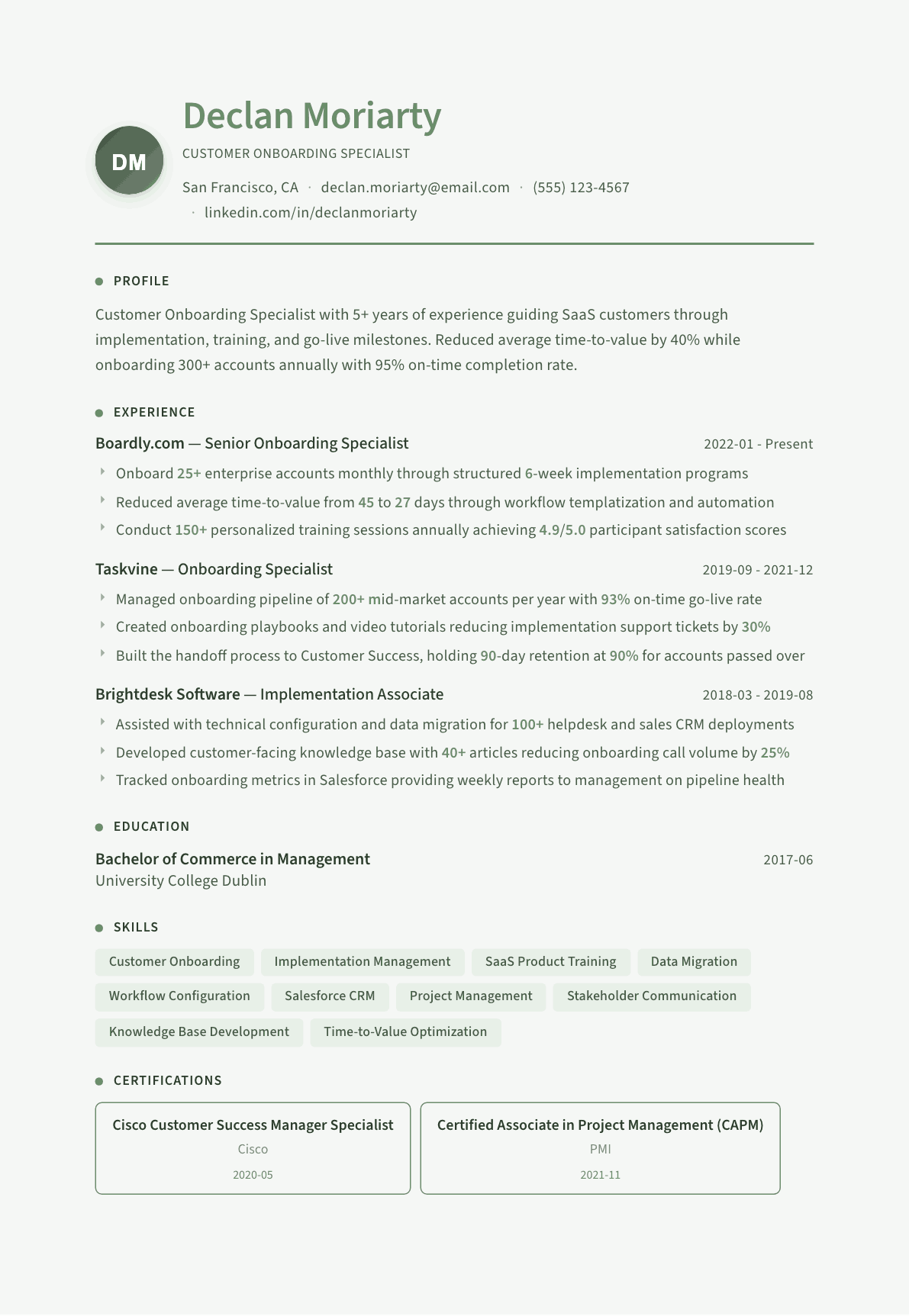
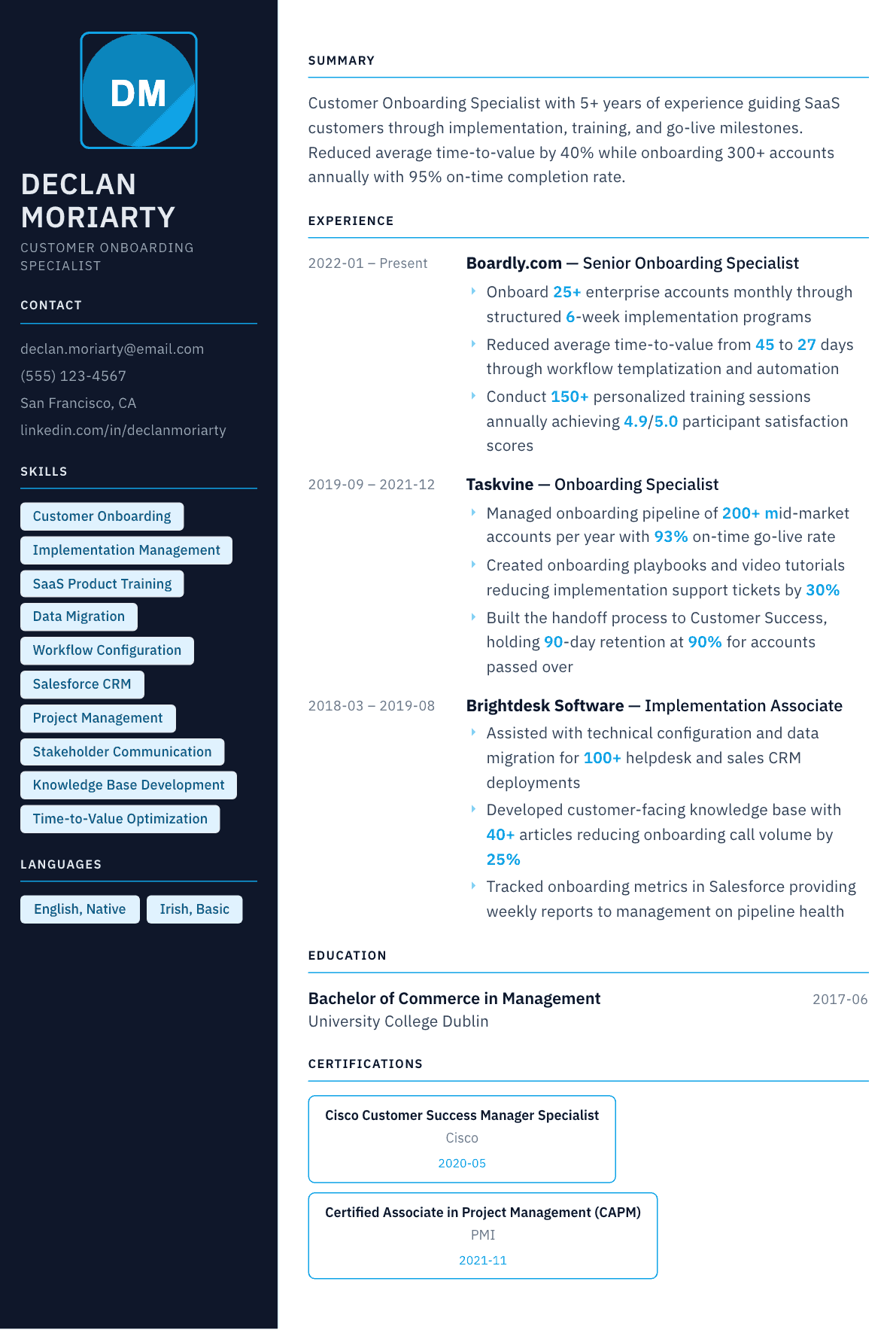
Example Customer Onboarding Specialist summary
Customer Onboarding Specialist with 5 years of SaaS implementation experience onboarding 300+ accounts annually. Reduced time-to-value by 40% and maintained 95% on-time go-live rate with 4.9/5.0 training satisfaction scores.
Skills to list on a Customer Onboarding Specialist resume
- Customer Onboarding
- Implementation Planning
- SaaS Configuration
- Data Migration
- Product Training
- Workflow Automation
- Salesforce / HubSpot CRM
- Project Management
- Stakeholder Communication
- Knowledge Base Creation
- Time-to-Value Metrics
- Customer Retention
What actually gets this resume read
- Quantify accounts onboarded annually and on-time completion rates to demonstrate throughput.
- Highlight time-to-value improvements. This is the most critical onboarding metric.
- Include training delivery experience: session counts, satisfaction scores, materials created.
- Show technical skills like data migration, API configuration, or workflow automation.
- Emphasize handoff processes with Customer Success to show end-to-end customer lifecycle understanding.
How to write a customer onboarding specialist resume
A customer onboarding specialist resume is assessed on throughput and time. The hiring manager wants to know how many accounts you took from signed contract to live use, how long that took, what proportion finished on schedule, and how many of those customers were still active after the first renewal window. Onboarding is one of the few customer-facing jobs with a genuine cycle time attached, and leaving it off wastes your strongest evidence.
The second question is technical depth. Onboarding covers everything from a scripted welcome call to a multi-week implementation with data migration, single sign-on configuration and integration work through an application programming interface. Those hire differently. Say which end of that range you worked at, in the first three lines, or a reader will assume the simpler one.
This guide covers the section order onboarding postings expect, how to describe an implementation without turning it into a project plan, three summaries from associate to senior specialist, before-and-after bullets, and the questions onboarding specialists ask when they are competing with project managers and support agents for the same job.
Format: one page, cycle metrics up front
Reverse chronological on one page for most candidates. Directly beneath the summary, put a short results band with the three numbers this role is run on: accounts onboarded in a period, average time to go live, and on-time completion rate. A manager who sees those three before the bullets has already decided you understand the job.
Each role needs a scope line naming the product, the customer segment, the typical implementation length and the number of accounts running in parallel. Carrying 8 enterprise implementations at once is a different skill from closing 30 self-serve accounts a week, and the scope line is what makes the difference legible.
- Section order: summary, onboarding results, experience, tools and technical skills, education and certifications.
- Name the segment: self-serve, small business, mid-market, enterprise, public sector.
- State whether you owned the plan or executed someone else's.
Summary: segment, volume, time to value, retention
Name the product category and the customer segment, then the volume you carried, then the cycle time you achieved, then what happened after handoff. The last part is what separates a strong onboarding resume from an average one, because a fast go-live that churns in the second quarter is not a success and experienced managers know it.
Avoid the phrase passionate about customers. It appears on nearly every application for this role and adds nothing a reader can act on. The equivalent claim, made credibly, is a retention or adoption figure measured at a fixed point after go-live.
Experience: kickoff, configuration, training, go-live, handoff
Structure bullets along the actual implementation sequence, because a hiring manager is mentally checking which stages you have run. Kickoff and scoping, where you set success criteria with the customer. Configuration and data, where records get migrated, fields mapped and permissions set. Enablement, where you train the administrators and the end users. Go-live, where the first real work happens in the product. And handoff, where an account manager or success manager takes over with documented context.
The stage most candidates undersell is scoping. Agreeing what success means before the work begins is the single highest-leverage act in onboarding, and describing how you did it, the questions asked, the milestones written down, the executive sponsor identified, immediately reads as senior.
Where onboarding went wrong, say so and say what you changed. Stalled projects caused by an unavailable customer contact, incomplete data files, or a scope that grew after kickoff are universal in this work. A candidate with a stated method for restarting a stalled implementation is more valuable than one whose page implies nothing ever slipped.
Scale: playbooks, templates and the one to many move
Onboarding teams are always trying to serve more customers without adding people, so anything you built that made the process repeatable belongs on the page. Templated project plans, configuration checklists, recorded training modules, help center articles, in-product walkthroughs and group webinars all reduce the hours each account consumes.
Quantify the leverage rather than the artifact. The number of support tickets a new article removed, the training hours replaced by a recorded session, or the reduction in average implementation hours per account are what a manager will use to justify hiring you.
- Say how many accounts you ran in parallel, not only the annual total.
- Name the artifacts you authored and what they replaced.
- Give the handoff document or health summary you produced for the receiving team.
Tools, technical skills and keywords
List the customer relationship and success platforms, the project tracking tool, the support desk, and the technical work you can genuinely do. Salesforce, HubSpot, Gainsight, ChurnZero, Asana, Monday, Jira, Zendesk and Intercom are the recurring names, and the technical line matters: comma separated file imports, field mapping, spreadsheet transformation, single sign-on setup, webhook or interface configuration, and reading application programming interface documentation well enough to brief an engineer.
For the keyword pass, mirror the posting: implementation, time to value, adoption, kickoff, go-live, enablement, training delivery, account handoff, escalation and customer health. Use each once where it is claimed and once where it is proven inside a bullet.
Customer Onboarding Specialist resume summary examples
Implementation associate
Implementation associate with eighteen months supporting onboarding for a small business software product, completing data imports and account configuration for 40 customers monthly and running 12 training sessions a month. Seeking a customer onboarding specialist role with full project ownership.
Four years in
Customer onboarding specialist with four years in mid-market software, running 12 implementations in parallel on a 6-week cycle and completing 90% on schedule. Cut average time to first value from 41 to 26 days by templating the kickoff and configuration stages, with 92% of accounts active at 90 days.
Senior or lead specialist
Senior onboarding specialist with eight years in enterprise software, leading complex implementations involving data migration, single sign-on and third party integrations across 8 concurrent accounts. Built the onboarding playbook now used by a team of 6 and mentors new specialists through their first three projects.
Work experience bullets: before and after
Before: Onboarded new customers onto the platform.
After: Onboarded 25 mid-market accounts per quarter through a structured 6-week program covering kickoff, data migration, administrator training and go-live sign-off.
The volume, the cycle length and the named stages show a defined process instead of unstructured hand-holding.
Before: Reduced the time it takes customers to get started.
After: Reduced average time to first value from 44 to 27 days by moving configuration ahead of the kickoff call and replacing three live sessions with a recorded onboarding module.
A before and after cycle time plus the two changes that caused it make the improvement repeatable elsewhere.
Before: Trained customers on how to use the software.
After: Delivered around 15 administrator and end-user training sessions monthly for groups of 5 to 30, and rewrote the curriculum around the three workflows that drove the majority of early support tickets.
Session volume, audience size and a curriculum decision demonstrate teaching judgment, not just calendar time.
Before: Worked with technical teams on customer setup.
After: Handled data imports, field mapping and single sign-on configuration independently, escalating only genuine product defects and writing the reproduction steps engineering needed.
Naming the technical tasks you own and where you escalate proves you reduce load on engineering rather than add to it.
Before: Made sure customers were happy after onboarding.
After: Handed each account to the success team with a written summary of configuration, adoption baseline and open risks, and 92% of onboarded accounts remained active at the 90-day mark.
A concrete handoff artifact and a retention checkpoint prove the onboarding actually held after you left the account.
Hard skills
- Implementation project planning
- Kickoff and success criteria scoping
- Data migration and field mapping
- Product configuration and permissions
- Single sign-on setup
- Integration and interface configuration
- Training delivery and curriculum design
- Onboarding playbook development
- Salesforce and HubSpot
- Gainsight and ChurnZero
- Asana, Monday and Jira
- Adoption and usage reporting
Soft skills
- Project discipline
- Teaching non-technical users
- Chasing without irritating
- Expectation setting
- Written clarity
- Parallel task management
Certifications worth listing
- Certified Customer Success Manager (SuccessCOACHING)
- Salesforce Certified Administrator (Salesforce)
- Certified Associate in Project Management (CAPM) (Project Management Institute)
- Gainsight Associate Administrator (Gainsight)
Mistakes that cost customer onboarding specialist candidates the interview
- Describing onboarding without a cycle time, which removes the one number this role is genuinely measured on.
- Leaving out how many implementations ran in parallel, so a manager cannot judge whether you can carry her queue.
- Hiding the technical depth, or overstating it, when interviews test data mapping and configuration directly.
- Ending the story at go-live and never showing whether the account was still active a quarter later.
- Listing training sessions delivered with no audience size, no topic and no effect on support volume.
- Writing the resume as generic customer service when the posting is for a project-driven implementation role.
- Omitting the playbooks, templates and articles you built, which is the evidence that you scale a team rather than add to it.
Customer Onboarding Specialist resume questions
What is the difference between a customer onboarding specialist and an implementation consultant?
Onboarding usually covers a repeatable program across many accounts on a defined cycle, while implementation consulting is deeper, longer and often billable. If your work involved configuration and migration on long timelines, use consulting language and lead with project complexity.
Which metrics matter most on an onboarding resume?
Accounts onboarded per period, average time to go live or first value, on-time completion rate, and retention or adoption measured at a fixed point after handoff. Two or three you genuinely owned beat a full dashboard you only watched.
How technical does a customer onboarding specialist need to be?
Enough to run a data import, map fields, configure permissions and single sign-on, and read interface documentation without help. You do not need to write production code, but a resume with no technical detail loses to one that names those tasks.
How do I write about implementations that failed or stalled?
Frame the recovery. Describe the cause, whether an absent sponsor, dirty data or scope creep after kickoff, then the intervention you used and the outcome. Managers hire the recovery method because every onboarding team has stalled accounts.
Can I move into onboarding from a support or training role?
Yes, and the bridge is the account-level work you already do. Lead with training you delivered, configuration you handled, documentation you wrote and any customer you personally carried from setup to active use, then add project language around it.
Related resume examples
- Customer Success Manager Resume example
- Client Relations Manager Resume example
- Live Chat Agent Resume example
- Customer Retention Specialist Resume example
- Executive Assistant Resume example
- Virtual Assistant Resume example