E-Learning Developer Resume Examples: what gets the call
Create an E-Learning Developer Resume With a Portfolio Behind It
By Mustafa Tarabya, founder of CVBooster · Published · Updated
E-learning developer resume examples with authoring tool keywords, SCORM and accessibility proof points, and a full writing guide by section.
Sample resumes for a e-learning developer
The same e-learning developer content laid out in three CVBooster templates, so you can see what the finished document looks like before you write a word.
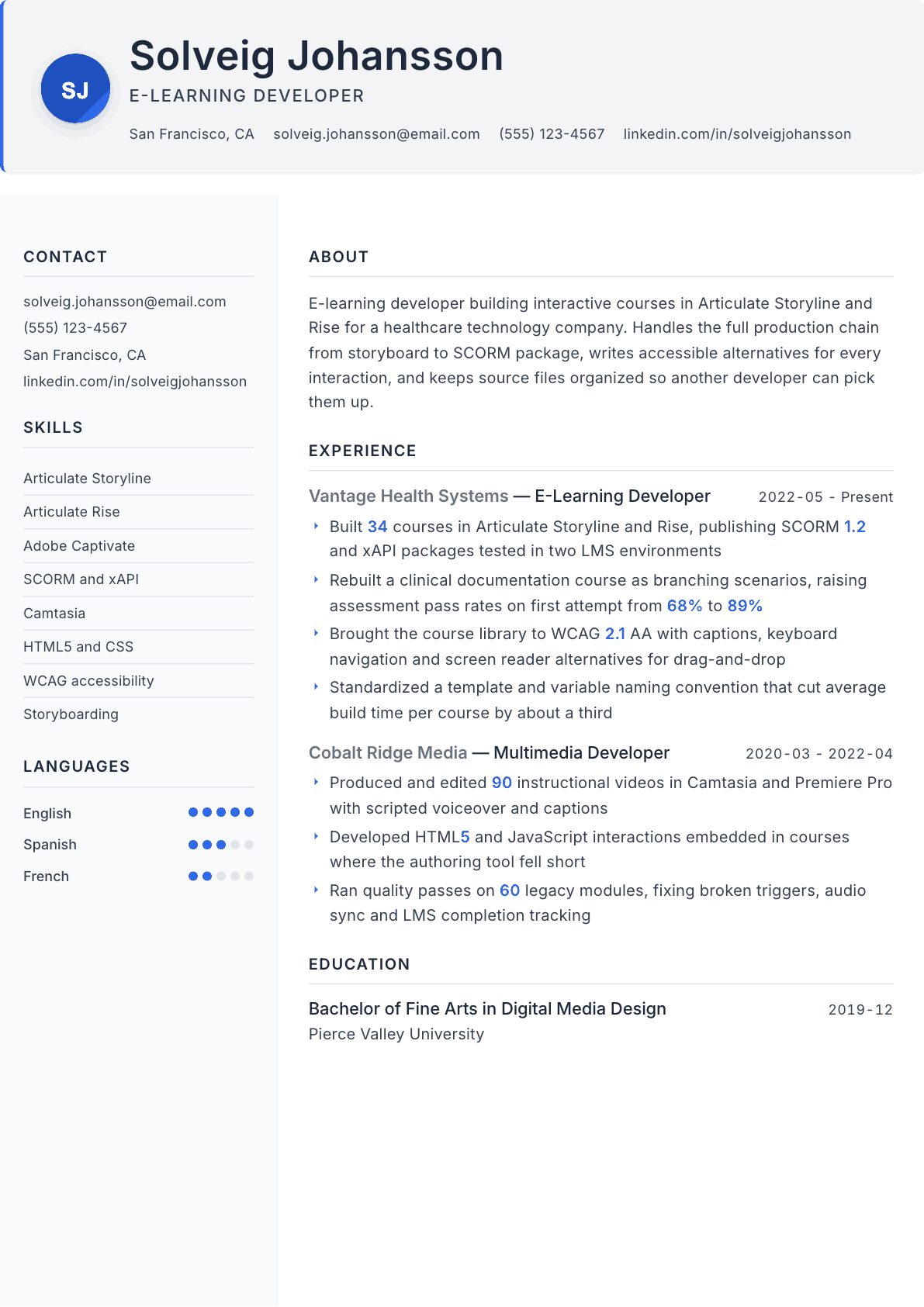
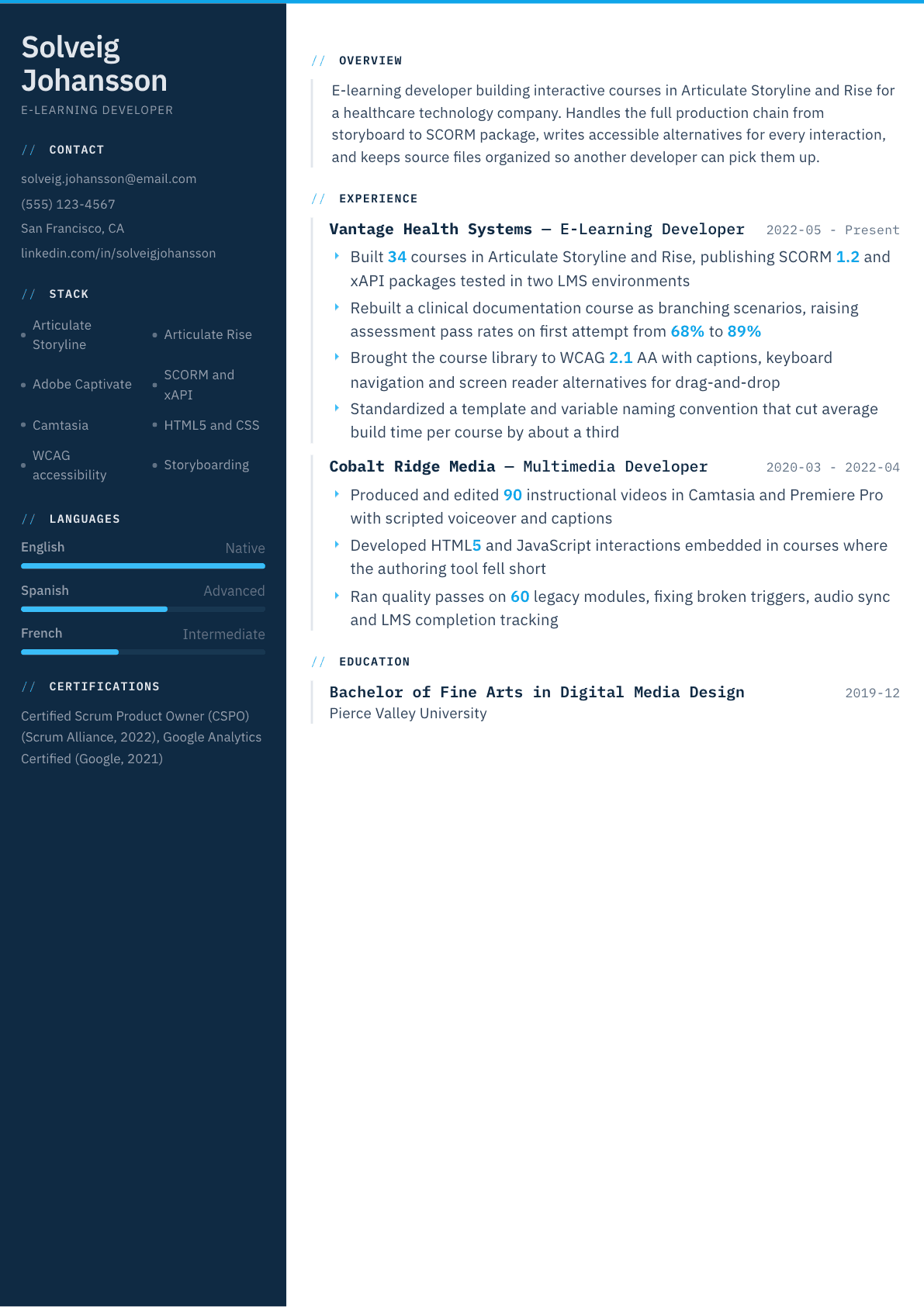
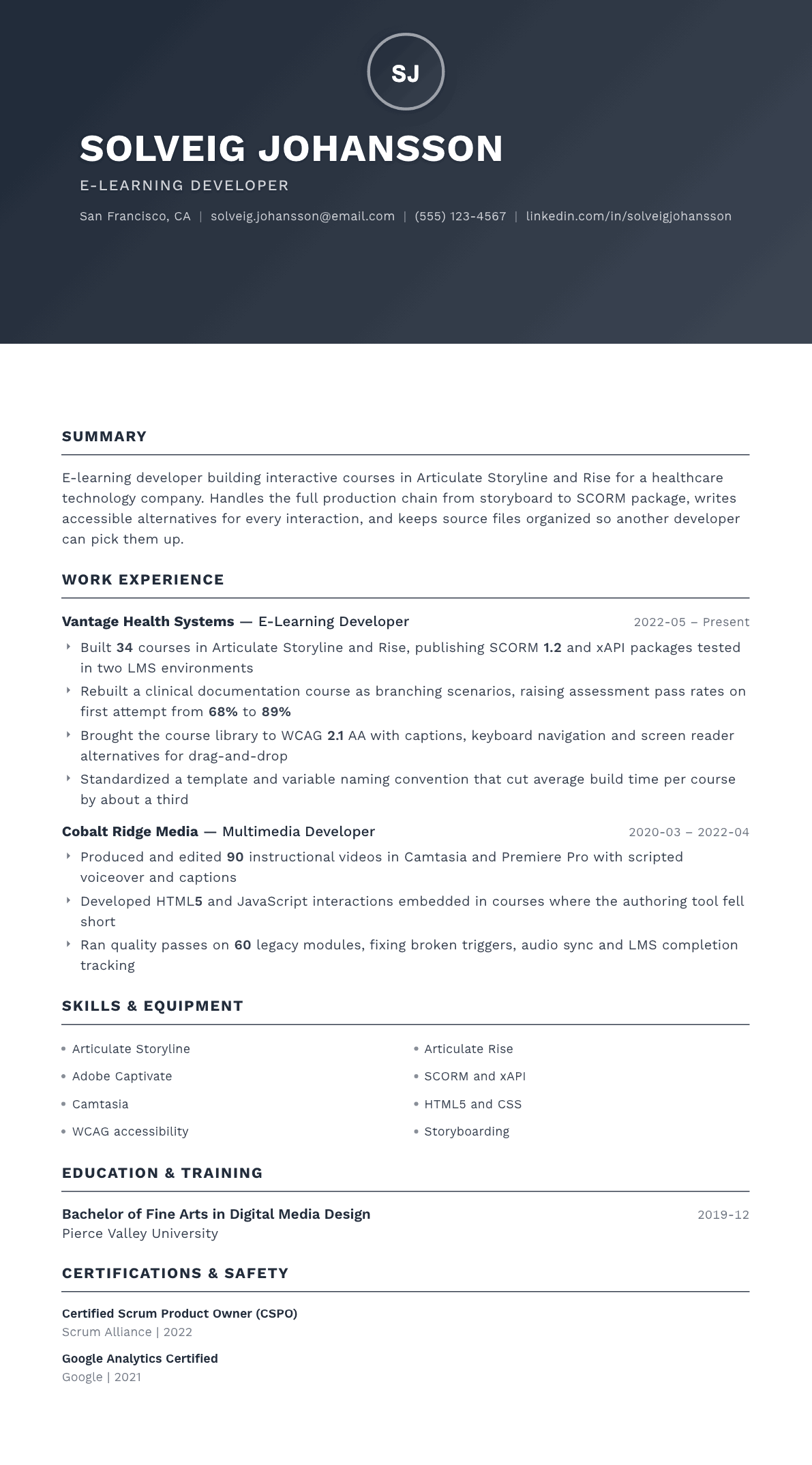
Example E-Learning Developer summary
E-learning developer with five years building interactive courses in Articulate Storyline, Rise and Captivate for healthcare and media employers. Owns production from storyboard through SCORM and xAPI packaging, tests in more than one LMS before release, and meets WCAG 2.1 AA with captions, keyboard navigation and screen reader alternatives. Writes HTML5 and JavaScript when the authoring tool cannot do the job.
Skills to list on a E-Learning Developer resume
- Articulate Storyline
- Articulate Rise
- Adobe Captivate
- SCORM 1.2 and 2004
- xAPI
- Camtasia
- Adobe Premiere Pro
- HTML5
- CSS
- JavaScript
- WCAG 2.1 accessibility
- Storyboarding
- Branching scenarios
- Audio recording and editing
- LMS testing
- Version control of source files
What actually gets this resume read
- Put a portfolio link in the header, because no e-learning developer gets an interview on a text description alone.
- Name every authoring tool with version-level specifics, and say which ones you have built branching scenarios in.
- List the publishing standards you have tested, such as SCORM 1.2, SCORM 2004, xAPI or cmi5, and the LMS you tested against.
- Show accessibility work concretely: captions, keyboard navigation, focus order, alt text and screen reader behavior.
- Include the media production side, since most teams expect video editing, audio cleanup and graphic work in the same seat.
- Add any code you write, such as HTML5, JavaScript triggers or CSS, because it separates developers from template fillers.
How to write a e-learning developer resume
No e-learning developer is hired on prose. The resume opens the door and the portfolio decides the job, so the first thing your page has to do is make the portfolio easy to reach and make a reviewer want to click it. A link in the header, near your name, is not optional in this field.
The second thing the resume has to settle is what kind of developer you are. Some people in this title assemble content in a template-driven tool. Others build variable-driven branching, write JavaScript when the tool runs out of road, package for more than one standard, and fix completion tracking when a course reports the wrong status. Those are different hires and the wording of your bullets decides which one a reviewer sees.
This guide covers the header and portfolio, how to describe builds so a lead developer can judge complexity, the publishing and accessibility details that get skipped and then cost you the interview, and the production skills teams now expect in the same seat.
Header and portfolio: make the samples one click away
Put the portfolio link directly under your name, not at the bottom under interests. If your best work is locked behind a client firewall, build two or three public samples that show the interaction types you want to be hired for, and say plainly that proprietary work is available to discuss.
Curate hard. Three strong pieces beat twelve, and each should show something different: a branching scenario, a software simulation, a responsive microlearning module. Reviewers open the first sample, form an opinion in under a minute, and rarely reach the fourth.
- Header: name, city, email, portfolio link, and optionally a code repository.
- Order: summary, tools, experience, selected projects, education and certifications.
- One page unless you have a long production history, since the portfolio carries the depth.
Tools section near the top, named by product
This is one of the few roles where a tools block belongs above the experience section, because reviewers screen on it. Group by function: authoring, media, code, and delivery. Then write the products, not the categories.
Say what you can do inside each tool. Building a variable-driven branching scenario, custom triggers and a results slide in one authoring tool is a much stronger claim than listing the tool alone, and it is the level of detail a senior developer uses to sort candidates.
- Authoring: Articulate Storyline, Rise, Adobe Captivate, Lectora, Camtasia.
- Media: Premiere Pro, Audition, After Effects, Illustrator, Figma, Vyond.
- Code and delivery: HTML5, CSS, JavaScript, xAPI, SCORM, learning platform testing.
Describe builds so complexity is visible
Course counts alone flatten your work. A reviewer cannot tell whether thirty courses were thirty template conversions or thirty branching builds with custom interactions. Give the interaction type, the length, the audience and anything unusual about the build, such as a simulation of a live clinical system or a course that had to work on shared tablets on a factory floor.
Include the parts of production nobody advertises but everyone needs: storyboarding, script writing, voiceover recording or direction, translation handoff, and the review cycle with subject matter experts. Developers who manage the review cycle well save teams weeks, and saying how you run it is a genuine differentiator.
Publishing, tracking and accessibility
Name the standards you have published and tested: SCORM 1.2, xAPI, cmi5, and which learning platforms you tested against. Then mention completion and tracking troubleshooting explicitly, because broken completion reporting is the most common production problem in this field and the ability to diagnose it is worth real money to a team.
Accessibility deserves its own sentences rather than one keyword. Captions and transcripts, keyboard navigation and focus order, color contrast, screen reader labeling, and non-drag alternatives for drag-and-drop interactions. Public sector and healthcare employers screen for this seriously, and a specific description beats an accessibility bullet every time.
Working with subject matter experts and reviewers
Most delays in course production come from the review cycle, not the build. Show that you control it: a storyboard sign-off gate before development, a single consolidated feedback round, a change log, and a rule about what can still change after alpha. Teams hire developers who protect the timeline.
If you have set standards for others, say so. A template, a variable naming convention, a style guide or a quality checklist that other developers use is evidence of seniority that no course count can convey.
E-Learning Developer resume summary examples
First developer role
Multimedia graduate with a portfolio of four self-built modules, including a branching customer scenario and a software simulation. Works in Articulate Storyline and Camtasia, publishes and tests SCORM packages in a free learning platform, and captions every video. Seeking a junior e-learning developer position.
Four years in
E-learning developer who has built more than thirty courses in Articulate Storyline and Rise for a healthcare technology employer. Owns production from storyboard through packaging and platform testing, writes HTML5 and JavaScript for custom interactions, and brought the course library to accessibility conformance.
Senior or lead developer
Senior e-learning developer setting build standards for a four-person production team. Maintains the template library, variable naming conventions and the quality checklist every course passes, leads accessibility remediation, and diagnoses tracking failures across two learning platforms for the wider organization.
Work experience bullets: before and after
Before: Developed e-learning courses for the company.
After: Built 34 courses in Articulate Storyline and Rise, ranging from 10-minute microlearning to a 90-minute branching clinical documentation scenario.
Length range and interaction type let a reviewer judge build complexity instead of guessing from a count.
Before: Published courses to the LMS.
After: Published SCORM 1.2 and xAPI packages and tested completion, bookmarking and score reporting in two separate learning platforms before release.
Naming the standards and what you tested proves you handle the failure points that break live courses.
Before: Made courses accessible.
After: Brought a library of 40 modules to accessibility conformance with captions, keyboard navigation, corrected focus order and non-drag alternatives for every drag interaction.
Specific remediation work is checkable, while the word accessible on its own tells a reviewer nothing.
Before: Used JavaScript in courses.
After: Wrote JavaScript and HTML5 interactions for a scored simulation the authoring tool could not produce, passing results back to the course variables for reporting.
Describing what the tool could not do shows where your coding actually earned its place in the build.
Before: Improved the course development process.
After: Standardized a template library and variable naming convention across the team, cutting average build time per course by roughly a third.
A reusable standard adopted by others is a seniority signal that individual course output cannot provide.
Hard skills
- Articulate Storyline
- Articulate Rise
- Adobe Captivate
- Camtasia
- SCORM packaging
- xAPI and cmi5
- HTML5 and CSS
- JavaScript
- Storyboarding
- Branching scenario design
- Video editing and audio cleanup
- Accessibility remediation
- Learning platform testing
- Source file version control
Soft skills
- Managing subject matter expert review cycles
- Protecting scope after storyboard sign-off
- Explaining technical limits to non-technical clients
- Attention to detail on triggers and states
- Estimating build time honestly
- Documenting builds for the next developer
Certifications worth listing
- Certified Professional in Accessibility Core Competencies (CPACC) (International Association of Accessibility Professionals)
- Web Accessibility Specialist (WAS) (International Association of Accessibility Professionals)
- Certified Professional in Talent Development (CPTD) (Association for Talent Development)
- Adobe Certified Professional (Adobe)
Mistakes that cost e-learning developer candidates the interview
- Burying or omitting the portfolio link, which is the one element this role cannot be hired without.
- Listing tools with no indication of build depth, so a lead cannot tell template work from custom development.
- Skipping publishing standards and platform testing, the details that separate developers from course assemblers.
- Treating accessibility as a single keyword rather than describing the remediation you actually performed.
- Showing twelve portfolio pieces of uneven quality when three strong and varied samples would land the interview.
- Leaving out media production skills, which most teams now expect from the same person in the same seat.
E-Learning Developer resume questions
What should an e-learning developer portfolio contain?
Three to five pieces that each demonstrate a different capability: a branching scenario, a software simulation, a responsive microlearning module and one video-led piece. Add a short note per sample explaining the constraint you were solving and the build decisions you made.
Do I need to know JavaScript for e-learning development?
Not for every job, but it widens the range of postings you qualify for considerably. Even modest ability to read and adapt triggers, pass variables and call platform functions puts you ahead of candidates limited to what the authoring interface offers.
How is an e-learning developer different from an instructional designer?
A designer owns analysis, objectives, structure and assessment strategy. A developer owns the build: interactions, media, packaging, testing and accessibility. Many jobs blend both, so say which half you are strongest in rather than claiming equal depth in each.
What if all my work is confidential client content?
Build two or three original samples on neutral subjects that demonstrate the same interaction types. Describe client projects on the resume by audience, length, interaction design and constraints, without exposing the content itself, which reviewers accept as normal practice.
Should I list every course I have built?
No. Give a total and then detail the six that show range: different tools, lengths, interaction types and audiences. A full catalog reads as volume, while a curated selection reads as judgment about what this particular employer needs.