Administrative Coordinator Resume Examples: free score
Write an Administrative Coordinator Resume That Shows Real Ownership
By Mustafa Tarabya, founder of CVBooster · Published · Updated
A full administrative coordinator resume sample, section by section tips, the keywords office hiring managers screen for, and a writing guide.
Sample resumes for a administrative coordinator
The same administrative coordinator content laid out in three CVBooster templates, so you can see what the finished document looks like before you write a word.
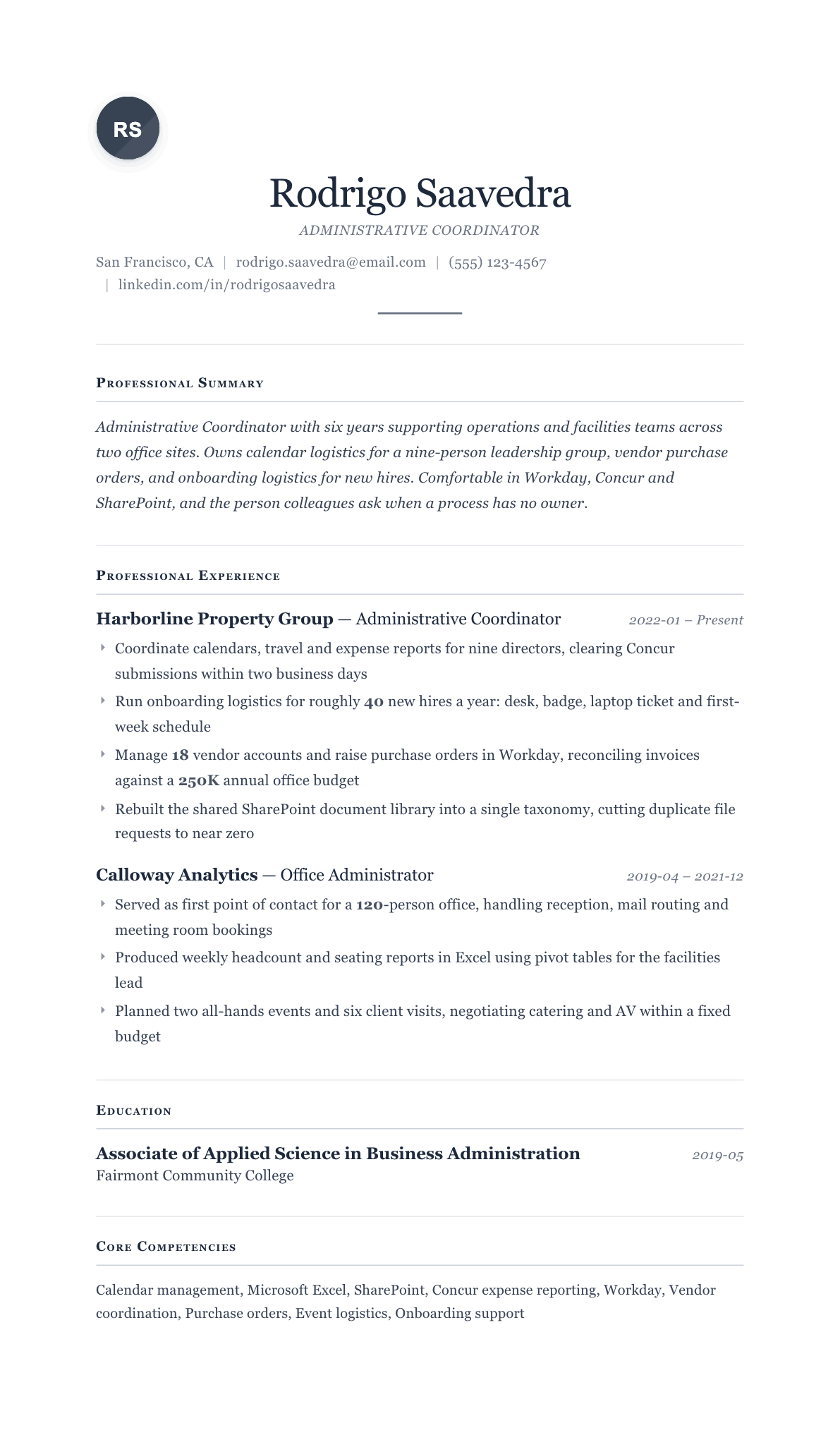
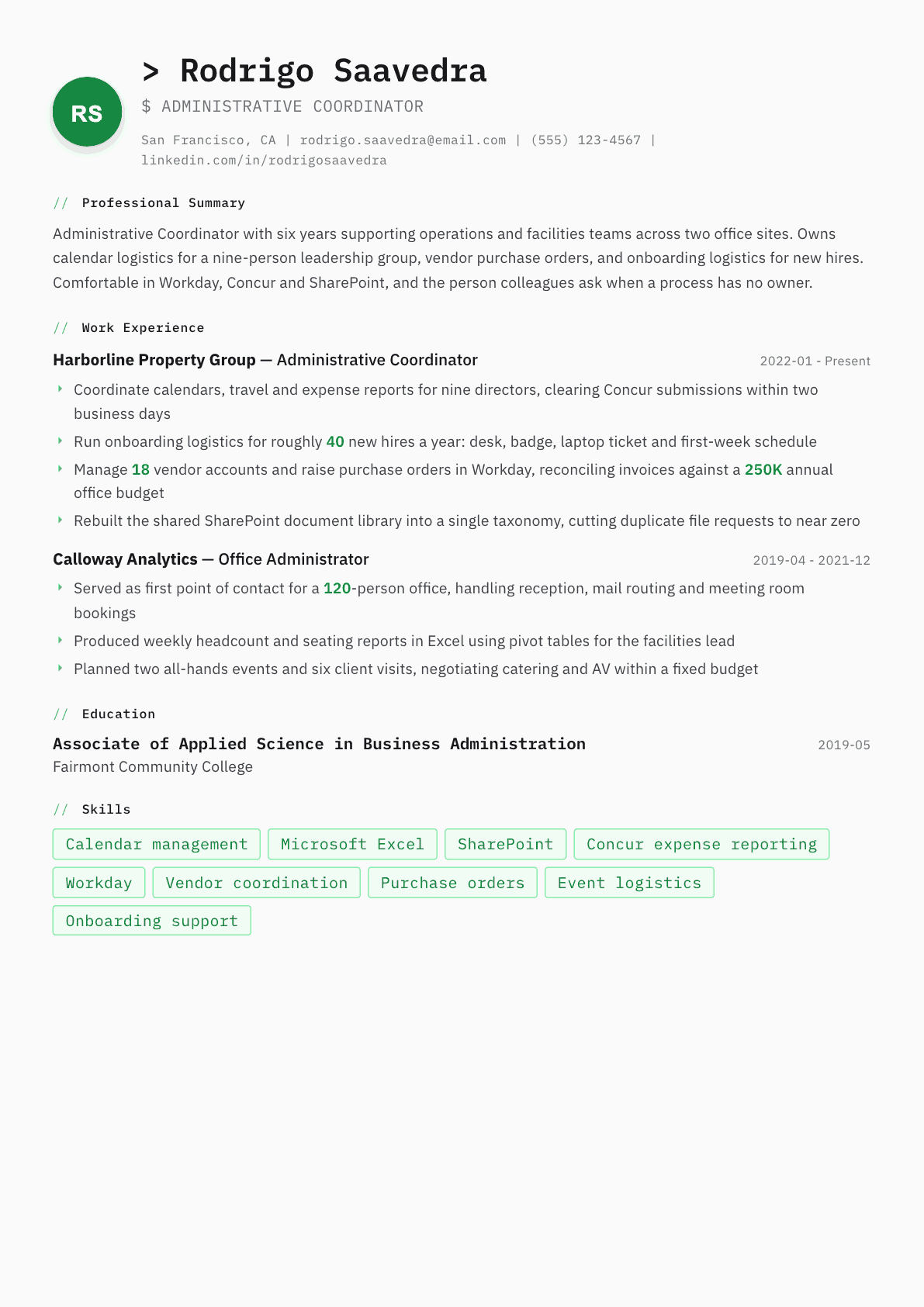
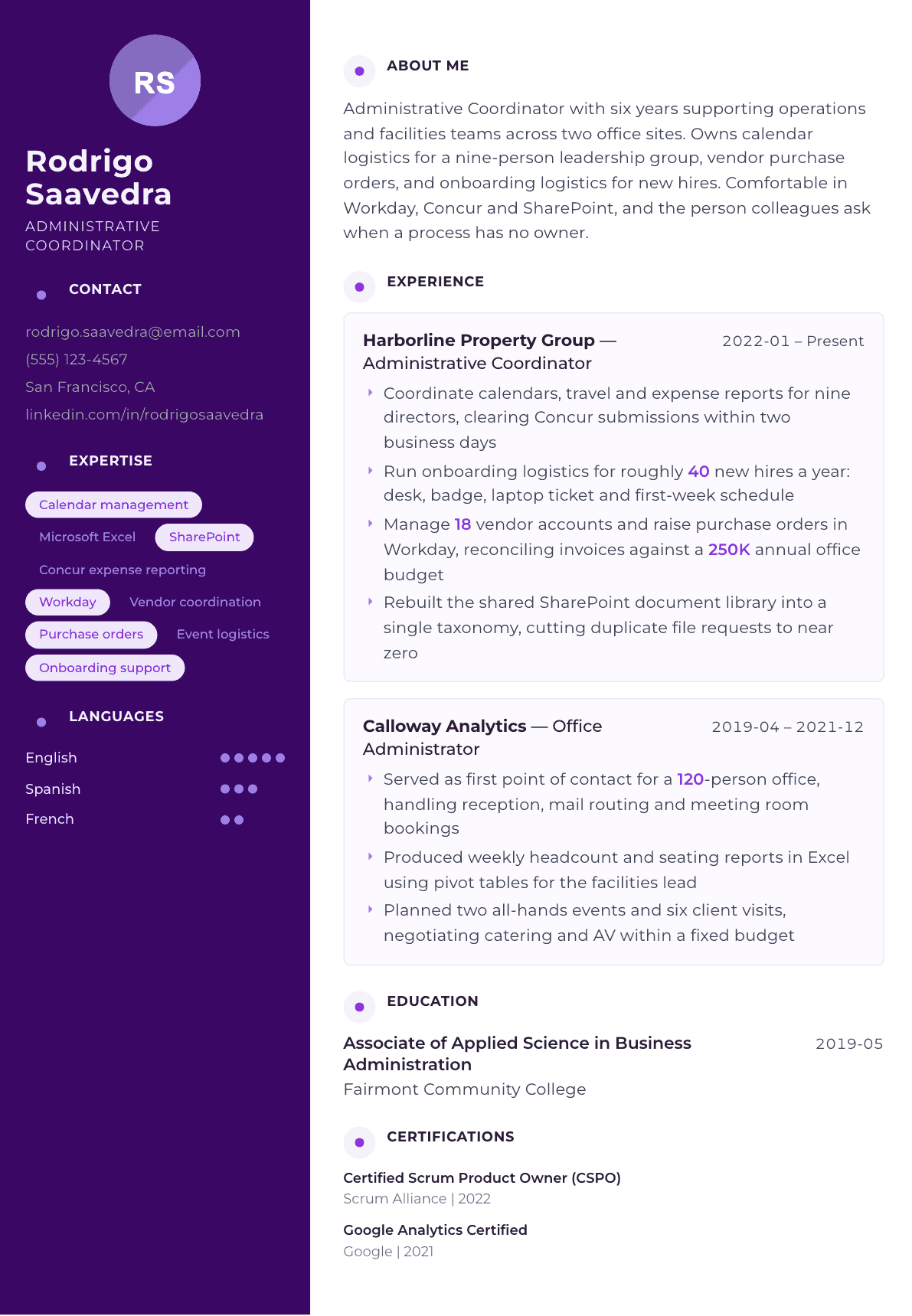
Example Administrative Coordinator summary
Administrative Coordinator with six years supporting multi site office operations for teams of up to 120 people. Owns executive calendars, travel and expense workflows, vendor purchase orders and new hire logistics, working daily in Workday, Concur and SharePoint. Known for turning undocumented routines into written processes that survive staff turnover. Seeking a coordinator role with facilities and events scope.
Skills to list on a Administrative Coordinator resume
- Calendar and scheduling management
- Travel booking and itineraries
- Expense reporting
- Vendor management
- Purchase order processing
- Microsoft Excel
- Microsoft Outlook
- SharePoint
- Workday
- Concur
- Meeting minutes
- Onboarding coordination
- Event planning
- Document control
- Process documentation
- Confidential recordkeeping
What actually gets this resume read
- Open each job with the size of the office and the number of people you supported, because scope is what a hiring manager compares.
- Name the systems you work in by product: Workday, Concur, NetSuite, SharePoint, Asana. Generic phrasing like office software gets filtered out.
- Show budget or purchase order authority in dollars or in the count of vendor accounts you own, not as a vague claim of responsibility.
- Coordinator means you run recurring processes, so describe one process end to end: who requests it, what you do, and how fast it closes.
- Put event and onboarding logistics in their own bullets, since those are the two areas that separate a coordinator from a general assistant.
- Mirror the posting language exactly once in your summary: cross functional coordination, calendar management, vendor management, whichever wording appears.
How to write a administrative coordinator resume
An administrative coordinator resume is judged on scope before it is judged on skill. The office manager or director of operations reading it wants to know how many people you supported, how many sites, how many vendor accounts, and whether the money that passed through your hands was measured in office supplies or in signed purchase orders. Two candidates can both write that they coordinated calendars and travel, and only one of them will name the leadership group, the systems and the turnaround time.
The word coordinator is the other thing being tested. A coordinator owns recurring processes end to end: onboarding logistics that repeat every month, an expense cycle that closes on a date, a vendor renewal calendar that nobody else is watching. An assistant reacts to requests. Your bullets have to read like the first, not the second, or you will be screened into the assistant pile and paid accordingly.
This guide covers the section order office hiring managers expect, how to write the summary so the systems appear early, before and after bullets drawn from calendar, procurement and onboarding work, and the questions coordinators ask when the job they actually do is much larger than the title suggests.
Format: one page, single column, systems visible in the top third
Reverse chronological, one clean font, no icon columns. Corporate applicant tracking systems handle a single column reliably and mangle sidebars, which matters more here than in most fields because administrative postings draw very large applicant pools and the first pass is mechanical.
Give the reader the shape of each office in the job header line rather than in a bullet. Something like Administrative Coordinator, Harborline Property Group, two sites, 140 staff carries more information than a paragraph of description and costs you one line.
- Header: name, city and state, phone, email. No photo, no headshot, no address block.
- Order: summary, core systems, experience, education, certifications if you hold any.
- A short core systems line near the top is worth more than a long skills list at the bottom.
- Two pages only once you have gone past roughly eight years or multiple site responsibility.
Summary: scope, systems, and the process you own
Three sentences. The first gives years and the size of what you support. The second names the platforms by product, because Workday, Concur, NetSuite, SharePoint and Asana each imply a different set of screens and approval chains, and generic wording about office software is invisible to both the software and the manager.
The third sentence is where you separate yourself. Name a process you own outright and what it produces: onboarding logistics for new hires, an expense cycle that clears within two business days, a vendor renewal calendar. Avoid adjectives entirely. Detail oriented and highly organized appear on nearly every resume in the pile, so they carry no signal at all.
Experience: run the process end to end on the page
Pick one recurring process per job and write it as a sequence: who requests it, what you do, what the deadline is, and what closing it looks like. A manager reading that a new hire request arrives, and a desk, badge, laptop ticket and first week schedule are all ready before day one, understands your standard immediately.
Keep budget and purchase order authority explicit. The number of vendor accounts you administer, the value of the office budget you reconcile, and whether you raise purchase orders or only route them are three different levels of trust, and they are the fastest way to show seniority without claiming it.
Include one improvement bullet in each job. Rebuilding a shared document library into a single taxonomy, or turning an undocumented routine into a written procedure, tells the reader you leave the office better organized than you found it. That is the difference between a coordinator who holds a role and one who grows into office manager.
- Lead each job with size: headcount supported, number of executives, number of sites.
- Give volumes per month or per year: expense reports cleared, purchase orders raised, new hires onboarded.
- Separate event logistics and onboarding logistics into their own bullets.
- Name every approval you hold, including any purchasing limit you sign within.
Skills and systems: name products, not categories
Split the list into systems and functions. Systems are the products: Workday, Concur, SharePoint, Outlook, Excel, NetSuite, Asana, Envoy. Functions are the work: calendar management, travel booking, expense reporting, vendor management, purchase order processing, meeting minutes, document control.
Excel deserves one qualifier rather than a bare mention. Pivot tables and lookups on a headcount or seating report is a claim a manager can test in an interview and is far more convincing than listing Microsoft Office as a single item.
Keywords office postings are screened against
Coordinator postings recycle a small vocabulary: cross functional coordination, calendar management, travel and expense, vendor management, purchase orders, meeting minutes, onboarding logistics, event coordination, records management, office operations. Mirror the exact phrasing of the posting once in the summary and once inside a bullet where it is doing real work.
Resist the urge to paste the whole list into a keyword block. A human reads the page seconds after the parser does, and a block of unattached nouns reads as padding. Every keyword should sit inside a sentence that proves it.
Administrative Coordinator resume summary examples
First coordinator role
Office support professional with two years of front desk and scheduling work, now coordinating calendars and travel for a six person management team. Comfortable in Outlook, Excel and Concur, and responsible for the supply and meeting room budget for a 40 person office. Seeking an administrative coordinator position with onboarding scope.
Six years in
Administrative Coordinator with six years supporting operations and facilities teams across two office sites. Owns executive calendar logistics for nine directors, 18 vendor accounts and purchase orders in Workday, and onboarding logistics for roughly 40 new hires a year. Rebuilt a shared document library that removed most duplicate file requests.
Lead coordinator
Senior Administrative Coordinator with eleven years across property and professional services offices, now leading two coordinators and the shared services inbox for 300 staff on three sites. Administers 45 supplier accounts, reconciles a departmental office budget monthly in NetSuite, and runs the quarterly all hands and client visit calendar.
Work experience bullets: before and after
Before: Managed calendars for executives and booked travel.
After: Coordinated calendars, multi city travel and expense reports for nine directors, clearing every Concur submission within two business days of receipt.
The number of executives, the platform and the turnaround time turn a duty into a service level a manager can rely on.
Before: Responsible for ordering supplies and dealing with vendors.
After: Administered 18 vendor accounts and raised purchase orders in Workday, reconciling monthly invoices against an annual office budget and challenging billing errors before approval.
Account count, the system and the reconciliation step show purchasing authority rather than errand running.
Before: Helped with onboarding new employees.
After: Ran onboarding logistics for roughly 40 new hires a year, confirming desk, badge, laptop ticket and a booked first week schedule before each start date.
A repeating volume and a finished checklist prove you own the process instead of assisting with it.
Before: Organized company events and meetings.
After: Planned two all hands events and six client visits a year, negotiating catering and audiovisual support within a fixed budget and running the room, signage and attendee list on the day.
Frequency, budget constraint and day of ownership make event work measurable instead of decorative.
Before: Improved the filing system on the shared drive.
After: Rebuilt the shared SharePoint document library into a single naming taxonomy with owner and retention tags, cutting repeat requests for missing files to almost none.
Naming the platform and the structure you designed shows judgment, and the outcome shows why it mattered.
Hard skills
- Executive calendar management
- Travel booking and itineraries
- Concur expense reporting
- Workday
- Purchase order processing
- Vendor account administration
- Microsoft Excel pivot tables
- Microsoft Outlook
- SharePoint document control
- Onboarding coordination
- Event and catering logistics
- Meeting minutes
- Process documentation
- Invoice reconciliation
Soft skills
- Gatekeeping with diplomacy
- Prioritizing competing requests
- Discretion with confidential files
- Following up without being asked
- Vendor negotiation
- Written clarity in short notices
Certifications worth listing
- Certified Administrative Professional (CAP) (International Association of Administrative Professionals)
- Microsoft Office Specialist: Excel Associate (Microsoft)
- Certified Meeting Professional (CMP) (Events Industry Council)
- Project Management Professional (PMP) (Project Management Institute)
- Notary Public commission (State commissioning authority)
Mistakes that cost administrative coordinator candidates the interview
- Describing duties in the abstract so the reader cannot tell whether the office had twelve people or three hundred.
- Writing office software or computer literate instead of naming Workday, Concur, NetSuite and SharePoint by product.
- Hiding purchasing authority, which is the single line that separates a coordinator from an administrative assistant.
- Filling the page with adjectives such as detail oriented and highly organized that every competing applicant also used.
- Using a two column template with icons, which corporate parsers frequently read out of order and drop dates from.
- Leaving out event and onboarding logistics because they feel like extras, when they are the two areas managers screen on.
- Sending one identical resume to a facilities heavy posting and an executive support posting instead of swapping the summary.
Administrative Coordinator resume questions
What is the difference between an administrative coordinator and an administrative assistant?
A coordinator owns recurring processes and usually holds some purchasing or approval authority, while an assistant supports named individuals. Write your bullets around processes you run start to finish and the authority you hold, and the distinction becomes obvious to the reader.
Should I put a number on every bullet?
Not every one, but every job needs several. Headcount supported, executives covered, vendor accounts, monthly expense reports and annual new hires are all easy to count honestly. Use approximate wording when you are estimating rather than inventing a precise figure you cannot defend.
How do I show budget responsibility without exaggerating?
State exactly what you touch. Reconciling an office budget, raising purchase orders up to a set limit and approving them are three different things. Name which one applies to you and the system it happens in, and let the reader judge the level.
Do I need a certification to move up as a coordinator?
It is not required, but the Certified Administrative Professional credential and a Microsoft Office Specialist Excel badge both give a screener something verifiable. They matter most when you are competing against candidates with more years than you and need a tiebreaker.
How should I handle a coordinator job where I also did office management?
Keep the official title on the page for verification, then add a short scope line under it describing the larger work: facilities, supplier contracts, staff supervision. Never invent a title, but never let an understated one hide the responsibility you actually carried.
Related resume examples
- Office Coordinator Resume example
- Executive Assistant Resume example
- Administrative Specialist Resume example
- Facilities Coordinator Resume example
- Operations Assistant Resume example
- Project Assistant Resume example