Administrative Specialist Resume Examples: free score
Build an Administrative Specialist Resume Around Systems and Accuracy
By Mustafa Tarabya, founder of CVBooster · Published · Updated
An administrative specialist resume example with sample bullets, the skills and keywords screeners look for, plus a full guide to writing each section.
Sample resumes for a administrative specialist
The same administrative specialist content laid out in three CVBooster templates, so you can see what the finished document looks like before you write a word.
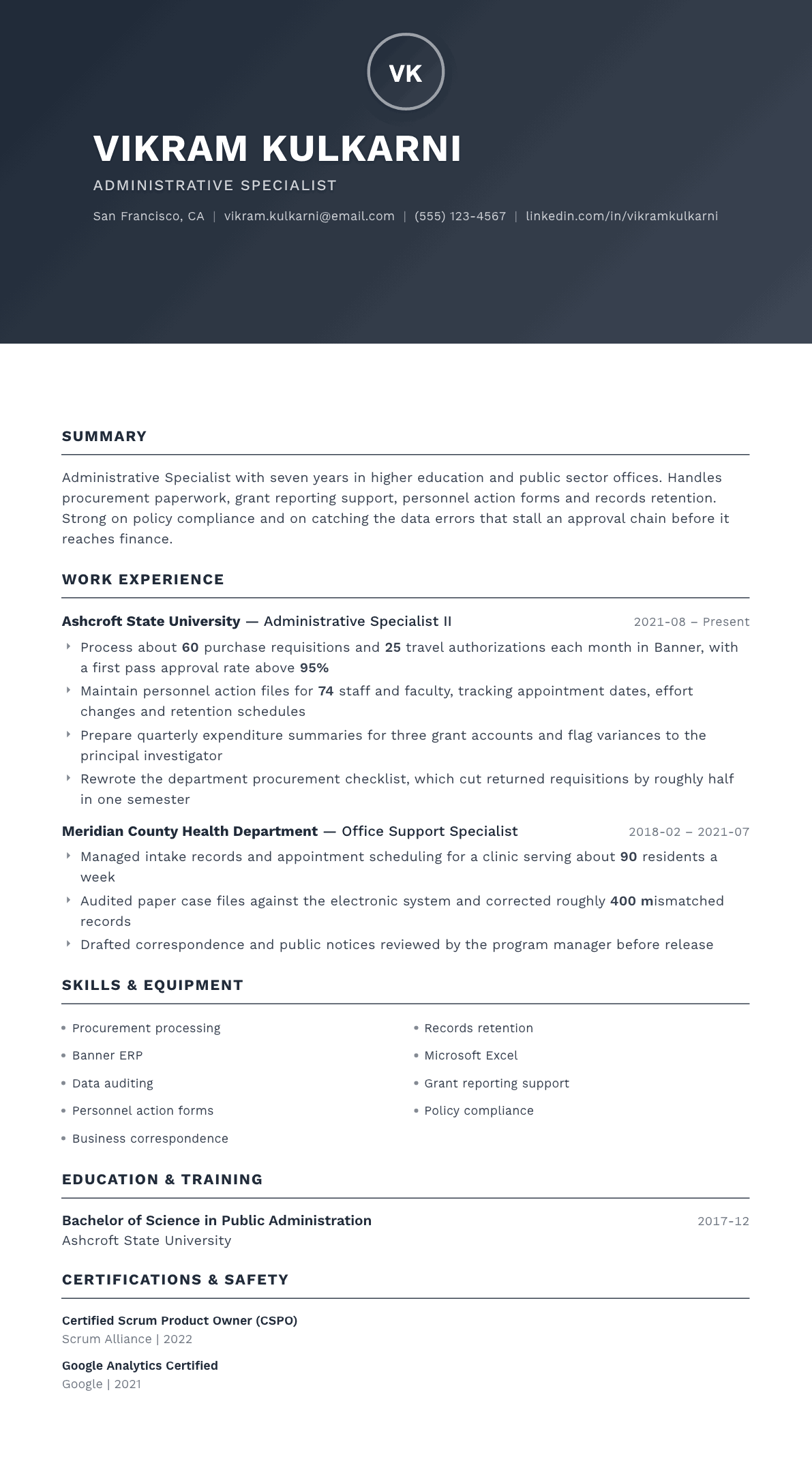
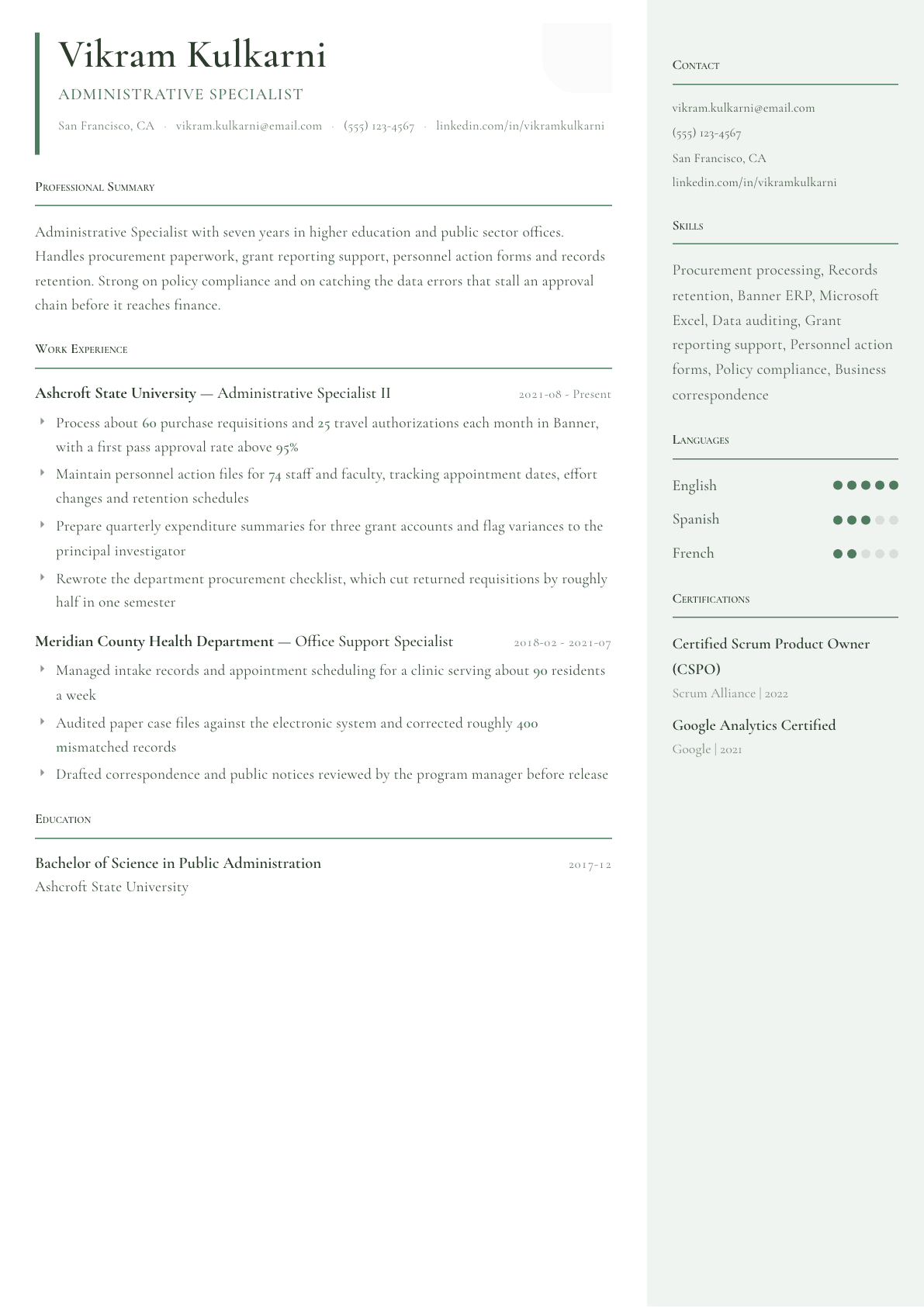
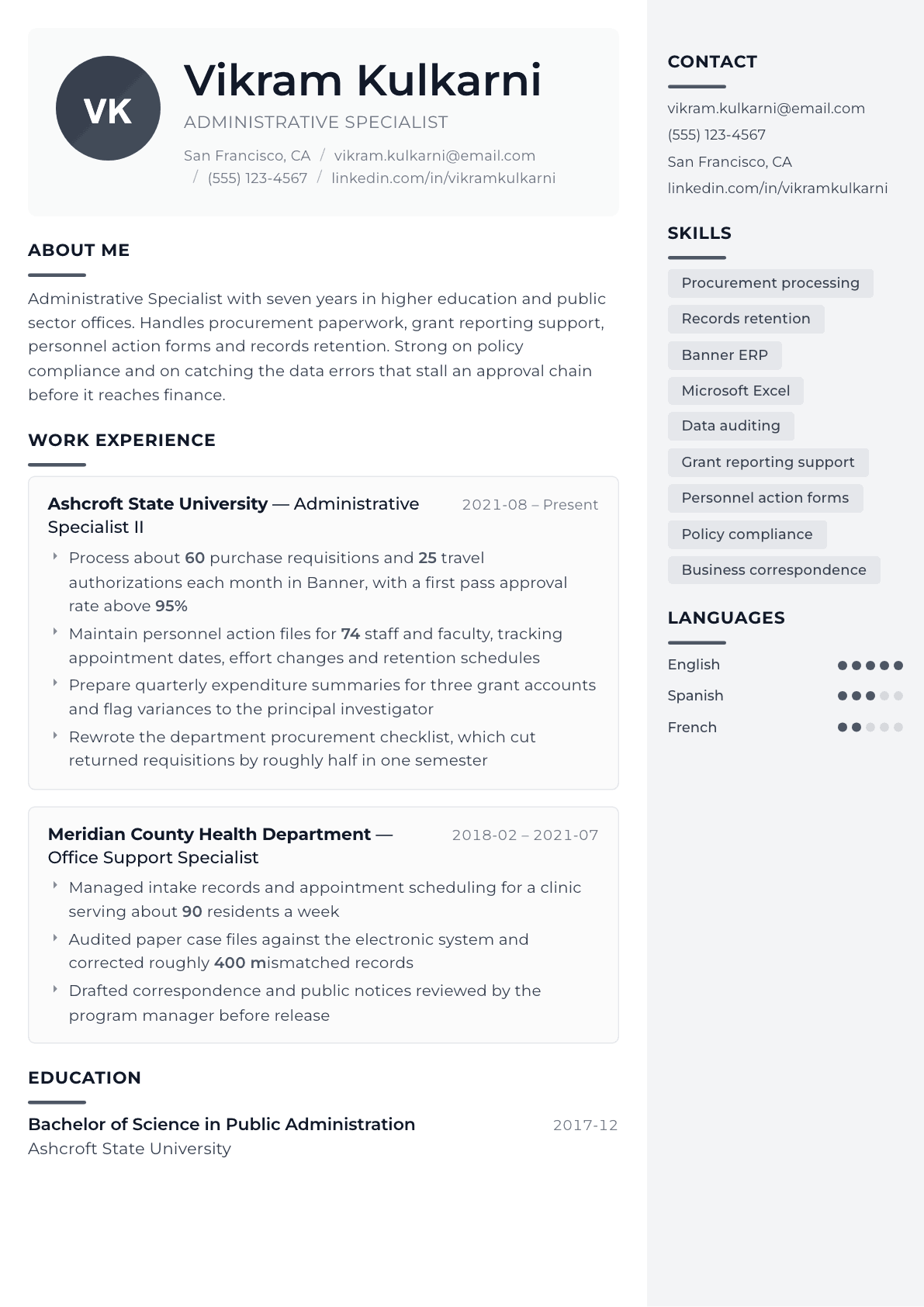
Example Administrative Specialist summary
Administrative Specialist with seven years in university and county government offices, focused on procurement, personnel records and grant expenditure reporting. Processes roughly 85 requisitions and travel authorizations a month in Banner with a high first pass approval rate. Rewrites unclear procedures into checklists that reduce returned paperwork. Looking for a specialist role with contract administration scope.
Skills to list on a Administrative Specialist resume
- Procurement and requisitions
- Records retention schedules
- Personnel action processing
- Data entry accuracy
- Microsoft Excel
- Microsoft Word
- Banner ERP
- PeopleSoft
- Grant expenditure tracking
- Business correspondence
- File auditing
- Policy compliance
- Travel authorization
- Meeting coordination
What actually gets this resume read
- Specialist implies depth in one area, so lead with the specialty: procurement, records, personnel actions, grants or contracts administration.
- Give transaction volumes per month rather than per year, because a monthly figure reads as a workload a manager can picture immediately.
- Name the enterprise system by product, since Banner, PeopleSoft, Oracle and SAP each imply a different set of screens and approval chains.
- Public sector postings score against minimum qualifications, so state your years of administrative experience plainly in the summary line.
- Include one bullet about accuracy or audit work, because specialists are hired to keep files clean and approvals moving without rework.
- If you handle confidential personnel or student records, say so and name the relevant policy training you have completed.
How to write a administrative specialist resume
Administrative specialist is a job title with a narrow center of gravity. Universities, county agencies, hospitals and school districts use it for the person who keeps one transactional area correct: procurement, records retention, personnel actions, grant expenditures or contracts. The hiring committee reading your resume is not looking for range. It is looking for depth in the area named in the posting, and for evidence that paperwork you touch does not come back.
That is why so many specialist resumes fail. Candidates write a general office resume, list ten unrelated duties, and never state which specialty they are strongest in. The committee scoring against minimum qualifications cannot find the years of relevant experience, and the file scores low before anyone reads a sentence.
This guide shows how to lead with a specialty, how to give transaction volumes a reviewer can picture, which enterprise systems to name, and how to handle the scoring rubric that public sector and higher education postings apply before a human ever calls you.
Format: plain, chronological, and written for a scoring rubric
Public sector and university applications are frequently scored against minimum and preferred qualifications by a human resources analyst who is not an expert in your work. Give that person an easy job. Reverse chronological, dates with month and year, no gaps left unexplained, and no design elements that interrupt the reading order.
State your total years of administrative experience plainly in the first line of the summary. If the posting asks for four years of progressively responsible administrative support, the reviewer needs to tick that box from the top of page one rather than adding up your job dates.
- Two pages is acceptable here, unlike most office roles, because agencies score on documented detail.
- Include the full official job classification you held, such as Administrative Specialist II, not a simplified version.
- Attach months to every start and end date, since date arithmetic decides eligibility.
- If the posting names a specific system, put it in your summary and in a bullet.
Summary: the specialty first, then the system, then the volume
Open by naming the specialty rather than the title. Procurement and personnel records, or grants and contracts administration, tells a reviewer within four words whether to keep reading. The title alone means very little because the same classification covers very different desks in different departments.
Follow with the enterprise system. Banner, PeopleSoft, Oracle and SAP each carry their own screens, approval routing and reporting quirks, and a manager who runs Banner will shortlist a Banner candidate over one who wrote enterprise resource planning software. Close with a monthly volume, because a monthly figure reads as a workload a reviewer can imagine while an annual one turns into an abstraction.
Experience: transactions, accuracy, and the approval chain
Write bullets around transactions with a count and a cycle. Requisitions processed each month, travel authorizations reviewed, personnel action forms submitted, journal entries corrected, retention boxes transferred. Then add what happened to them: first pass approval rate, exceptions returned, variances flagged to the principal investigator.
Accuracy work deserves its own bullet in every job. Specialists are hired to keep an approval chain moving without rework, so auditing paper files against the electronic system, correcting mismatched records, or rewriting a procurement checklist until returned requisitions dropped are exactly the achievements a reviewer is scanning for.
Confidential records belong on the page when you handle them. Personnel files, student records and health information all carry training requirements, and naming the policy training you have completed reassures a department that has to defend its files in an audit.
- Give per month volumes for requisitions, authorizations and forms rather than yearly totals.
- Name the funding sources you support, such as grant accounts, general funds or auxiliary accounts.
- Describe one procedure you documented or rewrote, and what stopped going wrong afterward.
- List the record types you are trusted with and the retention schedule you work under.
Skills and systems: enterprise platforms, then office tools
Lead the skills section with the enterprise systems: Banner, PeopleSoft, Workday, Oracle or SAP, plus any procurement or travel module you work inside. These are the terms an agency screener searches. Office tools come second, and Excel should be qualified with the work you actually do in it, such as reconciling expenditure summaries or building a tracking log with lookups.
Add the process vocabulary that the classification uses: purchase requisitions, encumbrances, records retention schedules, personnel action processing, travel authorization, effort reporting. These read as fluency to anyone who works in that environment and are invisible padding to nobody.
Education, credentials and the minimum qualifications box
Degrees still matter in this family of roles because many classifications substitute education for years of experience or the reverse. Show the degree, the field and the institution, and if your classification allowed a substitution, make the qualifying years easy to count.
Formal credentials are uncommon for this title, so do not invent one. What does help is naming completed training that a department can verify: procurement policy training, records management training, or a purchasing system certification your employer issued. List those as training rather than as certifications so the distinction stays honest.
Administrative Specialist resume summary examples
Two years in
Administrative Specialist with two years of county office support focused on intake records, scheduling and correspondence. Processes about 30 purchase requisitions a month, audits case files against the electronic system, and drafts public notices for program manager review. Associate degree in business administration and completed records management training.
Seven years in
Administrative Specialist with seven years in university and county government offices, focused on procurement, personnel records and grant expenditure reporting. Processes roughly 85 requisitions and travel authorizations a month in Banner with a high first pass approval rate, and maintains personnel action files for 74 staff and faculty.
Lead specialist
Lead Administrative Specialist with twelve years supporting academic and research departments, now training four specialists across two colleges. Owns procurement policy interpretation, quarterly expenditure reporting for nine grant accounts, and the departmental retention schedule. Rewrote the requisition checklist that halved returned paperwork in a single term.
Work experience bullets: before and after
Before: Processed purchase orders and travel paperwork for the department.
After: Processed about 60 purchase requisitions and 25 travel authorizations each month in Banner, with a first pass approval rate above 95%.
A monthly volume, the system name and an approval rate turn routine paperwork into a measurable standard.
Before: Maintained employee files and kept records up to date.
After: Maintained personnel action files for 74 staff and faculty, tracking appointment dates, effort changes and destruction dates against the university retention schedule.
The population size and the named tracking fields show the reader exactly what kind of file you are trusted with.
Before: Assisted with grant reporting.
After: Prepared quarterly expenditure summaries for three grant accounts, reconciling them to the general ledger and flagging variances to the principal investigator before the sponsor deadline.
Naming the accounts, the reconciliation and the escalation shows real ownership rather than assistance.
Before: Improved office procedures.
After: Rewrote the department procurement checklist after tracking the five most common rejection reasons, which cut returned requisitions by roughly half in one semester.
Showing the diagnosis before the fix proves analytical judgment, and the result gives the change a size.
Before: Checked files for errors.
After: Audited paper case files against the electronic record system and corrected roughly 400 mismatched entries, then documented the entry step that was creating the drift.
The volume corrected and the root cause found are what a hiring committee treats as accuracy evidence.
Hard skills
- Purchase requisitions and encumbrances
- Banner ERP
- PeopleSoft
- Travel authorization processing
- Personnel action forms
- Records retention schedules
- Grant expenditure tracking
- General ledger reconciliation
- Microsoft Excel lookups and reports
- Microsoft Word document formatting
- Business correspondence drafting
- File auditing and data cleanup
- Policy interpretation
- Meeting coordination and minutes
Soft skills
- Attention to approval detail
- Explaining policy without friction
- Confidentiality judgment
- Working to fixed deadlines
- Patience with repetitive review
- Escalating early rather than late
Certifications worth listing
- Certified Administrative Professional (CAP) (International Association of Administrative Professionals)
- Certified Records Manager (CRM) (Institute of Certified Records Managers)
- Certified Professional Public Buyer (CPPB) (Universal Public Procurement Certification Council)
- Microsoft Office Specialist: Excel Associate (Microsoft)
- Certified Research Administrator (CRA) (Research Administrators Certification Council)
Mistakes that cost administrative specialist candidates the interview
- Writing a general office resume when the posting names a single specialty such as procurement or records.
- Giving yearly totals instead of monthly volumes, which makes the workload hard for a reviewer to picture.
- Naming a category such as enterprise software rather than Banner, PeopleSoft, Oracle or SAP by product.
- Leaving the total years of administrative experience buried in the job dates when a rubric is scoring for it.
- Skipping the accuracy and audit bullet, which is the core of what a specialist is paid to guarantee.
- Omitting confidentiality training when you handle personnel, student or patient records every day.
- Simplifying an official classification title, which makes employment verification harder for the analyst.
Administrative Specialist resume questions
How is an administrative specialist resume different from a general office resume?
It is built around one transactional specialty rather than a list of duties. The reviewer wants depth in procurement, records, personnel actions or grants, plus the enterprise system you work in, because that is what determines how quickly you become productive.
Can my resume be two pages for a public sector posting?
Yes. Agencies and universities score documented detail, so a second page is normal when it carries real transaction volumes, system names and classification titles. Keep the padding out, but do not truncate qualifying experience to reach one page.
What if I have used a system the posting does not mention?
List what you have used and add one line describing the equivalent function, such as requisition entry, approval routing and encumbrance checking. Hiring managers accept transferable enterprise experience when you show you understand the workflow, not just the screens.
Should I include the exact wording from the minimum qualifications?
Mirror the key phrases once each in your summary and inside a bullet where they are backed by evidence. Copying the whole qualifications block verbatim reads as padding to the human reviewer who scores the file after the software.
How do I show accuracy if my employer never measured it?
Describe the control instead of inventing a figure. Reconciling files against the system, catching a recurring entry error, or rewriting a checklist that reduced returns are all verifiable accuracy evidence that does not require a statistic you cannot support.
Related resume examples
- Administrative Assistant Resume example
- Office Manager Resume example
- Administrative Coordinator Resume example
- Records Clerk Resume example
- Administrative Officer Resume example
- Program Assistant Resume example