Office Assistant Resume Examples: the lines they read
Write an Office Assistant Resume That Beats the Applicant Pile
By Mustafa Tarabya, founder of CVBooster · Published · Updated
Office assistant resume example with realistic bullets, the skills employers actually screen for, keyword lists and a full guide to writing each section.
Sample resumes for a office assistant
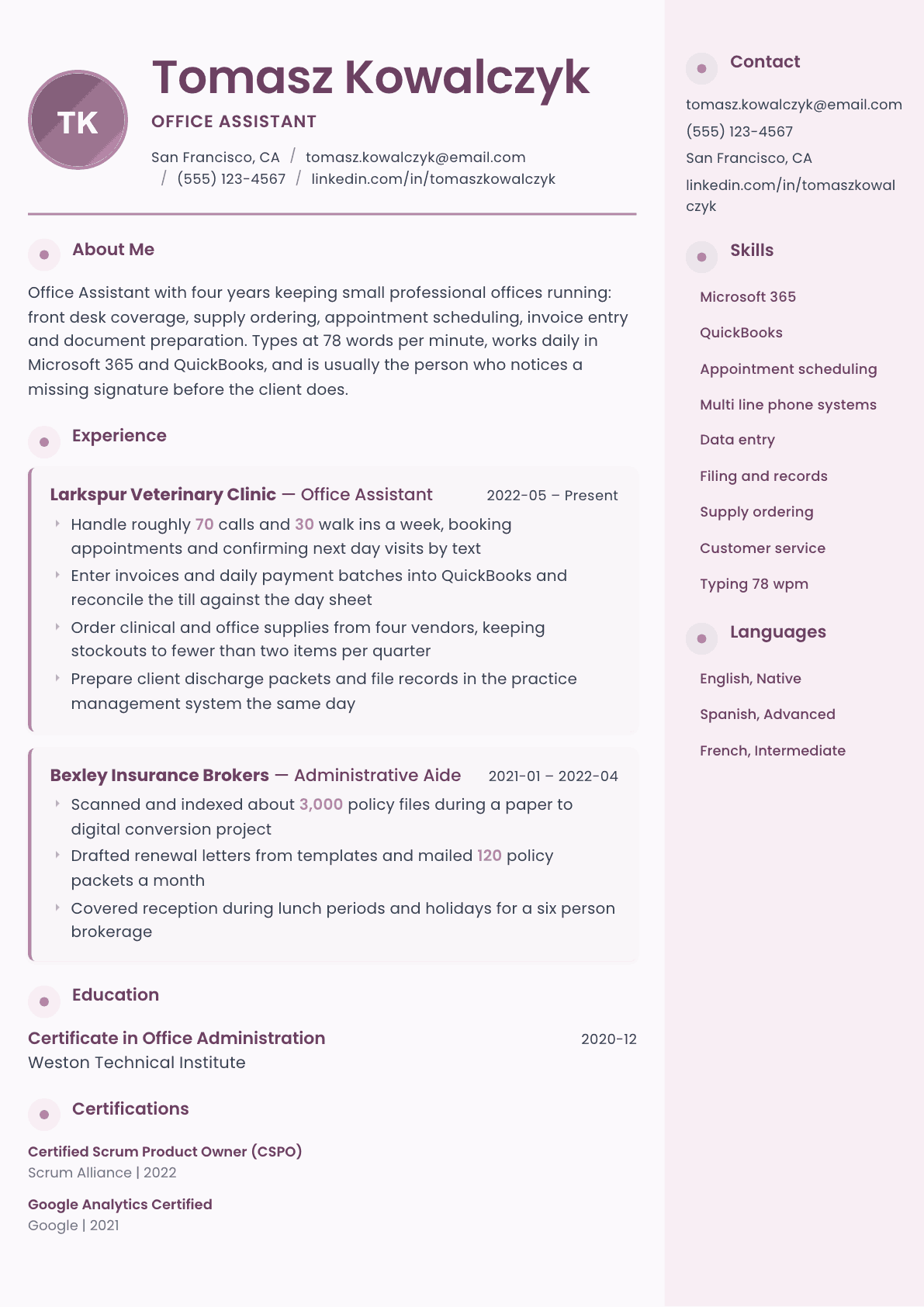
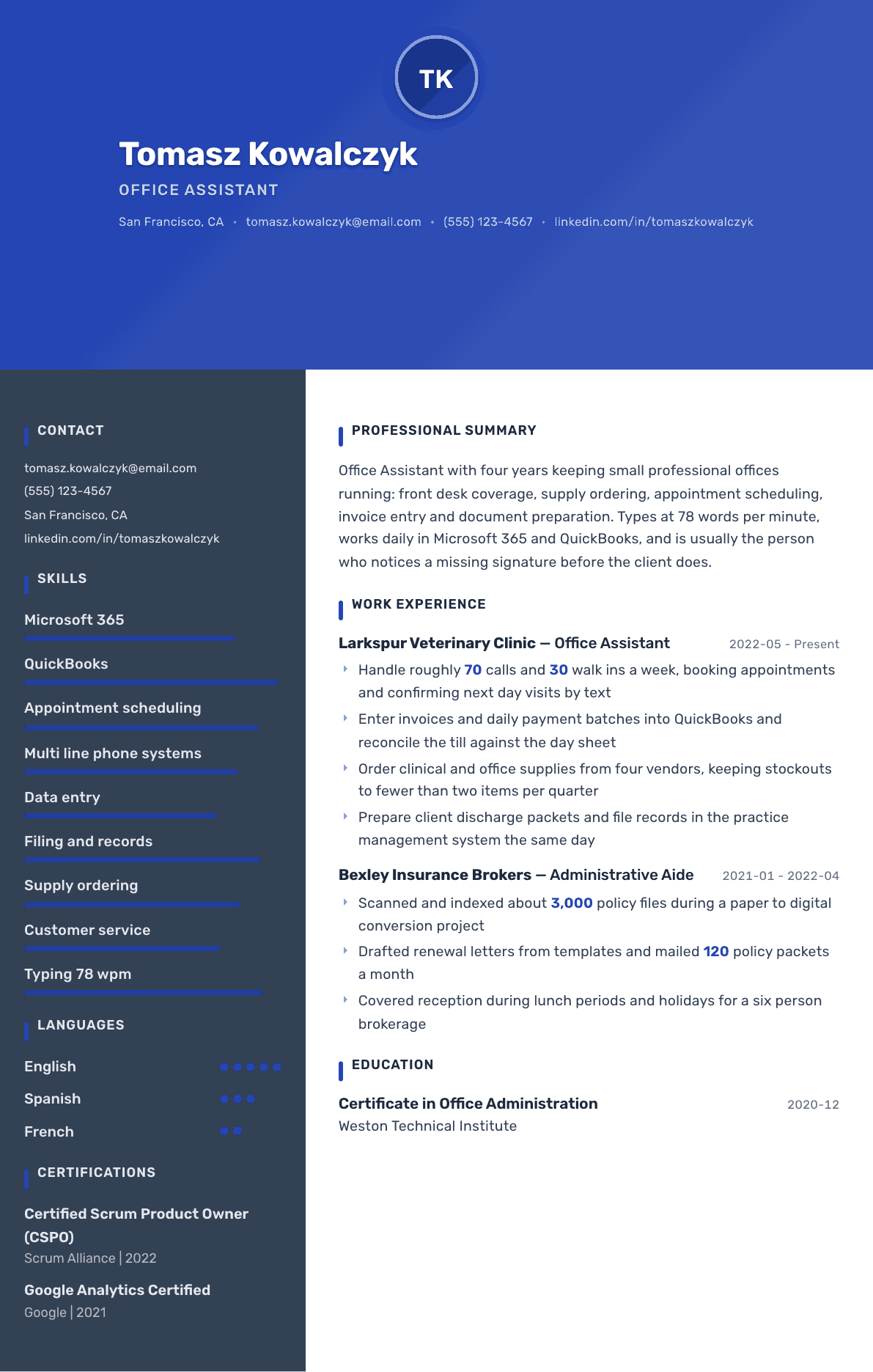
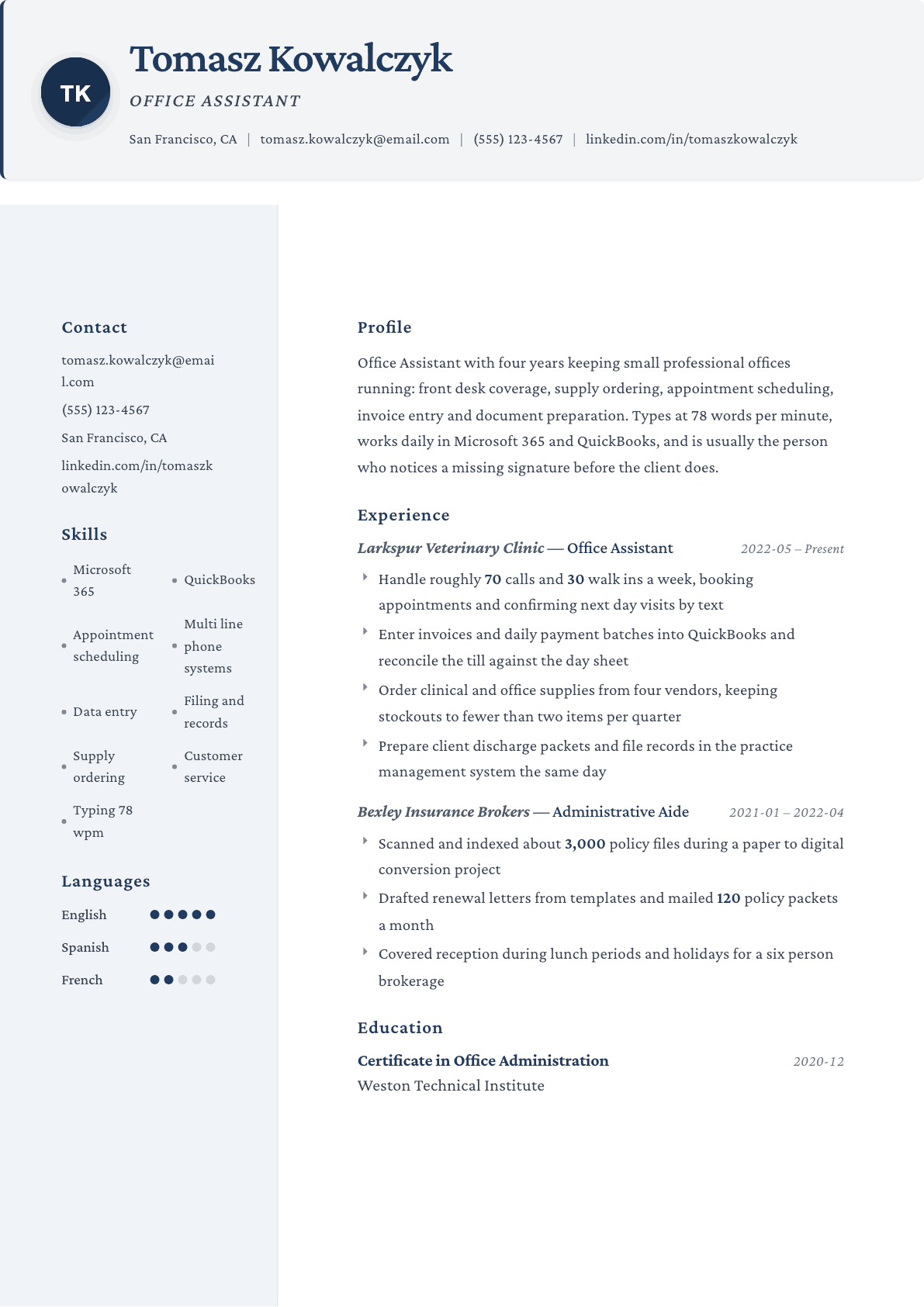
The same office assistant content laid out in three CVBooster templates, so you can see what the finished document looks like before you write a word.
Example Office Assistant summary
Office Assistant with four years in small professional offices, covering reception, scheduling, invoice entry and supply ordering. Handles about 70 calls and 30 walk ins a week, enters daily payment batches in QuickBooks, and reconciles the till against the day sheet. Types 78 words per minute and works fluently in Microsoft 365. Looking for a full time assistant role in a busy clinic or practice.
Skills to list on a Office Assistant resume
- Microsoft Word
- Microsoft Excel
- Microsoft Outlook
- Google Workspace
- QuickBooks
- Appointment scheduling
- Data entry
- Multi line phone handling
- Filing and document management
- Mail sorting and distribution
- Supply inventory
- Invoice processing
- Customer service
- Meeting room booking
What actually gets this resume read
- Office assistant postings attract large applicant pools, so put a number in your very first bullet: calls, files, invoices or appointments.
- List your typing speed and the software you know by name, because many employers screen on those two lines before reading anything else.
- Describe the kind of office you worked in, since a veterinary clinic, a law office and a warehouse front desk need different instincts.
- Turn errand style duties into ownership: supply ordering becomes managing four vendor accounts and keeping stockouts near zero.
- If you have no paid office history, use school, volunteer or family business work and describe it with the same concrete detail.
- Keep it to one page and skip an objective statement, since a short summary naming your software and volumes does more work.
How to write a office assistant resume
Office assistant postings attract some of the largest applicant piles in any category, and most of the resumes in that pile are interchangeable. They list answered phones, filed documents and greeted visitors, in that order, with no numbers and no software. The person hiring reads twenty of them, sees no difference, and picks whichever one mentioned the system her office already runs.
That is the whole opportunity. An office assistant resume wins on two things a screener can see in five seconds: concrete volume in the first bullet, and named software near the top. Seventy calls and thirty walk ins a week, invoices entered in QuickBooks, seventy eight words a minute. None of that is hard to state, and almost nobody states it.
This guide covers the section order that works for small professional offices, how to describe the kind of office you worked in, how to turn errand style duties into ownership, and what to do when you have no paid office history yet.
Format: one page, no objective, software high on the page
One page, always. An office assistant resume that runs to two pages signals that the writer cannot judge what matters, which is the exact skill the job tests. Reverse chronological, plain single column, and a short summary instead of an objective statement, since an objective describes what you want and a summary describes what the office gets.
Put a compact software and speed line in the top third. Microsoft 365, QuickBooks, a practice management system, a typing speed you can defend on a test. Many small employers screen on those two lines before they read a single bullet, and burying them at the bottom of page one costs you the interview.
- Header: name, city and state, phone, email. Nothing else.
- Order: summary, skills and software, experience, education, then any certificate.
- Skip photos, icons and rating bars, which parsers drop and small employers distrust.
- Include your typing speed only if you have measured it recently and honestly.
Summary: the office type, the volume, the systems
Say what kind of office you have worked in. A veterinary clinic, a law office, a construction trailer and an insurance brokerage each need a different instinct, and the manager reading your resume is trying to work out whether you already have hers. Naming the setting does that work in three words.
Then give a volume and the systems. Calls a week, patients or clients checked in daily, invoices entered, files scanned. Finish with a plain statement of what you are looking for, because part time, full time and front desk versus back office are practical facts that save both of you a wasted screening call.
Experience: turn errands into owned processes
Every duty on an office assistant resume can be written two ways. Ordered supplies is an errand. Managing four vendor accounts and keeping stockouts under two items a quarter is a process with a standard attached. The work is identical. The second version is the one that gets read as a reason to hire you.
Do the same with money and records. Entering payments becomes entering daily payment batches in QuickBooks and reconciling the till against the day sheet. Filing becomes preparing client discharge packets and filing records in the practice system the same day. The added detail is the closing step, and the closing step is what proves nothing is left half done.
Cover work counts. Reception cover during lunches and holidays, phone coverage for a six person brokerage, scanning and indexing a paper archive during a digital conversion project. These are real projects with real volumes and they belong on the page with the numbers attached.
- Put a number in the very first bullet of your most recent job.
- Name the practice, case or accounting system you worked inside, not just the office suite.
- Describe one project with a total, such as thousands of files scanned during a conversion.
- Show the closing step: reconciled, filed the same day, confirmed by text, logged.
Skills: software first, office functions second
List software by product: Microsoft Word, Excel and Outlook, Google Workspace, QuickBooks, and any scheduling or practice system you know. Then list functions: appointment scheduling, data entry, multi line phone handling, filing and document management, mail sorting, supply inventory, invoice processing, meeting room booking.
Customer service belongs in this list, but only as a label for what your bullets already demonstrate. If nothing in your experience shows you calming a caller or handling a walk in during a busy morning, the words on their own are not worth the line.
No paid office history yet: what to use instead
School office work, volunteer coordination, a church or community group, a family business, and even structured retail cash handling all count if you describe them with the same specificity. Booked appointments for a family practice, kept the schedule for a volunteer roster of thirty people, balanced a register nightly for two years.
A short office administration certificate strengthens the page considerably here, because it gives the employer a reason to believe your software claims. Put it near the top with the institution and the field, and add the training modules if they map to the posting.
Office Assistant resume summary examples
New to office work
Office administration certificate holder with two years of retail and volunteer coordination experience. Booked and confirmed appointments for a community clinic front desk, balanced a register nightly, and produced a weekly volunteer roster in Excel. Types 62 words per minute and works confidently in Microsoft 365. Seeking a full time office assistant role.
Four years in
Office Assistant with four years in small professional offices covering reception, scheduling, invoice entry and supply ordering. Handles about 70 calls and 30 walk ins a week, enters daily payment batches in QuickBooks, and reconciles the till against the day sheet. Types 78 words per minute and works fluently in Microsoft 365.
Senior assistant
Senior Office Assistant with eight years across clinics and brokerages, now training new front desk staff and holding the supply and courier budget for a 40 person office. Runs the scanning and indexing workflow, manages five vendor accounts, and covers bookkeeping entry in QuickBooks during month end.
Work experience bullets: before and after
Before: Answered phones and greeted customers.
After: Handled roughly 70 calls and 30 walk ins a week, booking appointments in the practice system and confirming next day visits by text the evening before.
Weekly volumes and the confirmation routine show pace and a habit that reduces no shows.
Before: Entered payments and did some bookkeeping.
After: Entered supplier invoices and daily payment batches into QuickBooks, then reconciled the till against the day sheet and flagged variances to the practice manager before closing.
The named software and the reconciliation step prove the work was closed out, not just typed in.
Before: Ordered office supplies as needed.
After: Ordered clinical and office supplies across four vendor accounts on a weekly cycle, holding stockouts to fewer than two items a quarter.
Account count, cycle and a stockout standard turn an errand into an inventory process you own.
Before: Helped scan old files onto the computer.
After: Scanned and indexed about 3,000 policy files during a paper to digital conversion, checking each index entry against the client record before archiving the paper copy.
A project total plus the verification step shows both throughput and accuracy on the same line.
Before: Prepared letters and mailings.
After: Drafted renewal letters from approved templates and mailed about 120 policy packets a month, tracking returns and correcting the address record at source.
Monthly volume and the follow up on returned mail show the work continued past the mailbox.
Hard skills
- Microsoft Word
- Microsoft Excel
- Microsoft Outlook
- Google Workspace
- QuickBooks
- Appointment scheduling
- Data entry and typing speed
- Multi line phone handling
- Filing and document management
- Mail sorting and distribution
- Supply inventory and ordering
- Invoice processing
- Scanning and indexing
- Meeting room booking
Soft skills
- Friendly first contact
- Working through interruptions
- Noticing a missing signature
- Keeping confidences
- Asking before assuming
- Steady pace on repetitive work
Certifications worth listing
- Microsoft Office Specialist: Word Associate (Microsoft)
- Microsoft Office Specialist: Excel Associate (Microsoft)
- QuickBooks Certified User (Intuit)
- Google Workspace certification (Google)
- Certified Administrative Professional (CAP) (International Association of Administrative Professionals)
Mistakes that cost office assistant candidates the interview
- Opening with an objective statement that explains what you want instead of what the office gets.
- Listing duties with no volumes, which makes your resume identical to every other one in a very large pile.
- Writing computer literate or Microsoft Office rather than naming the products and the system the office runs.
- Running to two pages, which reads as poor judgment for a role that is partly about judgment.
- Leaving out the type of office you worked in, so the manager cannot tell whether you know her environment.
- Claiming excellent customer service without a single bullet that shows a walk in or an upset caller handled.
- Skipping unpaid or family business office work that would have shown exactly the skills the posting names.
Office Assistant resume questions
Should I put my typing speed on an office assistant resume?
Yes, when you have tested it recently and would be comfortable retaking the test in the interview. Many small employers still screen on speed alongside software, and an honest measured figure is one of the few directly comparable numbers on the page.
How do I write an office assistant resume with no experience?
Use school, volunteer, family business or retail work and describe it with office vocabulary: scheduling, cash reconciliation, record keeping, phone handling. Add an office administration certificate if you have one, and keep the same specificity you would use for a paid role.
Does the type of office I worked in really matter?
It matters a great deal. A veterinary clinic, a law office and an insurance brokerage have different paperwork, different urgency and different clients. Naming the setting lets a manager decide in seconds whether your instincts already fit her front desk.
What software should I list first?
Whatever the posting names, if you genuinely know it. Otherwise lead with the office suite you use daily, then the accounting or practice system, then anything scheduling related. Products beat categories every time because a screener searches for products.
How do I move from office assistant to a coordinator role?
Build bullets around processes you own rather than tasks you complete: vendor accounts, an onboarding checklist, a scanning workflow, a supply cycle. Coordinator hiring managers look for someone already running something, and your current job almost certainly contains one.
Related resume examples
- Administrative Assistant Resume example
- Receptionist Resume example
- Office Clerk Resume example
- Clerical Assistant Resume example
- Front Desk Receptionist Resume example
- Secretary Resume example