CAD Technician Resume Examples: the lines they read
Build a CAD Technician Resume Hiring Managers Trust
By Mustafa Tarabya, founder of CVBooster · Published · Updated
A CAD technician resume example with sample drafting bullets, software keywords, and a guide to drawing standards, revisions and file control.
Sample resumes for a cad technician
The same cad technician content laid out in three CVBooster templates, so you can see what the finished document looks like before you write a word.
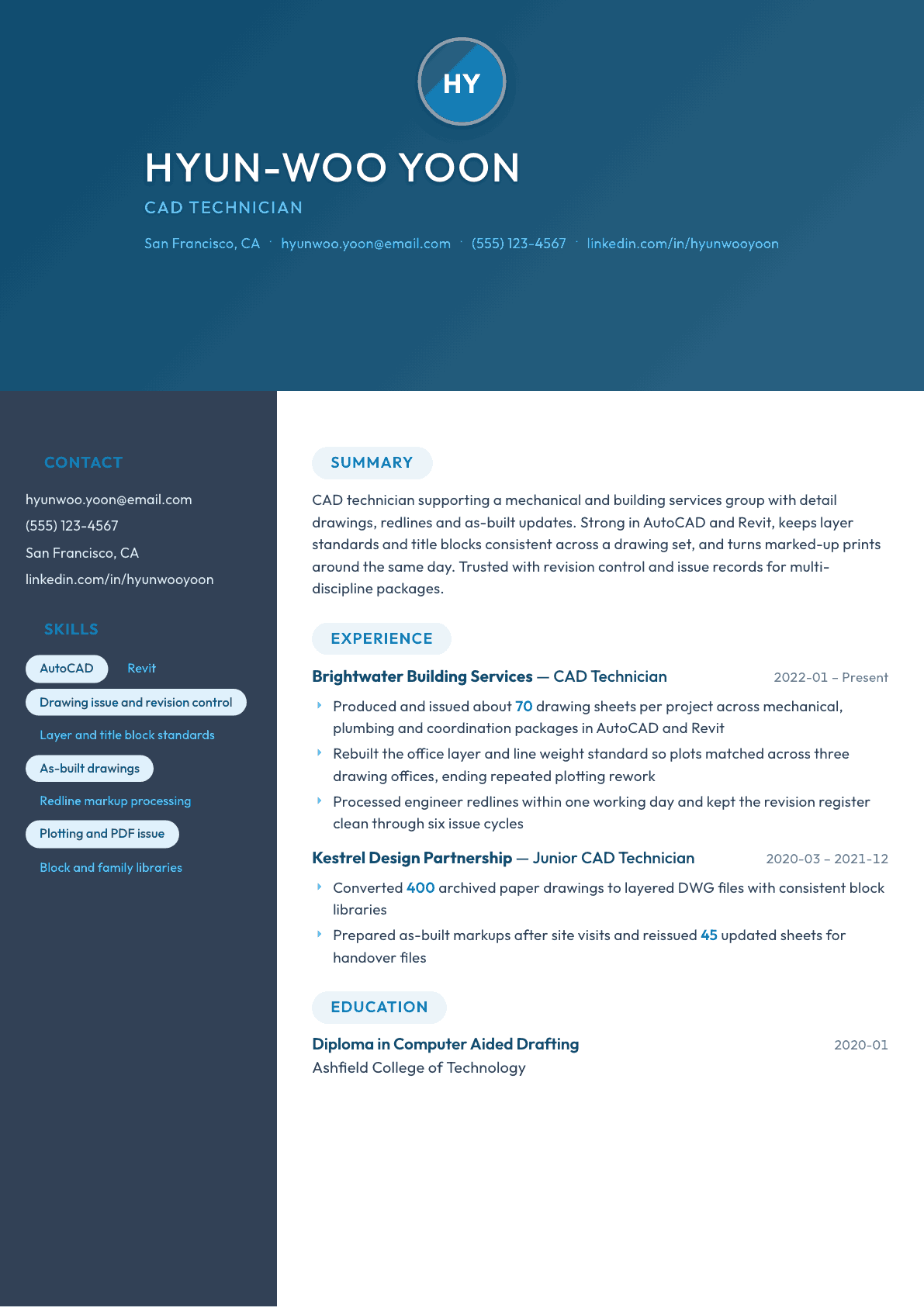
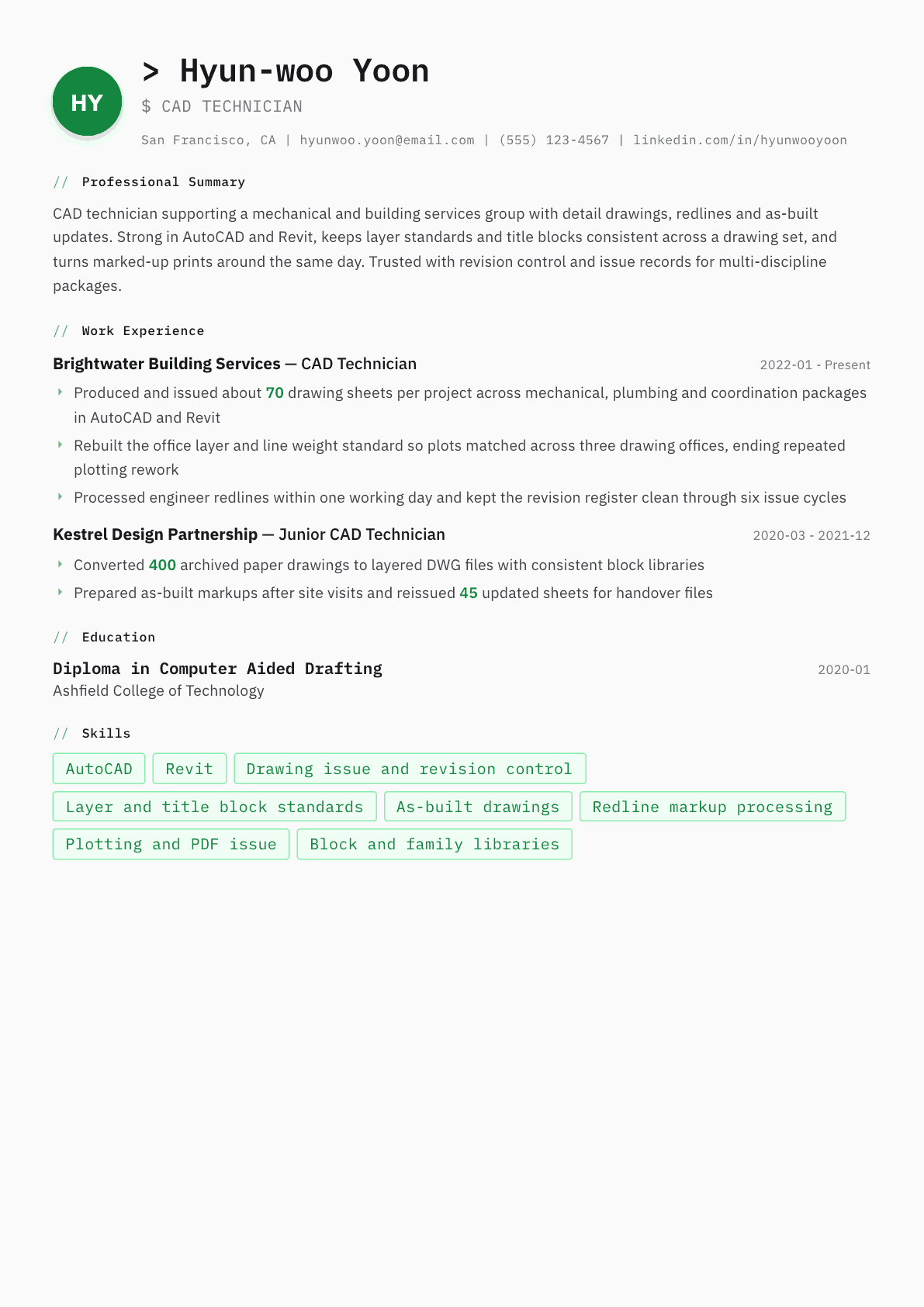
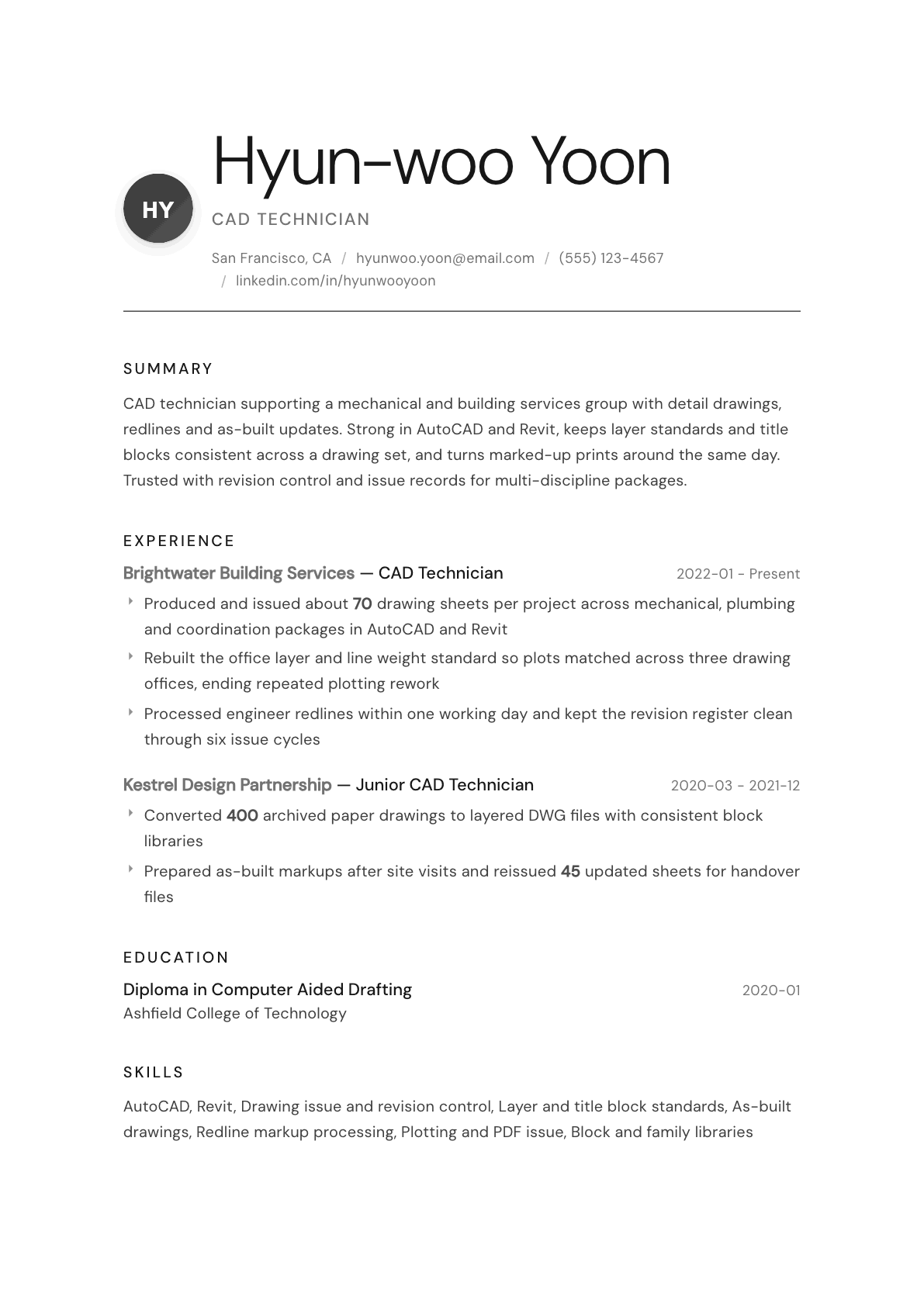
Example CAD Technician summary
CAD technician with four years detailing mechanical and building services packages in AutoCAD and Revit. Issues roughly 70 sheets a project, keeps layer and title block standards consistent, and turns engineer redlines around inside a day. Rebuilt an office drawing standard adopted across three teams. Seeking a technician role in a consultancy with a strong document control culture.
Skills to list on a CAD Technician resume
- AutoCAD
- AutoCAD LT
- Revit
- MicroStation
- SolidWorks
- Drafting standards
- Revision control
- As-built drawings
- Redline processing
- Title block and layer setup
- Block libraries
- Plotting and drawing issue
- Measured surveys
- Document control
What actually gets this resume read
- Lead with drawing volume: sheets per project, disciplines covered and how many issue cycles you handled.
- Separate drafting from design in your wording, because employers hire technicians to produce and control drawings accurately.
- List the standards you draw to, whether that is a company CAD manual, a national layer convention or a client template.
- Name the file and issue system you worked in, such as a document control platform or a shared network structure.
- Include site work if you have it: measured surveys, as-built markups and handover documentation carry weight.
- Show speed and accuracy together, for example redline turnaround time next to a low count of returned sheets.
How to write a cad technician resume
A CAD technician is hired to produce and control drawings, not to invent them, and the resume that gets called reflects that split honestly. The person reading it manages a drawing office. They want to know how many sheets you can turn out in a week, whether your layers and title blocks match the office standard without being fixed afterward, and whether a revision you issued can be traced six months later.
Most applications for these roles arrive looking identical: AutoCAD, Revit, MicroStation, then a paragraph about being a team player. The ones that survive name the packages that were actually drawn, the disciplines they served, and the issue process the drawings passed through. That is the difference between an applicant who has opened the software and one who has carried a package to site.
What follows is the section order drawing offices expect, how to write a summary that positions you as a technician rather than a junior engineer, before and after bullets taken from real drawing office work, and the questions technicians ask when they rewrite a resume that has stopped getting replies.
Format: one page, software and standards visible immediately
Reverse chronological, one page, single column. Consultancies and contractors run applicant tracking software that struggles with side panels, and an unreadable submission from someone whose job is drawing legibility is an easy rejection.
Directly beneath the summary, place a short technical band naming the CAD packages, the file formats you issue, and the standard your drawings follow. A reviewer decides in seconds whether you can be dropped into an existing drawing set, and that band is where the decision happens.
- Header: name, location, phone, email, and the disciplines you draft for.
- Order: summary, software and standards, experience, education, certifications.
- One page unless you have more than ten years across several disciplines.
- Submit a PDF named with your surname and the job title so it survives a folder of attachments.
Summary: disciplines, output, and issue discipline
Three sentences at most. Say which disciplines you draft for, the packages you produce them in, roughly how many sheets a project carries, and how you handle revisions. A drawing office manager reads that and already knows whether to keep going.
Resist the temptation to inflate the role into design work. Technicians who describe themselves as engineers get filtered out by the people who hire technicians and get caught out by the people who hire engineers. Precision about scope is a strength here, and it reads as professional maturity rather than modesty.
Experience: sheets, disciplines, and the revision trail
Open every role with a one line orientation: the type of employer, the disciplines served, and typical package size. A line such as building services consultancy, mechanical and public health packages, thirty to eighty sheets per project tells a reviewer more than three duty bullets ever will.
Then write bullets that carry a number. Sheet counts, redline turnaround times, issue cycles handled, archived drawings converted, families or blocks built. Drawing production is measurable work, and technicians who never measure it end up sounding interchangeable with everyone else who lists AutoCAD.
Give one bullet per role to control rather than production. Layer conventions enforced, a title block rebuilt, a superseded drawing register cleaned up, a naming convention rolled out across teams. Offices lose far more time to bad drawing control than to slow drafting, and the technician who fixes that is worth interviewing.
- State the CAD package used inside each job entry, not only in the skills band.
- Include site work: measured surveys, as-built markups, handover records.
- Quantify redline turnaround in hours or days rather than calling yourself efficient.
- Name the document control system or folder structure you issued through.
Standards and templates: the part reviewers actually test
Every drawing office has a CAD manual, and every interview eventually asks what you did when a drawing broke it. Write about standards directly: the layer convention you drew to, who owns the title block, how you handle a client template that conflicts with the office one, and what you do with drawings inherited from a subconsultant.
Template work is worth its own line. Building a family library, standardizing plot styles so every office prints the same line weights, or setting up a sheet template that carries the revision cloud and the issue table correctly are the tasks that convert a competent drafter into the person a lead trusts with a new project folder.
Keywords the parser is looking for
Technician postings recycle a narrow vocabulary: two dimensional drafting, detail drawings, general arrangement drawings, as-built records, redlines, revision control, drawing register, title block, layer standards, plotting, and the software names. Use each phrase once in the skills band and once inside a bullet where the work is visible.
Keep the software list truthful and graded. Separate what you use daily from what you have used occasionally, because drawing offices frequently run a short practical test, and a package you listed but cannot navigate is discovered in the first ten minutes.
CAD Technician resume summary examples
First technician role
Drafting graduate with a college diploma in computer aided drafting and a portfolio of mechanical and building services sheets produced in AutoCAD. Comfortable working from engineer sketches and marked-up prints, careful with layers and title blocks, and used to checking dimensions against a printed list before a drawing is passed on.
Four years in
CAD technician producing around 70 sheets a project across mechanical, plumbing and coordination packages in AutoCAD and Revit. Turns engineer redlines around inside a working day, keeps the revision register clean through repeated issue cycles, and rebuilt an office layer standard now used by three drawing teams.
Lead technician
Senior CAD technician running drawing production for a multi-discipline consultancy, coordinating three technicians and owning the office CAD manual. Sets templates, plot styles and family libraries, checks outgoing packages before issue, and manages the drawing register across concurrent projects so superseded sheets never reach site.
Work experience bullets: before and after
Before: Created drawings in AutoCAD.
After: Produced and issued around 70 sheets per project in AutoCAD and Revit across mechanical, plumbing and coordination packages for a building services consultancy.
The rewrite adds volume, software, disciplines and the type of employer, which is everything a drawing office manager needs to place the candidate.
Before: Responsible for revisions.
After: Processed engineer redlines within one working day and maintained the revision register through six issue cycles without a superseded sheet reaching site.
It converts a duty into a turnaround time and a control outcome that can be checked in a reference call.
Before: Helped standardize CAD files.
After: Rebuilt the office layer and line weight standard so plots matched across three drawing offices, ending repeated plotting rework on shared packages.
The stronger version names the artifact that changed and the waste it removed, which is how standards work gets valued.
Before: Converted old drawings.
After: Converted 400 archived paper drawings into layered DWG files with a consistent block library, making the historic set searchable for the maintenance team.
A count and a downstream user turn a data entry task into a project with a purpose.
Before: Did site visits.
After: Recorded as-built conditions on site with measured markups, then reissued 45 corrected sheets into the handover file within the agreed close-out window.
It shows the full loop from field measurement to issued record drawing rather than an unexplained trip to site.
Hard skills
- AutoCAD
- AutoCAD LT
- Revit
- MicroStation
- SolidWorks
- Two dimensional drafting
- General arrangement drawings
- Detail drawings
- As-built records
- Redline processing
- Revision and issue control
- Layer and title block standards
- Block and family libraries
- Plotting and PDF issue
- Measured surveys
- Document control systems
Soft skills
- Accuracy under repetitive work
- Clear written markup notes
- Working to instruction from engineers
- Deadline discipline across concurrent packages
- Asking early when a markup is ambiguous
- Patience with revision churn
Certifications worth listing
- Autodesk Certified Professional in AutoCAD for Design and Drafting (Autodesk)
- Autodesk Certified Professional in Revit for Architectural Design (Autodesk)
- Certified Drafter (American Design Drafting Association)
Mistakes that cost cad technician candidates the interview
- Listing six CAD packages with no indication of which one you used yesterday and which one you last opened in college.
- Describing yourself as a designer or engineer when the work was detailing to instruction, which fails the first technical question.
- Writing duty bullets with no sheet counts, no package sizes and no turnaround times, leaving nothing to compare against another applicant.
- Leaving out drawing control entirely, so the reader cannot tell whether you understand revisions, issue sheets and superseded drawings.
- Submitting a decorated two column resume that the applicant tracking system reduces to scrambled text.
- Naming a client project without saying what you personally drew, which makes an impressive job title carry no evidence.
CAD Technician resume questions
How is a CAD technician resume different from a CAD designer resume?
A technician resume emphasizes drawing production, accuracy and revision control, while a designer resume emphasizes modeling decisions, tolerancing and ownership of a part or assembly. Use the vocabulary that matches the posting, because the two roles are screened by different people with different tests.
Should I include a portfolio with my application?
Yes, when the posting allows attachments or a link. Send four to six sheets that show a general arrangement, a detail, a section and a revised sheet with the cloud visible. Remove client names and any confidential dimensions before sending anything from a former employer.
Do I need Revit if I only know AutoCAD?
It depends on the sector. Building services and architectural offices increasingly work in a model environment, while manufacturing and infrastructure detailing still runs heavily on two dimensional drafting. List honestly what you have, and mention any structured training you are partway through.
How do I show experience when my work was all under an engineer sign-off?
Describe the production and control you owned rather than claiming design authority. Sheet counts, redline turnaround, register maintenance and template work are entirely yours to claim, and hiring managers understand that technician drawings are always checked by someone senior.
What should I do about a gap between drafting jobs?
State it plainly in one line and show what kept your skills current, such as a software subscription used on personal projects, a college refresher module, or contract work. An unexplained gap invites more suspicion than a short factual sentence ever will.
Related resume examples
- Civil Engineer Resume example
- Mechanical Engineer Resume example
- CAD Designer Resume example
- Drafter Resume example
- Architectural Drafter Resume example
- Electrical Engineering Technician Resume example