System Administrator Resume Examples: what gets the call
Build a Systems Administrator Resume That Shows Real Scale
By Mustafa Tarabya, founder of CVBooster · Published · Updated
System administrator resume examples and a sysadmin resume sample that name your server estate, directory services, backup targets and patch record, with the format to follow.
Sample resumes for a system administrator
The same system administrator content laid out in three CVBooster templates, so you can see what the finished document looks like before you write a word.
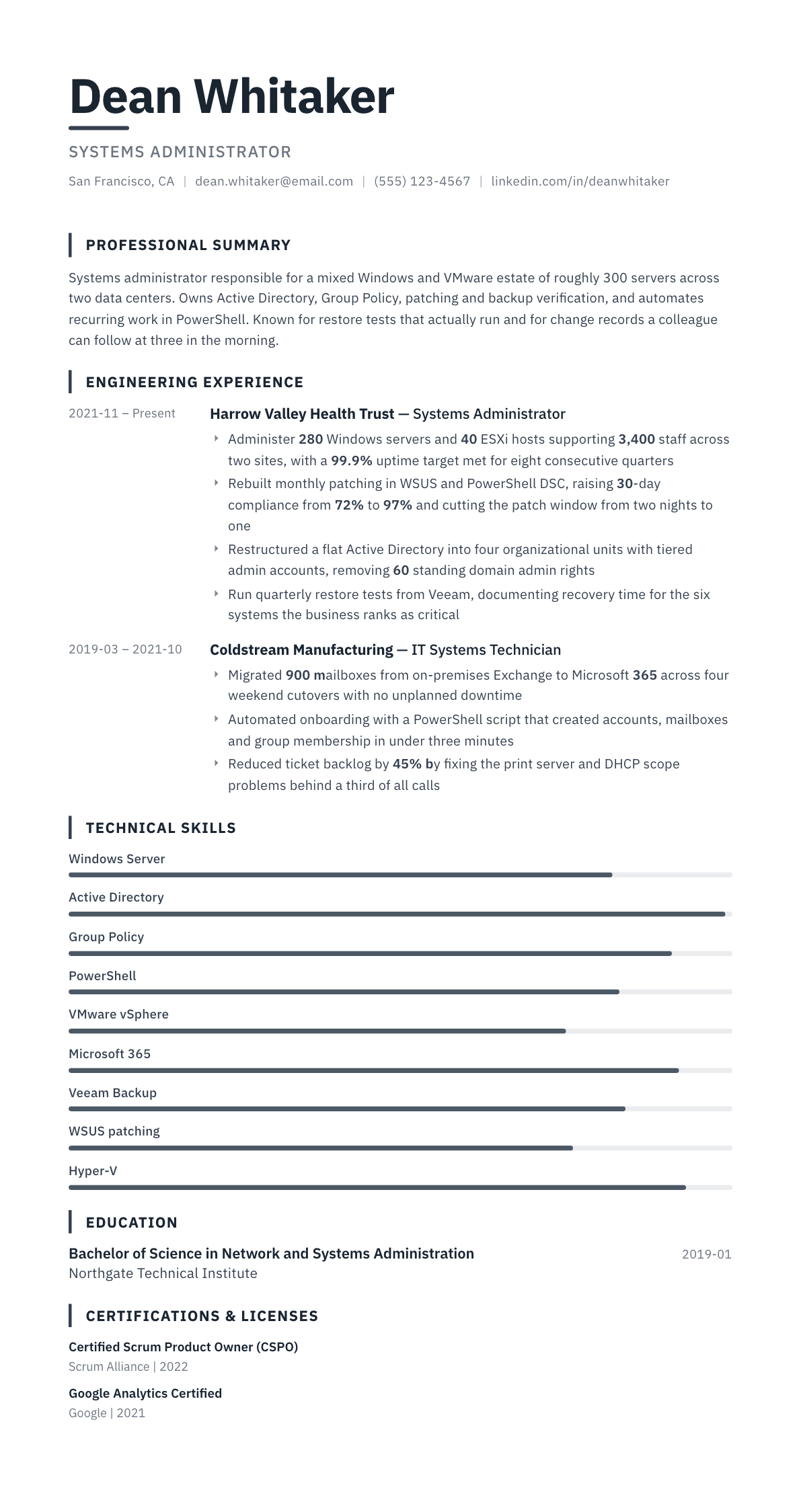
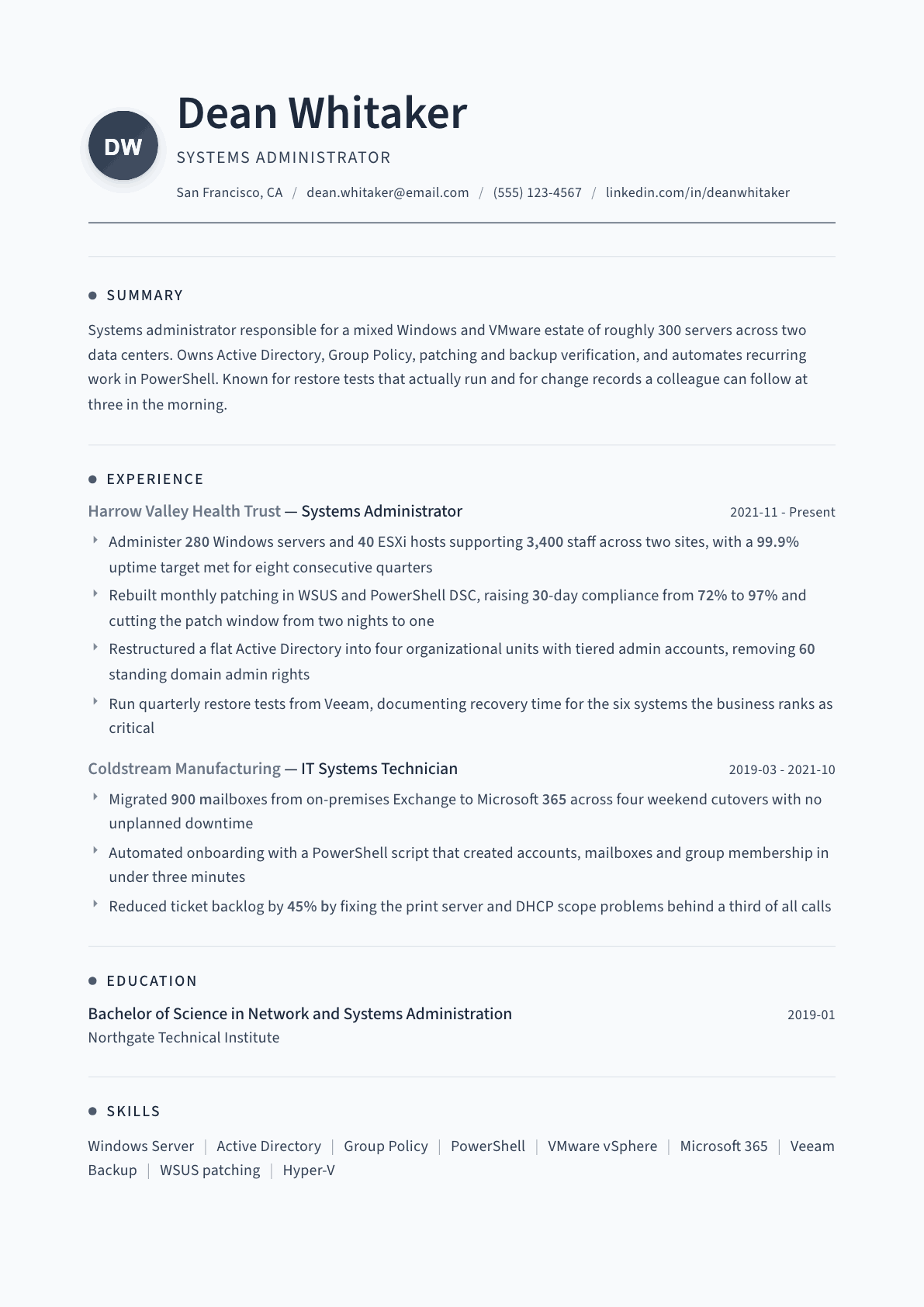
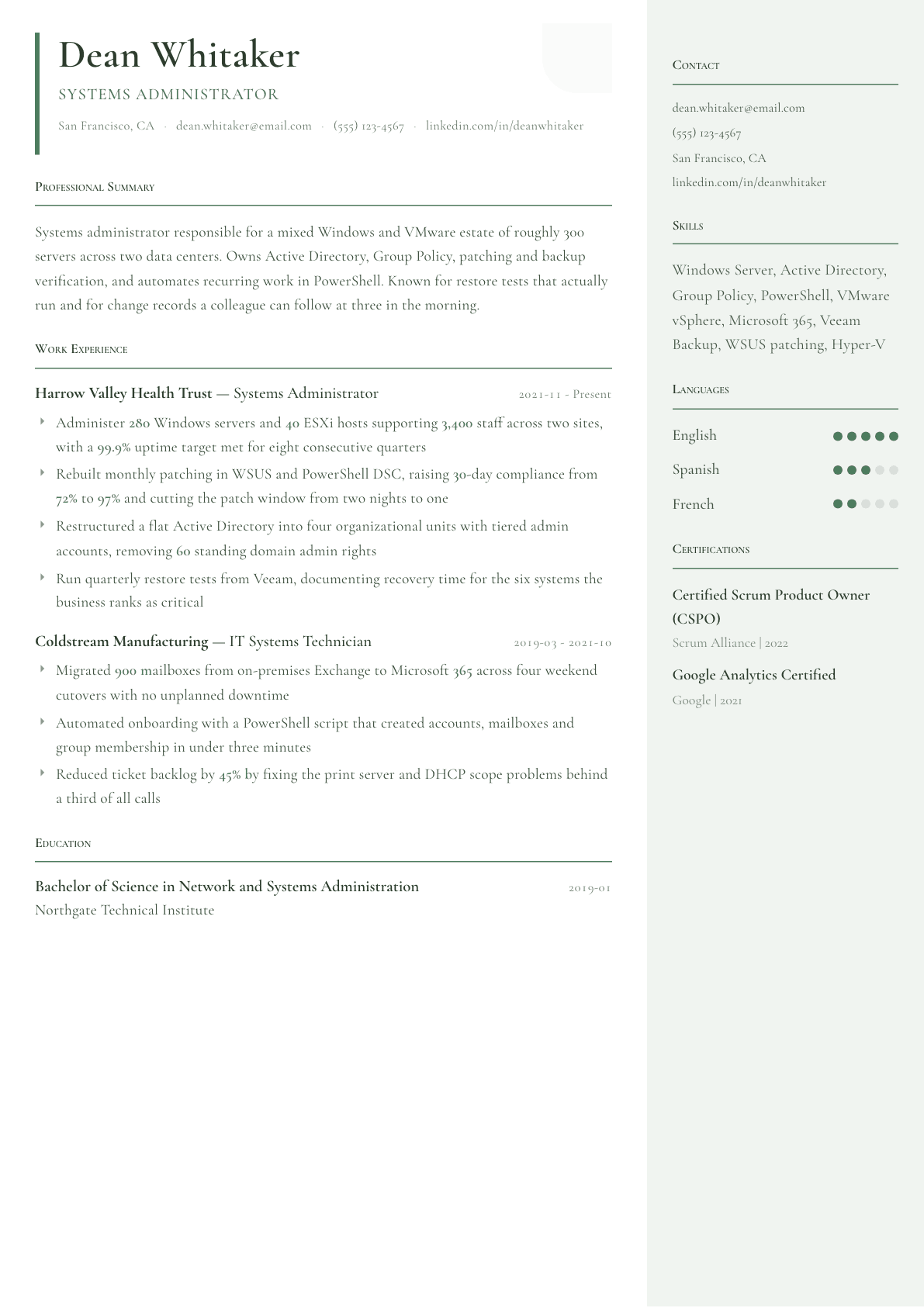
Example System Administrator summary
Systems administrator with six years running mixed Windows and VMware estates for organizations of a few thousand users. Owns Active Directory design, Group Policy, patching and backup verification, and replaces manual routines with PowerShell. Raised 30-day patch compliance from 72% to 97% and cut a two-night maintenance window in half. Holds current Microsoft Azure and VMware credentials and writes change records other administrators can follow.
Skills to list on a System Administrator resume
- Windows Server
- Active Directory
- Group Policy
- PowerShell scripting
- VMware vSphere
- Hyper-V
- Microsoft 365 administration
- Exchange Server
- DNS and DHCP
- Patch management
- Backup and recovery
- Storage and SAN
- Monitoring and alerting
- Disaster recovery planning
- Change management
What actually gets this resume read
- Open each job with the estate size: server count, host count, user count and number of sites you supported.
- Separate the platforms you own from the ones you touch, because a hiring manager screens on primary platform first.
- Prove backups with restore tests and recovery times, not with the name of the backup product alone.
- Turn your patching record into a number: compliance percentage, patch window length, or the size of the vulnerability backlog you cleared.
- List every automation script by what it removed, such as manual onboarding steps or a recurring weekend task.
- Put migrations in their own bullets with mailbox, server or user counts, since migration experience is what most postings hunt for.
How to write a system administrator resume
An infrastructure manager reading systems administrator resumes is trying to answer one question quickly: how big was the estate this person actually carried? Server counts, host counts, user counts and site counts do that in a single line. Without them, every resume in the pile reads the same, because every administrator installs updates, resets accounts and restores files.
The second question is whether you leave things better than you found them. Anyone can keep a domain running for a year. The candidate who gets the interview is the one whose bullets show a patch process rebuilt, a directory restructured, a backup finally tested, or a nightly manual routine replaced with a script.
Whether you call it a sysadmin resume or a system admin CV, the reader wants the same proof. This guide walks through the section order that fits the role, gives three summaries for different levels of experience, rewrites the bullets administrators most often write badly, and answers the questions that come up when you are trying to prove operations work on paper.
Format: two pages is normal once you have a real estate to describe
Reverse-chronological, plain single column, no icons in the experience section. Many corporate parsers still read multi-column layouts out of order and drop dates, which is a bad trade for a role where dates and tenure matter.
One page is right for the first few years. Beyond that, two pages is expected, because you need room for platforms, migrations and the operational detail that proves scale. Put a technical environment block directly under the summary so a reader sees the stack before the story.
- Header: name, title, city and state, phone, email, and any active clearance if the sector requires one.
- Order: summary, technical environment, experience, certifications, education.
- Technical environment lists operating systems, virtualization, directory, backup, monitoring and scripting, in that order.
Summary: the estate, the platforms, and the thing you fixed
Say what you run, how much of it there is, and one improvement you are known for. A systems administrator with eight years across Windows and VMware for a three thousand user hospital group is a person a manager can place immediately.
Skip adjectives about reliability and dedication. Every operations candidate claims those, and the claim is settled by the numbers further down the page anyway.
Experience: lead with scope, then with change
Give the environment in the first line of each role: number of physical and virtual servers, hypervisor hosts, users supported, sites and whether the estate is on premises, hybrid or cloud hosted. This one line does more work than any three bullets that follow it.
Then write bullets that carry a verb of change. Rebuilt, migrated, automated, consolidated, hardened, restructured. Under each, put a number: mailboxes moved, compliance figure reached, minutes removed from a task, servers retired, tickets eliminated.
Backups deserve a bullet of their own, and it must mention restore testing. A resume that names a backup product but never mentions a tested restore tells an experienced manager that recovery was assumed rather than proven.
- One scope line per role, then three to five change bullets.
- Name the migration projects with volumes: mailbox count, virtual machine count, user count, cutover windows.
- Include the automation language, usually PowerShell or Bash, and what the script removed from the week.
Certifications and education: near the top when they are current
Vendor credentials still function as filters in this field. List the exact certification title and the issuing vendor, and keep expiry in mind, because a lapsed cloud credential invites a question you do not want to answer in the first minute of a call.
Degrees matter less than tenure and platform depth here. If your degree is unrelated or unfinished, move education to the last section and let the certifications and the estate size carry the page.
Keywords the applicant tracking system will match
Postings recycle the same terms: Active Directory, Group Policy, virtualization, patch management, backup and recovery, disaster recovery, DNS, DHCP, monitoring, incident and change management. Use the exact phrase the posting uses, once in the technical block and once inside a bullet. Writing directory services when the posting says Active Directory costs you a match for no benefit.
System administrator resume format and a sample layout
The system administrator resume format that works is reverse chronological, two pages at most, with a short technical block near the top. A hiring manager for an IT administrator or sysadmin role wants to see the estate before the history: how many servers, which platforms, which directory, which backup product. Put that in four lines and the rest of the page reads as proof.
An IT administrator resume for a smaller company looks slightly different. The job is half help desk and half infrastructure, so the sample below keeps one bullet per job for end user support and spends the rest on the systems you own. Do not hide the help desk work. Small employers hire the person who can do both.
A system administrator CV sample follows the same layout. CV is the word used in the UK, Ireland, India and much of Europe and Africa, and for a systems role it is the same document as a US resume: technical block, estate size in each job's first bullet, certifications near the top. Adjust the spelling and date format to the country, and leave out a photo and date of birth unless the employer asks for them.
- Header: name, city, phone, email, and a GitHub or blog link only if it shows scripts or write-ups.
- Technical summary: platforms, directory, virtualization, cloud, backup, monitoring, scripting, one line each.
- Experience: estate size and user count in the first bullet of every job, then change, automation and recovery work.
- Certifications: name, issuer and year, near the top when current, at the bottom when older than five years.
- Education: one line, unless you finished recently or the posting asks for a degree.
System Administrator resume summary examples
First systems role
Help desk technician moving into server work, supporting 600 users and 25 Windows servers alongside a senior administrator. Handles account lifecycle in Active Directory, patch deployment and backup monitoring, and automates repeat tickets in PowerShell. Holds CompTIA Network+ and is finishing an Azure administrator credential.
Five years in
Systems administrator running 180 Windows servers and 20 VMware hosts for a 2,000 user manufacturer across three plants. Owns patching, backup verification and identity, and migrated 900 mailboxes to Microsoft 365 with no unplanned downtime. Raised 30-day patch compliance from 70% to 96% by scripting the process.
Lead administrator
Lead systems administrator with eleven years across hospital and financial estates, currently responsible for 400 servers, 50 hypervisor hosts and two data centers. Sets patch and backup standards, runs the change advisory process, and mentors three administrators. Designed the tiered administration model that removed standing domain admin rights.
Work experience bullets: before and after
Before: Responsible for managing servers and user accounts.
After: Administered 280 Windows servers and 40 hypervisor hosts for 3,400 staff across two sites, including account lifecycle, Group Policy and quarterly access reviews.
The counts and the named tasks let a manager judge whether your estate resembles theirs.
Before: Performed regular patching and updates.
After: Rebuilt monthly patching with WSUS and PowerShell, lifting 30-day compliance from 72% to 97% and shortening the maintenance window from two nights to one.
A compliance figure and a shorter window turn a routine duty into a measurable improvement.
Before: Managed backups using Veeam.
After: Ran quarterly restore tests of the six business-critical systems, documenting recovery times and correcting two jobs that had been failing silently for months.
Restore testing is the part that proves the backup worked; naming the failures found makes it real.
Before: Helped migrate email to the cloud.
After: Migrated 900 mailboxes from on-premises Exchange to Microsoft 365 over four weekend cutovers, with a documented rollback plan and no unplanned downtime.
Volume, method and outcome give the reader the scale and the risk management in one line.
Before: Automated some manual IT tasks.
After: Wrote a PowerShell onboarding script that creates the account, mailbox, group membership and home folder in under three minutes, replacing a checklist that took nearly an hour.
Saying what the script does and what it replaced converts automation from a buzzword into recovered time.
Hard skills
- Windows Server administration
- Active Directory and Group Policy
- PowerShell scripting
- VMware vSphere
- Hyper-V
- Microsoft 365 and Exchange
- DNS, DHCP and file services
- Patch management
- Backup and restore testing
- SAN and storage administration
- Monitoring and alerting
- Disaster recovery planning
- Endpoint management
- Change and incident management
Soft skills
- Calm incident handling
- Clear change documentation
- Prioritizing under a full ticket queue
- Explaining outages to non-technical staff
- Vendor and support escalation
- Knowledge sharing with the help desk
Certifications worth listing
- Microsoft Certified: Windows Server Hybrid Administrator Associate (Microsoft)
- Microsoft Certified: Azure Administrator Associate (Microsoft)
- VMware Certified Professional, Data Center Virtualization (VMware)
- CompTIA Server+ (CompTIA)
- Red Hat Certified System Administrator (Red Hat)
Mistakes that cost system administrator candidates the interview
- Never stating estate size, which leaves the reader unable to tell a ten server office from a two data center operation.
- Listing every product ever touched in one long block, so the platforms you are genuinely deep in disappear.
- Describing duties that every administrator performs while omitting the projects that only you delivered.
- Naming a backup product without a single mention of a tested restore or a recovery time.
- Leaving migrations undated and unsized, when migration experience is the strongest hiring signal in this role.
- Using a decorative two-column template that scrambles dates in older parsers used by large employers.
System Administrator resume questions
How long should a systems administrator resume be?
One page for the first three or four years, two pages afterwards. Operations careers accumulate platforms, migrations and incidents that genuinely need the space, and hiring managers in infrastructure expect a second page rather than penalizing it.
Should I list every server product I have touched?
No. Separate what you own from what you have supported occasionally. A short primary list that matches the posting reads as depth, while a wall of thirty product names reads as familiarity and forces the manager to guess where you are strong.
Do certifications still matter for a systems administrator?
They matter most as filters at the application stage and least in the interview. Keep one current cloud credential and one platform credential visible near the top, and drop anything expired unless the technology is still central to the role you want.
What is the best format for a system administrator resume or CV?
Reverse chronological, two pages at most, with a four line technical summary under the header that names platforms, directory, virtualization, backup and scripting. Each job then opens with estate size and user count, followed by change, automation and recovery bullets. Certifications go near the top while current.
How do I write an IT administrator resume from a small company?
Treat breadth as the selling point. Name every system you owned end to end, from the firewall to the backup to the user accounts, and give the size: users, devices, sites. Keep one bullet on end user support, because small employers want someone who can fix the printer and the domain controller.
Related resume examples
- IT Specialist Resume example
- Database Administrator Resume example
- Linux Administrator Resume example
- IT Support Specialist Resume example
- Network Administrator Resume example
- Azure Engineer Resume example