IT Support Specialist Resume Examples: read this first
Build an IT Support Specialist Resume Hiring Managers Trust
By Mustafa Tarabya, founder of CVBooster · Published · Updated
An IT support specialist resume example with ticket volume, resolution metrics, help desk keywords and a complete writing guide.
Sample resumes for a it support specialist
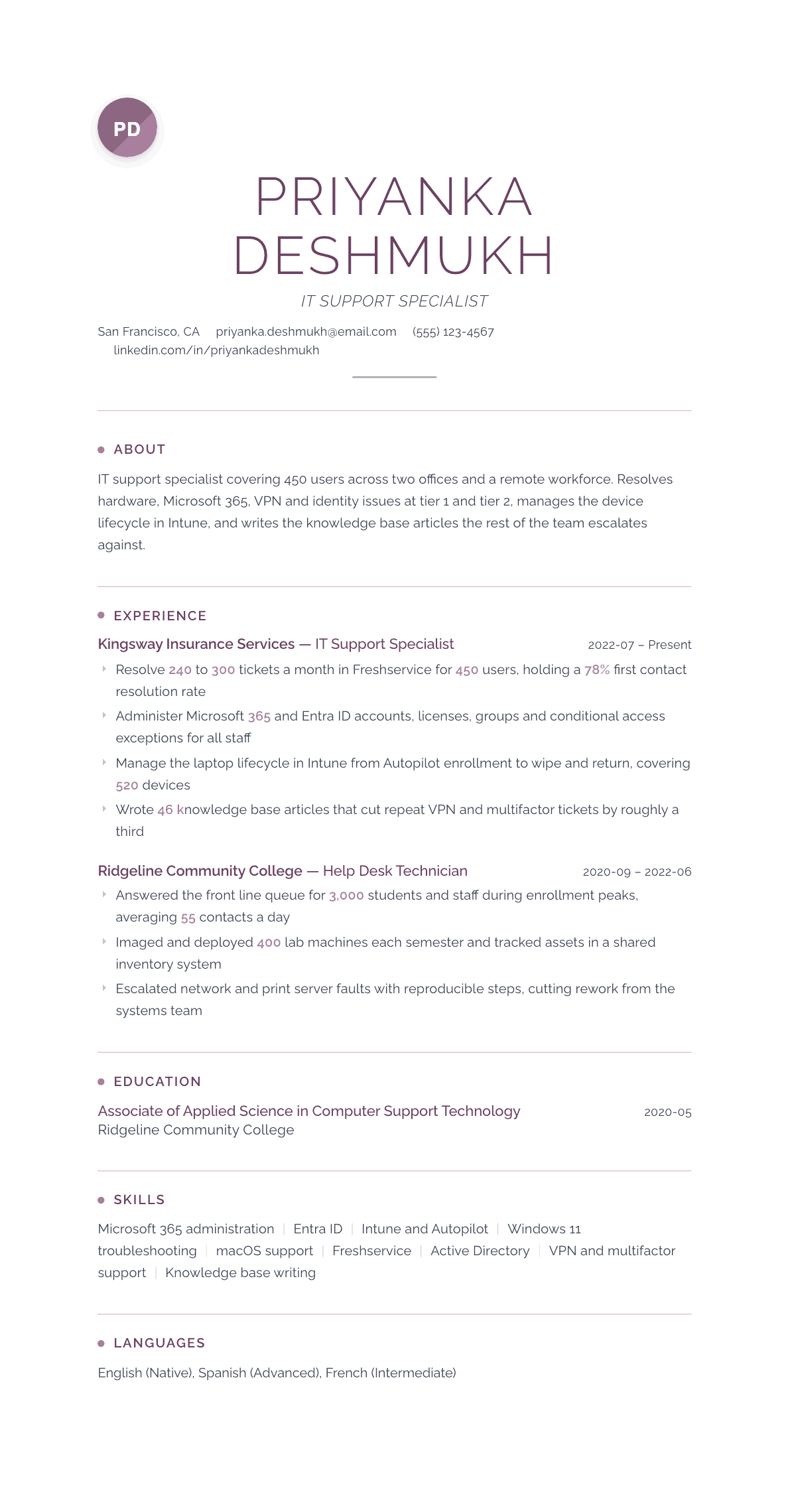
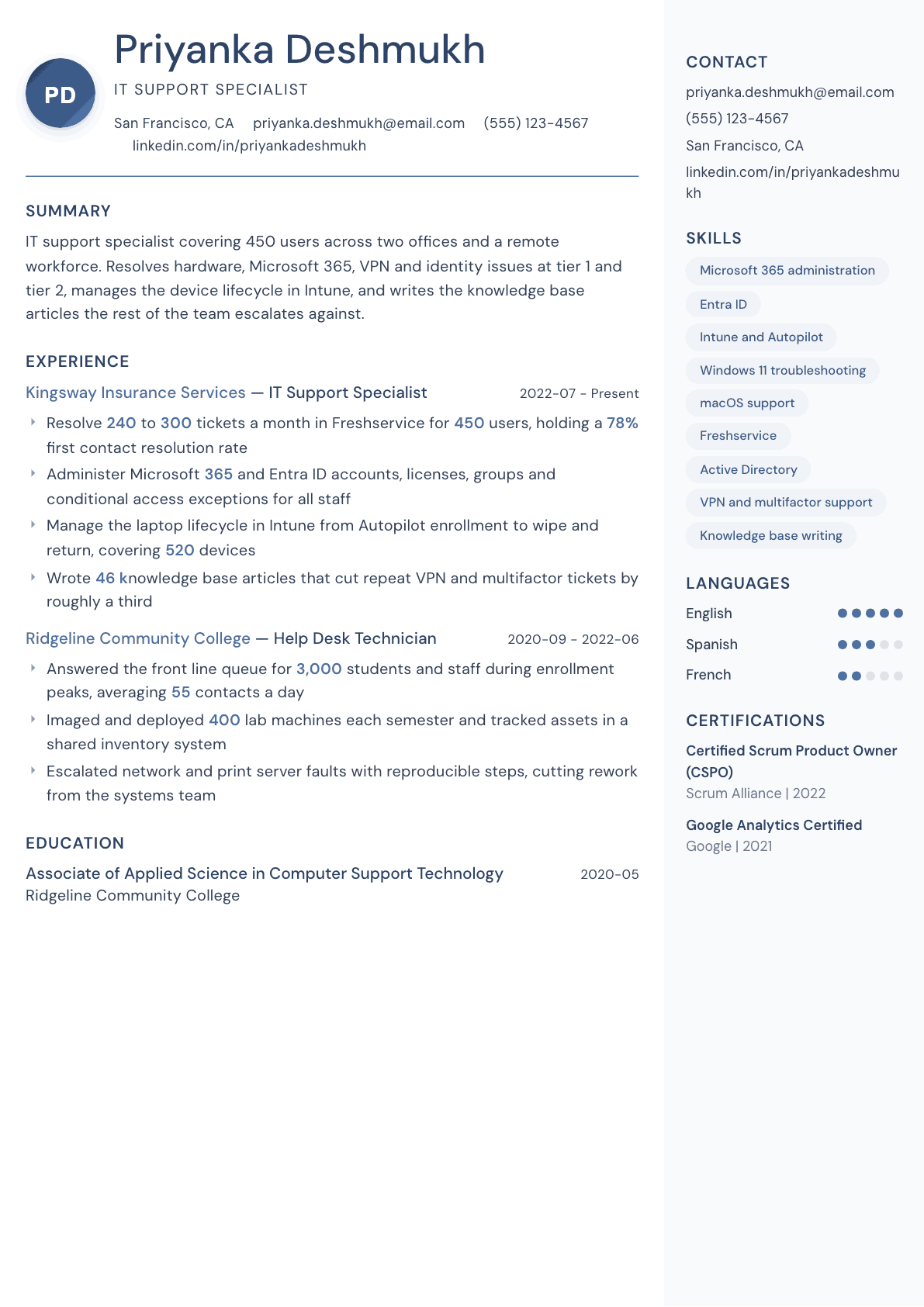
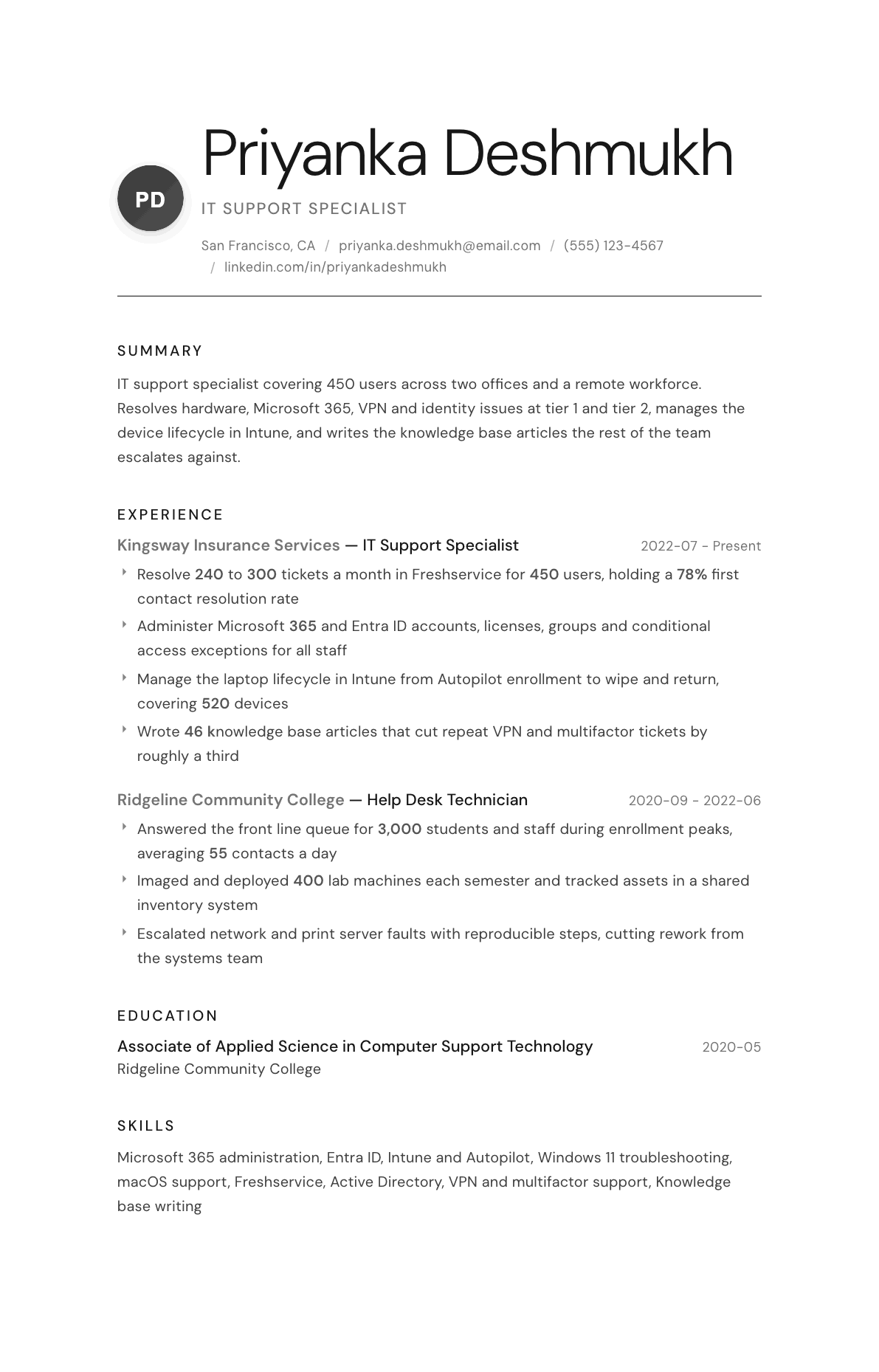
The same it support specialist content laid out in three CVBooster templates, so you can see what the finished document looks like before you write a word.
Example IT Support Specialist summary
IT support specialist with four years covering 450 users across two offices and a remote workforce. Resolves 240 to 300 Freshservice tickets a month at a 78% first contact rate, administers Microsoft 365 and Entra ID, and runs the laptop lifecycle in Intune for 520 devices. CompTIA A+ certified and looking for a tier 2 support role with a clear path into endpoint engineering.
Skills to list on a IT Support Specialist resume
- Help desk support
- Ticket triage and escalation
- Microsoft 365 administration
- Active Directory and Entra ID
- Windows 11 troubleshooting
- macOS support
- Intune and Autopilot
- VPN and remote access support
- Multifactor authentication support
- Printer and peripheral support
- Asset and inventory management
- Knowledge base documentation
- Onboarding and offboarding
- Remote desktop tools
What actually gets this resume read
- Give the numbers a support manager checks: users supported, tickets per month, and first contact resolution.
- Name the ticketing system by product, because Freshservice, Jira Service Management and ServiceNow are different jobs.
- Separate account administration from break-fix so the reader can see the scope of your permissions.
- Show device lifecycle work: imaging, enrollment, asset tracking, and return, not only fixing what breaks.
- List CompTIA A+ or the Microsoft endpoint administrator credential in a certifications block near the top.
- Add one bullet on documentation you wrote, since support teams hire for the person who reduces repeat tickets.
How to write a it support specialist resume
Support hiring is a volume game. A single opening pulls in a few hundred applications, most of them identical, most of them a list of duties copied from the last job description. The person reading them is usually the support lead who will have to sit next to the hire, and they are scanning for three facts: how many users you covered, what you were allowed to touch, and whether anyone ever came back with the same problem twice.
That last one is the quiet differentiator. Anyone can reset a password. The candidate who writes the article that stops the next forty password tickets is the one who gets promoted, and the one whose resume stands out, because almost nobody writes documentation work down.
This guide covers the section order support managers expect, how to write ticket work with numbers that survive an interview, three summaries from a first help desk job to a senior specialist, before and after bullets, and the questions support staff ask when the applications stop getting replies.
Format: one page, environment block up top
One page until you have eight years of experience. Reverse chronological, with a three line summary, a compact environment block, then experience. The environment block lists the identity platform, the productivity suite, the ticketing system, the endpoint management tool and the operating systems you support. Support postings are written from exactly that list, so the parser needs to find those names early.
Avoid the two-column template with icons. Support roles often go through applicant tracking systems configured by a generalist recruiter, and column parsing regularly merges your job titles into your dates.
- Header: name, city and state, phone, email, and whether you are open to onsite, hybrid or remote work.
- Order: summary, certifications, environment block, experience, education.
- With under a year of paid experience, add a short projects section: a home lab, a rebuilt family network, a volunteer setup.
Summary: users, tiers, systems, and what you administer
Three lines. How many users and sites you cover, which tiers you handle, the core platforms, and one thing you own beyond break-fix. Support summaries that open with a passion for helping people are interchangeable, and interchangeable is the whole problem in a stack of three hundred applications.
Draw a clear line between what you support and what you administer. Handling a locked account is support. Creating accounts, assigning licenses, managing groups and writing conditional access exceptions is administration, and it moves you up a band. Say which side you sit on.
Experience: volume, resolution, and the scope of your access
Start each role with a scope line: users supported, number of sites, remote or onsite, and the ticketing platform. Then four or five bullets. Give the volume as tickets per month or contacts per day, and pair it with a quality measure such as first contact resolution, average time to resolve, or reopen rate. A number without a quality measure invites the suspicion that you closed tickets fast and badly.
Split the bullets by the kind of work. Break-fix and troubleshooting. Account and license administration. Device lifecycle from enrollment through wipe and return. Documentation and process. That structure lets a support lead map you onto their own rota in seconds.
Delete the generic lines. Providing excellent customer service, troubleshooting hardware and software issues, and escalating tickets as required describe the entire profession. They occupy the space where your actual scope should be.
- Volume plus quality: tickets a month, first contact resolution, reopen rate, or time to resolve.
- Access scope: what you can create, disable, license, reset, enroll or wipe without escalating.
- Lifecycle: how many devices you enroll, image, track and return each year.
Onboarding, offboarding and the work that gets audited
New hire setup and leaver processing are the two support tasks with real compliance weight, and they belong on the page. Say how many people you onboarded, what the standard build contained, how long it took, and how you evidenced that a leaver lost access on the day they left. Auditors ask for that evidence and support teams that can produce it are valued differently.
If you built or improved the process, that is a leadership bullet in disguise. A checklist that took provisioning from an inconsistent two days to a repeatable ninety minutes is a concrete win that any support manager understands.
Certifications, documentation and the keywords the filter wants
CompTIA A+ still clears the entry filter, Network+ helps once you touch connectivity, and the Microsoft endpoint administrator credential proves you can do the modern management half of the job rather than just the deskside half. Put them in a short block with the issuer near the top.
Documentation deserves its own bullet. Knowledge articles written, a runbook you built, a self service guide that cut a recurring ticket type. Then mirror the vocabulary these postings recycle: incident, request, triage, escalation, service level agreement, account provisioning, endpoint enrollment, multifactor authentication, remote support, asset management. Use the exact product names from the posting where they are true of you.
IT Support Specialist resume summary examples
First help desk job
CompTIA A+ certified technician with a community college support diploma and a semester of paid campus lab work. Comfortable with Windows imaging, Active Directory account tasks, printer setup and remote sessions. Rebuilt a small business network of twelve devices as a volunteer project. Seeking a tier 1 help desk seat.
Three years supporting a business
IT support specialist covering 450 users across two offices and a remote workforce. Resolves 240 to 300 Freshservice tickets a month at a 78% first contact rate, administers Microsoft 365 and Entra ID accounts and licenses, and runs the laptop lifecycle in Intune from Autopilot enrollment through wipe and return.
Senior specialist and escalation point
Senior IT support specialist and escalation point for a support team of six, covering 1,400 users across five locations. Owns the knowledge base, the onboarding build standard and conditional access exception handling, and reduced repeat access tickets by a third after rewriting the provisioning checklist.
Work experience bullets: before and after
Before: Provided technical support to end users.
After: Resolved 240 to 300 tickets a month in Freshservice for 450 users across two offices and a remote workforce, holding a 78% first contact resolution rate.
Volume, user count and a quality measure make the workload checkable instead of generic.
Before: Managed user accounts in Active Directory.
After: Administered Microsoft 365 and Entra ID accounts, license assignments, security groups and conditional access exceptions for all staff, including same day leaver disablement evidenced for the annual access review.
Listing exactly what you can create and change shows the level of access you were trusted with.
Before: Set up laptops for new employees.
After: Enrolled and issued 520 devices through Intune and Autopilot, cutting new hire provisioning from an inconsistent two days to a repeatable ninety minute build with a standard application set.
A device count and a before and after build time turn a routine task into a process improvement.
Before: Created documentation for common issues.
After: Wrote 46 knowledge base articles covering multifactor enrollment, VPN failures and shared mailbox access, which cut repeat tickets on those three categories by roughly a third.
Naming the article count and the ticket categories affected proves the documentation actually reduced work.
Before: Assisted with hardware and printer problems.
After: Maintained 38 network printers and multifunction devices across two floors, replaced fusers and rollers in house, and moved print queues to a hosted print service that removed the local print server.
The device count, the in-house repair detail and the platform change show ownership rather than assistance.
Hard skills
- Microsoft 365 administration
- Active Directory and Entra ID account management
- Intune and Autopilot device enrollment
- Windows desktop troubleshooting
- macOS support
- Ticketing in Freshservice, Jira Service Management or ServiceNow
- VPN and remote access troubleshooting
- Multifactor authentication enrollment and recovery
- Printer and peripheral administration
- Remote support tools
- Asset and license tracking
- Basic networking and connectivity diagnosis
- Knowledge base writing
Soft skills
- Patience with non-technical users
- Triage judgment on what to escalate
- Clear written ticket notes
- Managing an interrupted queue
- Explaining a fix so it is not needed again
- Handover discipline between shifts
Certifications worth listing
- CompTIA A+ (CompTIA)
- CompTIA Network+ (CompTIA)
- Microsoft Certified: Endpoint Administrator Associate (Microsoft)
- Microsoft 365 Certified: Fundamentals (MS-900) (Microsoft)
- ITIL 4 Foundation (PeopleCert)
- Apple Certified Support Professional (Apple)
Mistakes that cost it support specialist candidates the interview
- Listing duties instead of scope, so the reader cannot tell whether you covered 40 users or 4,000.
- Giving ticket volume with no quality measure, which reads as speed with no evidence of accuracy.
- Blurring support and administration, leaving the hiring manager unsure what access you actually held.
- Omitting the ticketing platform, when it is one of the first keywords the recruiter filters on.
- Leaving out documentation work entirely, which is the fastest way to look like a ticket closer rather than a problem solver.
- Writing customer service claims with no example of a difficult user situation you handled and how it ended.
- Using a decorative two-column layout that scrambles job titles and dates when parsed.
IT Support Specialist resume questions
How do I get an IT support job with no experience?
Get CompTIA A+ to clear the automated filter, then build something you can describe concretely: a home lab with a domain controller and a couple of clients, or a volunteer setup for a small organization. Describe it with the same structure you would use for a paid role.
What ticket numbers should I put on a support resume?
Tickets per month or contacts per day, users supported, and one quality measure such as first contact resolution or reopen rate. Use the figures your ticketing dashboard shows, since an interviewer may ask how the metric was calculated.
Is a help desk role different from an IT support specialist role?
Usually yes. Help desk implies front line queue work at tier 1, while support specialist implies tier 2 depth plus administration rights over accounts, licenses and devices. Use the title your target posting uses and prove the scope in the bullets underneath.
Should I list every operating system and application I have touched?
No. Keep the environment block to what you support regularly and could be tested on. A long list of applications you opened once dilutes the platforms that matter and gives an interviewer easy questions you cannot answer well.
How do I move from support into systems or security work?
Push the administration and automation bullets to the top: scripting, endpoint policy, identity work, access reviews. Add a relevant certification in the direction you want, and rewrite the summary to state that move explicitly rather than hoping the reader infers it.
Related resume examples
- Technical Support Specialist Resume example
- Help Desk Analyst Resume example
- Desktop Support Technician Resume example
- System Administrator Resume example
- IT Intern Resume example
- IT Manager Resume example