Technical Support Specialist Resume Examples: free score
Troubleshoot Your Way to Success with a Tech Support Resume
By Mustafa Tarabya, founder of CVBooster · Published · Updated
Create a technical support specialist resume showcasing your troubleshooting skills, ticket resolution metrics, and technical expertise.
Sample resumes for a technical support specialist
The same technical support specialist content laid out in three CVBooster templates, so you can see what the finished document looks like before you write a word.
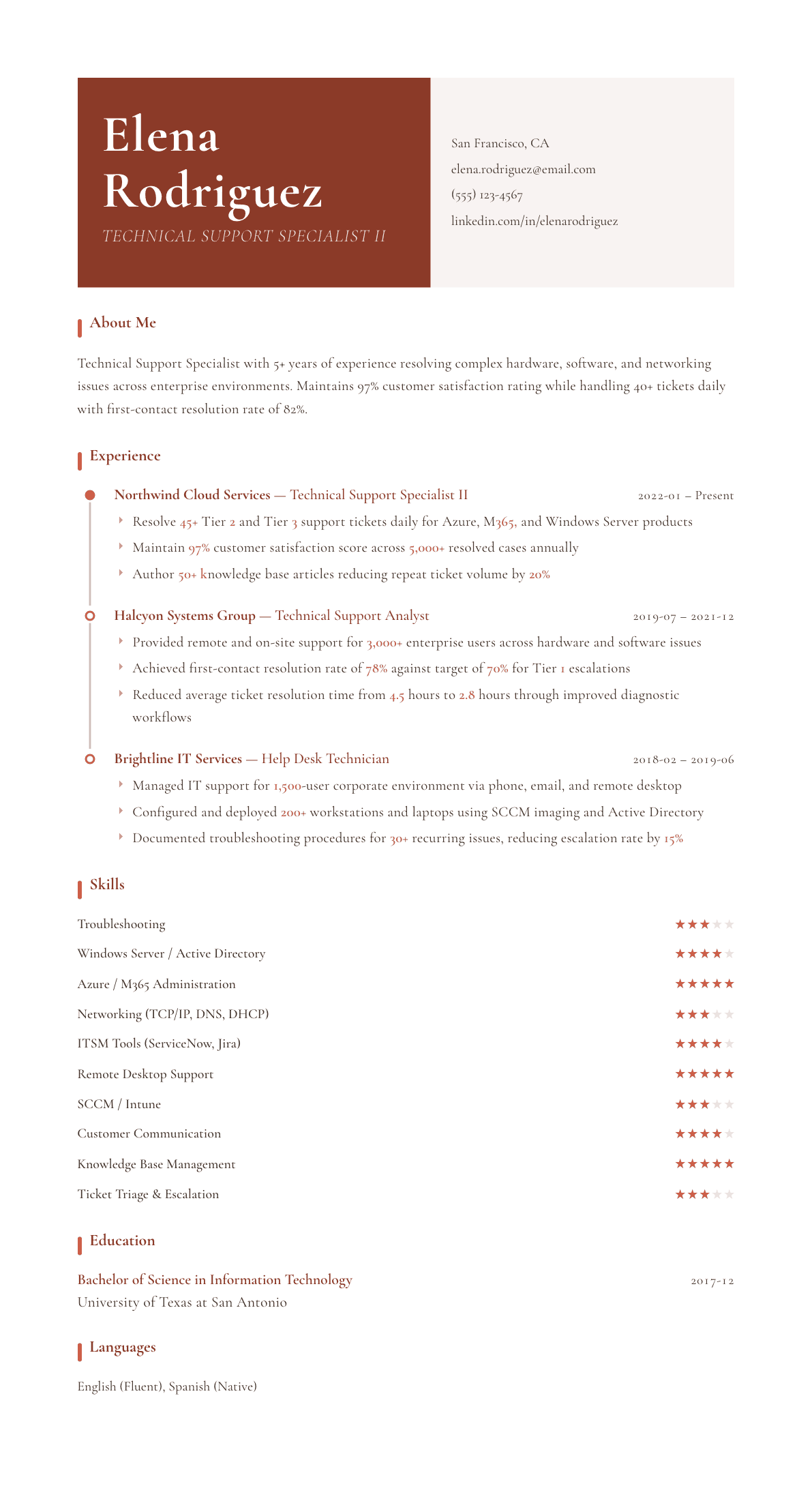
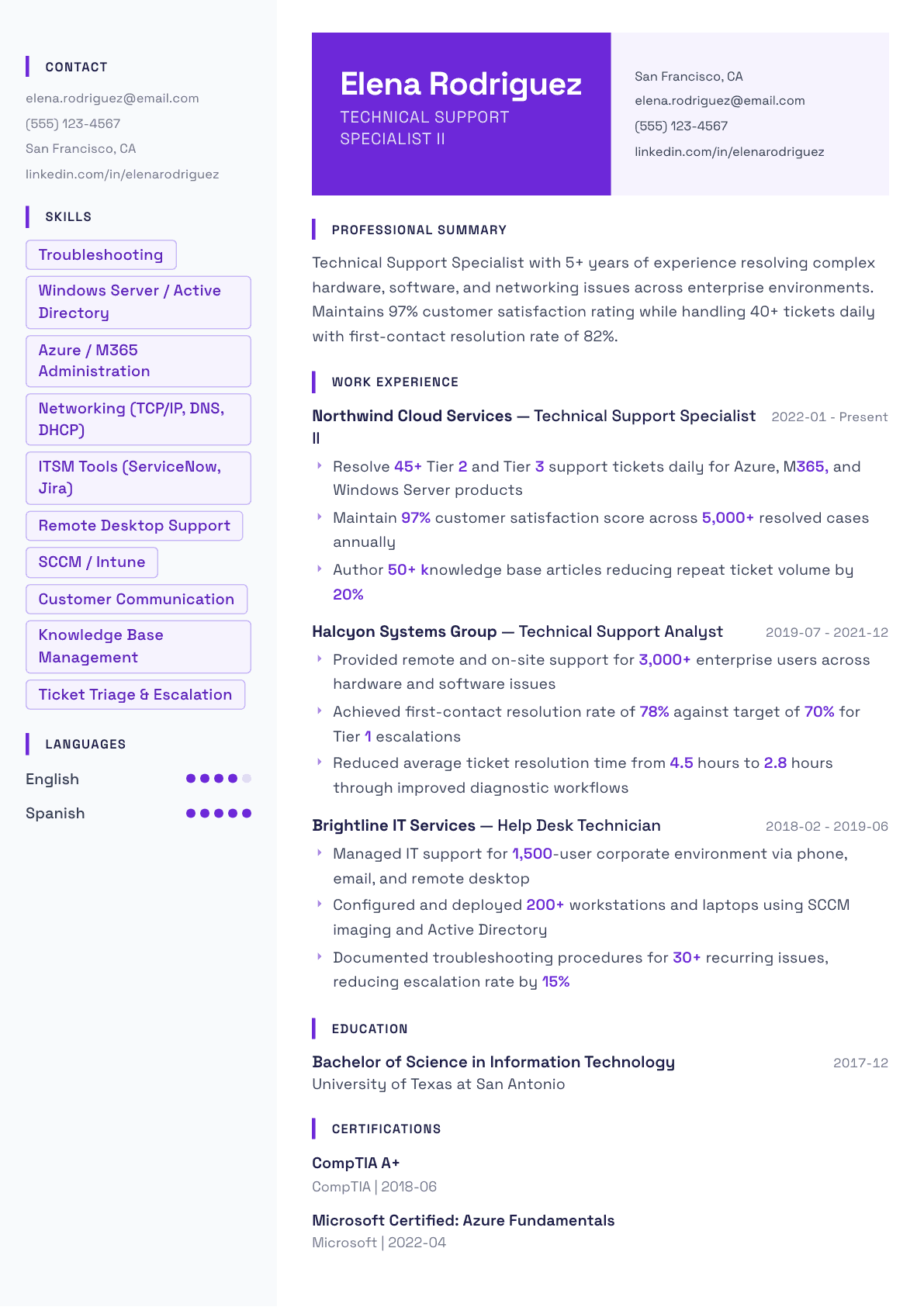
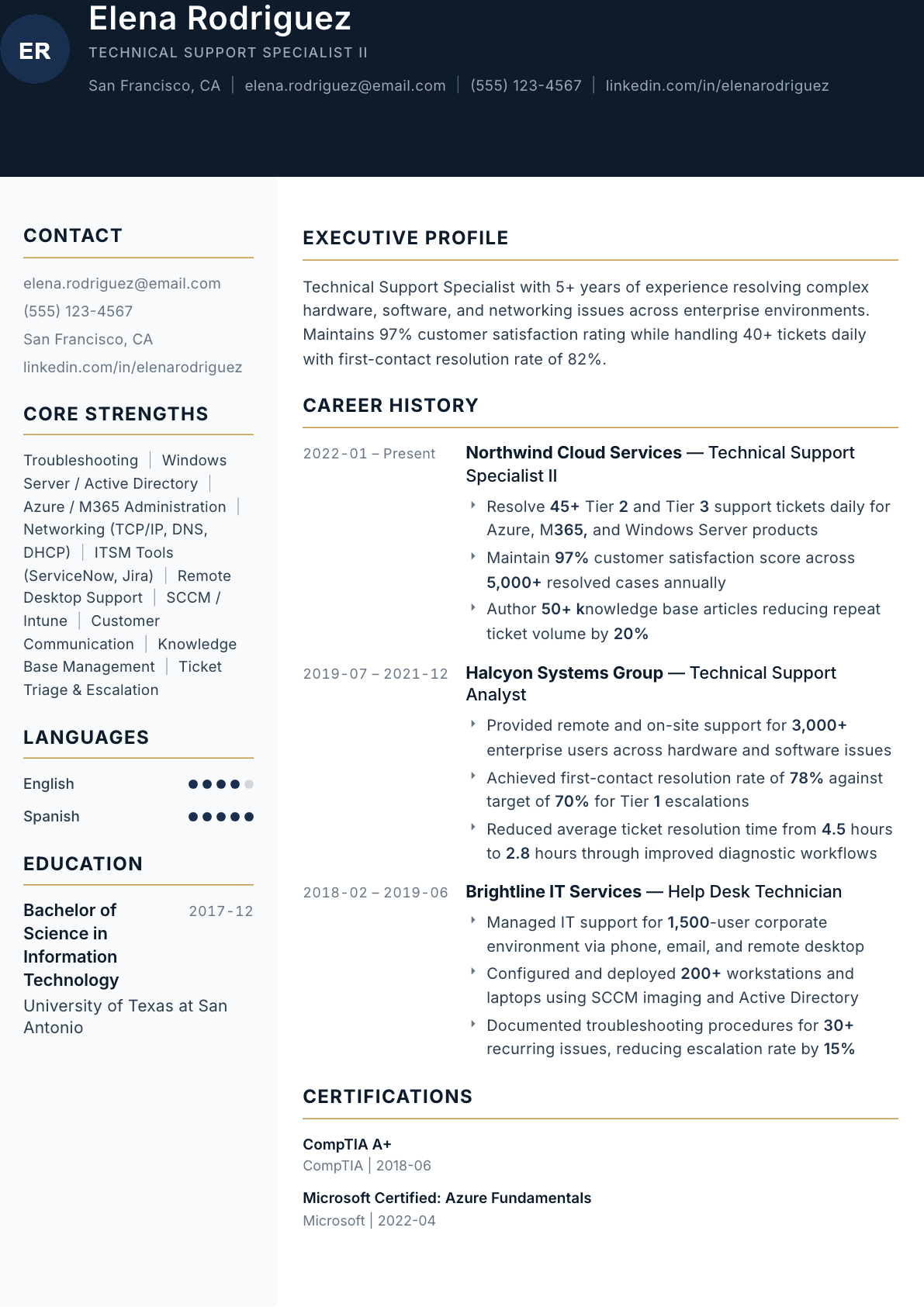
Example Technical Support Specialist summary
Technical Support Specialist with 5 years of experience resolving Tier 2/3 issues across Azure, M365, and enterprise networking. Maintains 97% CSAT with 82% first-contact resolution across 5,000+ annual cases.
Skills to list on a Technical Support Specialist resume
- Technical Troubleshooting
- Windows / macOS / Linux
- Active Directory
- Azure / M365
- Networking (TCP/IP, DNS, DHCP)
- ServiceNow / Jira Service Desk
- Remote Desktop Tools
- SCCM / Intune
- Knowledge Base Management
- Ticket Prioritization
- Customer Communication
- ITIL Framework
What actually gets this resume read
- Quantify your daily ticket volume and resolution metrics to demonstrate throughput.
- Specify tier levels (Tier 1, 2, 3) to clarify the complexity of issues you handle.
- List the specific technologies and platforms you support. Be granular with versions and products.
- Highlight knowledge base contributions and documentation that reduced future ticket volumes.
- Include certifications prominently. CompTIA, Microsoft, and ITIL are highly valued.
How to write a technical support specialist resume
The technical support specialist sits between the first line queue and engineering, and the resume has to show that middle position clearly. The hiring manager is looking for someone who takes what the first line could not solve: the intermittent network fault, the client whose deployment behaves differently from everyone else's, the printer that only fails from one subnet, the application error that has no article behind it yet.
That means the page must prove diagnosis rather than throughput alone. Ticket volume and satisfaction ratings set the scale, but the bullets that win interviews describe how you narrowed a problem down: what you tested, what you ruled out, and what the actual cause turned out to be. Very few resumes for this title do that, which is exactly why it works.
Whether the posting is titled technical support specialist, tech support or IT support, the reader asks the same question, and a tech support resume built for one of them works for the others once the summary uses the posting's own title. This guide covers formatting, how to write hardware, networking and application troubleshooting so it reads as method rather than vocabulary, how to handle the knowledge base and escalation work, and the questions people ask when deciding between an internal support career and a customer facing product support one.
Format: one page, tiers and platforms stated in the first lines
One page for the first five years, single column, reverse chronological. Put a technical block under the summary grouped into operating systems, directory and identity, networking, ticketing and hardware. This role attracts a wide applicant pool with very uneven skills, so a grouped block lets a manager verify the fit in seconds rather than hunting through bullets.
State the tiers you worked in every job. Tier 1, Tier 2 and Tier 3 mean different things at different companies, so add a short clause on what the tier meant in practice: whether you had administrative rights, whether you could touch servers, and who you escalated to.
- Header: name, city and state, phone, email. Note field or on-site availability if the role includes travel between sites.
- Order: summary, technical skills, certifications, experience, education.
- Every job: user or customer population, platforms supported, tier, and daily or weekly ticket volume.
Summary: platforms, tier, and the resolution figures
Three lines naming the environment you supported, the tier, the ticket volume and two figures: satisfaction and first contact resolution. Those two together tell the reader that you solve problems and that people are willing to have you on the line while you do it, which are different qualities and both required.
If your background is internal corporate support and you are applying to customer facing product support, or the other way round, name the transferable core and be specific about what changes. Internal support has standardized hardware and full administrative access; product support has unknown environments and no access at all, so the diagnostic approach differs completely.
Experience: write the diagnosis, not the category
For each job, open with the environment: how many users or customers, how many sites, which operating systems, which core applications. Then give the queue numbers once. After that, spend the remaining bullets on troubleshooting substance.
The most valuable bullets describe a class of problem and how you attacked it. Network faults isolated with layered testing from the endpoint outward, application errors traced through event logs and configuration files, hardware failures diagnosed by component substitution, performance complaints proved to be a storage or memory limit rather than a network one. Naming the method is what convinces a technical reader.
Then the scale work: imaging and deployment, refresh cycles, migrations, application packaging and remote configuration across a fleet. These bullets show you can work on many machines at once instead of one desk at a time, which is the difference between a support specialist and a desk-side helper.
Close each job with the documentation and escalation record. Articles authored, procedures documented for recurring faults, and the reduction in escalations or repeat tickets that followed. Support managers are graded on repeat contact, so this bullet speaks directly to her scorecard.
- Environment: users or customers, sites, operating systems, core applications.
- Queue figures once: daily tickets, first contact resolution against target, satisfaction, average resolution time.
- Two or three diagnostic bullets naming a class of fault and the method used.
- Fleet work: imaging, deployment, migrations, packaging, remote configuration.
- Documentation with the effect on repeat tickets or escalation rate.
Certifications and the technical block
A hardware and operating systems certification is the baseline, a networking certification is the one that separates candidates in this specific role because so many escalated faults turn out to be network faults, and a security credential matters where the desk handles access and endpoint protection. Add vendor credentials for the platforms in the posting.
In the skills block, name protocols and services rather than only product names. A specialist who lists address resolution, name resolution, routing and certificate errors is describing what she can diagnose; one who lists only product names is describing what she has seen installed.
Internal support versus product support
Decide which one the posting is before you write the summary. Internal corporate support values fleet management, directory administration, imaging and standardized builds. Customer facing product support values reproduction on environments you cannot see, structured escalation to engineering, and the ability to explain a fault to someone who does not work in technology.
The same experience can serve both, but the ordering must change. Lead with fleet and directory work for internal roles, and lead with reproduction, escalation quality and customer communication for product roles.
Tech support resume from help desk or with no IT job yet
Moving up from a first line help desk, write the tickets you took beyond the script: the ones you kept instead of escalating, the documentation you wrote after them, and any admin rights you were given because you had earned them. Those three lines are what turns a help desk resume into a tech support resume.
With no IT job yet, use a home lab, a certification lab environment, or support you gave at a previous job such as setting up point of sale terminals, printers or shared accounts. Name the hardware, the operating system and the fault, the same way an employed specialist would.
- Help desk to tier 2: Closed about 40 tickets a month that met the escalation rule without escalating them, by reproducing the fault first, and wrote four knowledge base articles from the fixes.
- Retail to IT: Set up and troubleshot eight point of sale terminals and two receipt printers across a store refit, coordinating with the vendor help desk.
- Home lab: Built an Active Directory lab on a spare PC with DNS, DHCP and group policy, and documented each break and fix.
Technical Support Specialist resume summary examples
First specialist role
IT support technician with two years on a Tier 1 queue for a 1,200 user environment, holding a hardware and operating systems certification and a networking credential. Resolves endpoint, printer and connectivity faults, and seeking a Tier 2 technical support specialist position.
Three years, Tier 2
Technical support specialist supporting 3,000 enterprise users on hardware and software faults, remotely and on site. Reached 78% first contact resolution against a 70% target and cut average resolution time from 4.5 hours to 2.8 hours by rebuilding the diagnostic workflow.
Tier 3 product support
Technical support specialist with five years resolving 45 daily Tier 2 and Tier 3 tickets across cloud, productivity and server products. Holds a 97% satisfaction score over 5,000 cases a year and authored 50 knowledge base articles that reduced repeat ticket volume by 20%.
Work experience bullets: before and after
Before: Troubleshot network issues for users in the office.
After: Isolated intermittent connectivity faults by testing from the endpoint outward through name resolution, address assignment and switch port configuration, tracing a recurring failure to a misconfigured VLAN on one floor.
The layered method and the actual cause show diagnosis, which is what the tier above first line is paid for.
Before: Fixed hardware and software problems on user computers.
After: Diagnosed hardware failures by component substitution and event log review across a mixed laptop and desktop fleet, returning devices to service the same day and sending only confirmed faults through warranty replacement.
Naming the technique and the same-day outcome shows you avoid needless replacements, which is a cost the manager owns.
Before: Deployed new computers to employees.
After: Imaged and deployed 200 workstations and laptops using the deployment console and directory join, applying department application packages and verifying compliance before handover.
Fleet count and the build steps show repeatable deployment rather than individual machine setup.
Before: Wrote articles for the knowledge base.
After: Authored 50 knowledge base articles for the highest volume fault categories and documented 30 recurring procedures, cutting repeat ticket volume by 20% and escalation rate by 15%.
Two counts and two effects tie the writing directly to the numbers a support manager reports upward.
Before: Met the response targets set by the team.
After: Held 97% customer satisfaction across 5,000 resolved cases a year while meeting response targets on Tier 2 and Tier 3 escalations without missed service levels in the last four quarters.
Combining satisfaction, volume and service level over a stated period makes the performance claim defensible.
Hard skills
- Tier 2 and Tier 3 fault diagnosis
- Windows Server and Active Directory
- macOS and mobile device support
- Networking: TCP/IP, DNS, DHCP, VLANs
- VPN, certificates and TLS troubleshooting
- Microsoft 365 and Azure administration
- Endpoint imaging and application packaging
- ServiceNow and Jira Service Management
- Remote support and screen sharing tools
- Printer, peripheral and driver troubleshooting
- Event log and configuration file analysis
- Hardware diagnosis and warranty replacement
- Knowledge base authoring
Soft skills
- Structured elimination
- Explaining faults without jargon
- Escalating with complete context
- Patience on intermittent problems
- Working across sites and time zones
- Documenting while working
Certifications worth listing
- CompTIA A+ (CompTIA)
- CompTIA Network+ (CompTIA)
- CompTIA Security+ (CompTIA)
- Microsoft Certified: Endpoint Administrator Associate (Microsoft)
- Microsoft Certified: Azure Administrator Associate (Microsoft)
- Apple Certified Support Professional (Apple)
- ITIL 4 Foundation (PeopleCert)
Mistakes that cost technical support specialist candidates the interview
- Listing fault categories instead of diagnoses, so the resume proves what you were assigned rather than what you worked out.
- Giving a satisfaction score with no ticket volume behind it, which a support manager reads as a small or selective sample.
- Omitting the tier definition. Tier 2 means something different at every company and the clause explaining yours takes one line.
- Filling the technical block with product names only, when protocols and services are what show diagnostic range.
- Ignoring the documentation work, which is the bullet most directly connected to the repeat contact rate the manager reports.
- Sending an internal corporate support resume to a customer facing product support posting without reordering it.
Technical Support Specialist resume questions
How is a technical support specialist different from a help desk analyst?
The analyst holds the first line queue and resolves known, documented issues at volume. The specialist takes what the first line could not close, which means deeper networking and application diagnosis, fleet work and escalation ownership, and the resume should be weighted that way.
What is the most useful certification for this role?
A networking certification, because a large share of escalated faults that reach this tier turn out to be name resolution, routing, certificate or firewall problems. Pair it with a hardware and operating systems credential and a vendor certification matching the posting.
What should a tech support resume include?
A summary with your tier, the platforms you support and one resolution figure, then jobs whose bullets name a fault, the method and the cause. Add a technical block listing operating systems, networking, ticketing tools and certifications. For a first IT job, include a home lab or support work from another job.
Should I list every application I have supported?
No. List the platforms and application families that appear in the posting plus anything specialized enough to be a differentiator, such as a clinical, engineering or financial system. A long undifferentiated list dilutes the specific ones a manager is scanning for.
How do I show troubleshooting ability rather than tool familiarity?
Write two bullets per job that name a class of problem, the method you used to narrow it, and what the cause turned out to be. That structure demonstrates thinking, and it gives the interviewer an obvious question you are already prepared to answer.
Related resume examples
- Help Desk Analyst Resume example
- Support Engineer Resume example
- Live Chat Agent Resume example
- Technical Support Representative Resume example
- Help Desk Technician Resume example
- Customer Support Specialist Resume example