Skills to Put on a Job Application Form
By Mustafa Tarabya, founder of CVBooster · Published · Updated
13 min read
Put the skills the posting names, in the posting's own words, and only the ones you could be questioned on. On an application form that means something narrower than on a resume: the form asks in fixed boxes, and each box wants the same true skill written a different way.
That difference is what this page is about. If you are writing the resume itself rather than filling in a form, start from the main guide at which skills to put on a resume instead.
How is an application form different from a resume?
A resume is a document you control. You choose the sections, the order, the wording and the emphasis. An application form controls all of that for you: fixed fields, fixed character limits, sometimes a fixed list of skills you are allowed to claim.
Two consequences follow. First, you cannot rely on context — a skill you enter into a box arrives without the job it came from attached, so it has to carry its own meaning. Second, the form is often the thing that gets filtered on, even when your resume is attached to it, so an empty or lazy field costs more here than a weak line on a resume would.
Which skills does the form actually want?
The ones in the posting. Open the posting in a second tab and work from it while you fill the form in. Pull out every concrete noun — tools, systems, methods, certifications, languages — and treat that as your candidate list.
Then apply the same honesty test you would to a resume. Things you have genuinely done go in. Things you have brushed against go in only if you would be comfortable being asked about them for ten minutes. Things you have never done stay out, because an application form is where an overclaim becomes a written record.
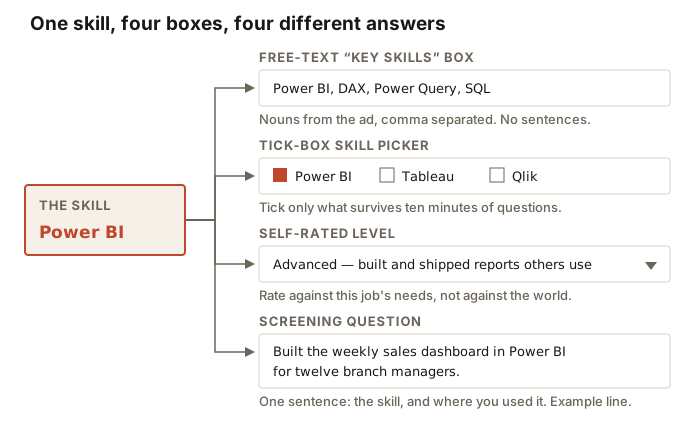
What goes in the free-text "key skills" box?
Nouns, separated by commas, in the posting's wording. No sentences, no adjectives, no "I am a highly motivated". The box is an index, and it is usually short — treat every character as expensive.
- Lead with the two or three skills the posting names first, because the field may be truncated when it is displayed.
- Mirror the posting's exact term. If it says "Power BI", do not write "business intelligence tools".
- Add the specifics in brackets only if the limit allows: "Excel (Power Query, pivot tables)".
- Do not repeat the same skill under two names to game a count. It reads as padding to a human.
- Include spoken languages with an honest level, since these are the most searched-on entries in many systems.
Three key skills boxes, weak and rewritten
The instruction is short and the execution is where people lose the field. Three example pairs, weak first, each against a different posting.
A support role. Weak: "Excellent communication skills, hard working, good with computers, customer focused." Rewritten: "Zendesk, Salesforce Service Cloud, live chat, phone queue, SLA triage, de-escalation, English and Spanish."
A warehouse role. Weak: "Reliable, fit, team player, willing to learn." Rewritten: "Counterbalance forklift licence, stock counts, EPOS terminal, pick and pack, health and safety induction, early shift availability." Cafe applications work the same way, and our barista cover letter examples show how to carry counter skills and shift availability into the letter that goes with the form.
An office administrator role. Weak: "Organised, efficient, Microsoft Office, multitasking." Rewritten: "Excel (Power Query, pivot tables), Outlook calendar management for four managers, purchase orders, Xero, GDPR record keeping, minute taking."
In every pair the weak version is a description of a personality and the rewrite is a list of facts. The rewrites are also shorter to read, which matters in a box that may be cut off after a set number of characters.
Why does the form field carry so much weight?
Because of what the employer does with it afterwards. An application form exists to make a pile of candidates sortable, so its fields are the fields that get sorted on: filtered, searched, compared side by side in a table.
Your resume, by contrast, is usually an attachment. It may be read carefully, it may be read at the shortlist stage, or it may never be opened by the first person who looks at your record. That asymmetry is why a beautifully written resume paired with a half-filled form is a common and expensive mistake.
It also explains a rule that otherwise sounds pedantic: enter the skill even when the resume already says it. The form and the file are not the same record, and a filter run on the form's fields cannot see inside your PDF.
The natural follow-up is whether that means writing longer answers. It does not. Sortable means specific, not lengthy. A long paragraph in a key skills box is harder to filter and harder to read than eight nouns.
How many boxes should you tick in a skills picker?
Fewer than you are tempted to. A picker with a hundred options is designed to be filterable, and every box you tick is a claim you may be asked to demonstrate. Ticking thirty makes none of them mean anything.
Work down the posting's requirements, tick the ones you have, then add only the extras that would genuinely make you a better candidate for this particular role. If the picker will not let you find a skill the posting asked for, look for a free-text "other" field and put it there in the posting's wording.
Tip: Some pickers order results by how many people selected them rather than by relevance. Search for the exact term from the posting rather than browsing the list, or you will end up selecting the popular near-miss instead of the thing that was asked for.
What should you choose in a self-rating dropdown?
Rate against the job in front of you, not against the best practitioner in the world. The dropdown is asking whether you can do this role's version of the task, and the modest answer is read as a no, not as humility.
A working definition for each rung, which you can apply consistently across a form. Basic: you have used it under supervision. Intermediate: you use it unsupervised for routine work. Advanced: you build things with it that other people rely on. Expert: you are the person colleagues escalate to.
Two guards. Do not mark yourself expert in something you cannot teach, and do not mark yourself the same level in everything, because a flat profile reads as untested.
How do you answer a "years of experience" field?
Count hands-on use, not elapsed time since you first met the tool. Two years in a job where you used SQL every day is two years. Six years in a job where you opened it twice is not six.
Where the field forces a number and your real answer is awkward — parallel roles, a career break, seasonal work — give the honest number and use the next free-text field to explain the shape of it. A number you can defend beats a number that flatters.
What about screening questions?
Screening questions are the one place on the form where a skill gets to bring its evidence with it. Answer in one or two sentences that name the skill and say where you used it, then stop.
Some of these are knockout questions — a right to work, a licence, a registration, a shift pattern. Answer those literally and accurately. A knockout question answered creatively does not get you further into the process, it gets you further into a process you will be removed from later.
What if the form asks about a skill you do not have?
Say no, and then use the nearest free-text field to say what you have instead. "No experience of Workday; three years administering BambooHR, including the annual review cycle" is an answer that keeps you in the process honestly. Ticking the box you do not deserve gets you to an interview where the first question is about the thing you cannot do.
There is a real exception for adjacent tools. If you have used a direct competitor of the named product, say so explicitly rather than claiming the product. Employers hiring for a category usually understand the category.
How do you handle the four common situations?
A first application. The skills fields will look intimidatingly empty. Fill them from education, volunteering and part-time work rather than leaving them blank, and be specific: "cash handling, stock rotation, opening and closing checks" is a real answer from a Saturday job. A blank field is read as nothing, not as modesty.
A career change. Enter the target field's vocabulary for skills you genuinely hold, not your old field's. If the form has a free-text field explaining your interest, use one sentence to name the bridge rather than three to apologise for the change.
A return after time out. Fill the years-of-experience fields with real numbers and let the dates in your history explain themselves. If a form offers a comments box, one plain sentence is enough — a form is not the place for the full account.
A self-taught background. Where the form asks how you acquired a skill, say self-taught and name the artefact. Many forms have a portfolio or link field precisely for this, and it is the strongest field on the page for somebody without a matching job title.
What about character limits?
Write the answer first without watching the counter, then cut. Cutting a full answer down produces something denser than writing a short answer from the start, which tends to produce something vague.
Two mechanical warnings. Draft long answers in a text editor rather than in the browser, because portals log you out and a timed-out session takes the box with it. And check what the counter is counting — some count characters including spaces, some count words, and pasted text that fits in your editor can arrive truncated mid-sentence.
Should the form match your resume exactly?
It should not contradict it, which is a lower bar than matching. Dates, job titles, employers and qualifications must be identical, because those are the fields a discrepancy check compares.
The skills themselves can be phrased for the field they sit in. What you cannot do is claim a skill on the form that appears nowhere on the resume, or grade yourself advanced in a tool your resume never mentions. Either one gives a reader a reason to doubt the rest.
What if the form has no skills field at all?
Then the skills have to arrive through whatever fields exist. The "reason for applying" or "supporting statement" box is the usual home: name the posting's main requirements early in it, and attach each to something you have done.
Paper and in-store forms behave the same way. There is usually one open box, and the winning version of it is short, specific and written in the wording of the notice on the door rather than in general enthusiasm.
Before you press submit
- Every skill the posting named that you genuinely have appears somewhere on the form, in the posting's words.
- Nothing you ticked or typed would embarrass you in an interview ten minutes long.
- Dates, titles and qualifications match your attached resume exactly.
- The free-text boxes contain nouns and evidence, not adjectives.
- Knockout questions are answered literally.
- You have kept a copy of what you submitted, because you will be asked about it weeks later.
Forms reward preparation more than writing talent. Once you have chosen your skills properly once — which is a resume exercise, covered at which skills to put on a resume — filling in the boxes becomes a matter of translating the same true list into whatever shape the employer's system happens to ask for.
Related articles
- Competency Based Application Form: 5 Filled Examples
- How to Write a Personal Statement for a Job Application
- Supporting Statement Example: 5 Full Statements, Annotated
- Job Offer Letter: What to Check Before Signing
More articles
- Skills to Put on a Resume (and What to Cut)
- Social Work Interview Questions: 7 UK Model Answers
- Soft Skills for a Resume: Communication Examples and More
Looking for a worked example for your job title? Browse the resume examples by job title.