Desktop Support Technician Resume Examples: free score
Write a Desktop Support Technician Resume That Gets Callbacks
By Mustafa Tarabya, founder of CVBooster · Published · Updated
A desktop support technician resume example with imaging, hardware repair and endpoint keywords, plus a guide to writing deskside bullets.
Sample resumes for a desktop support technician
The same desktop support technician content laid out in three CVBooster templates, so you can see what the finished document looks like before you write a word.
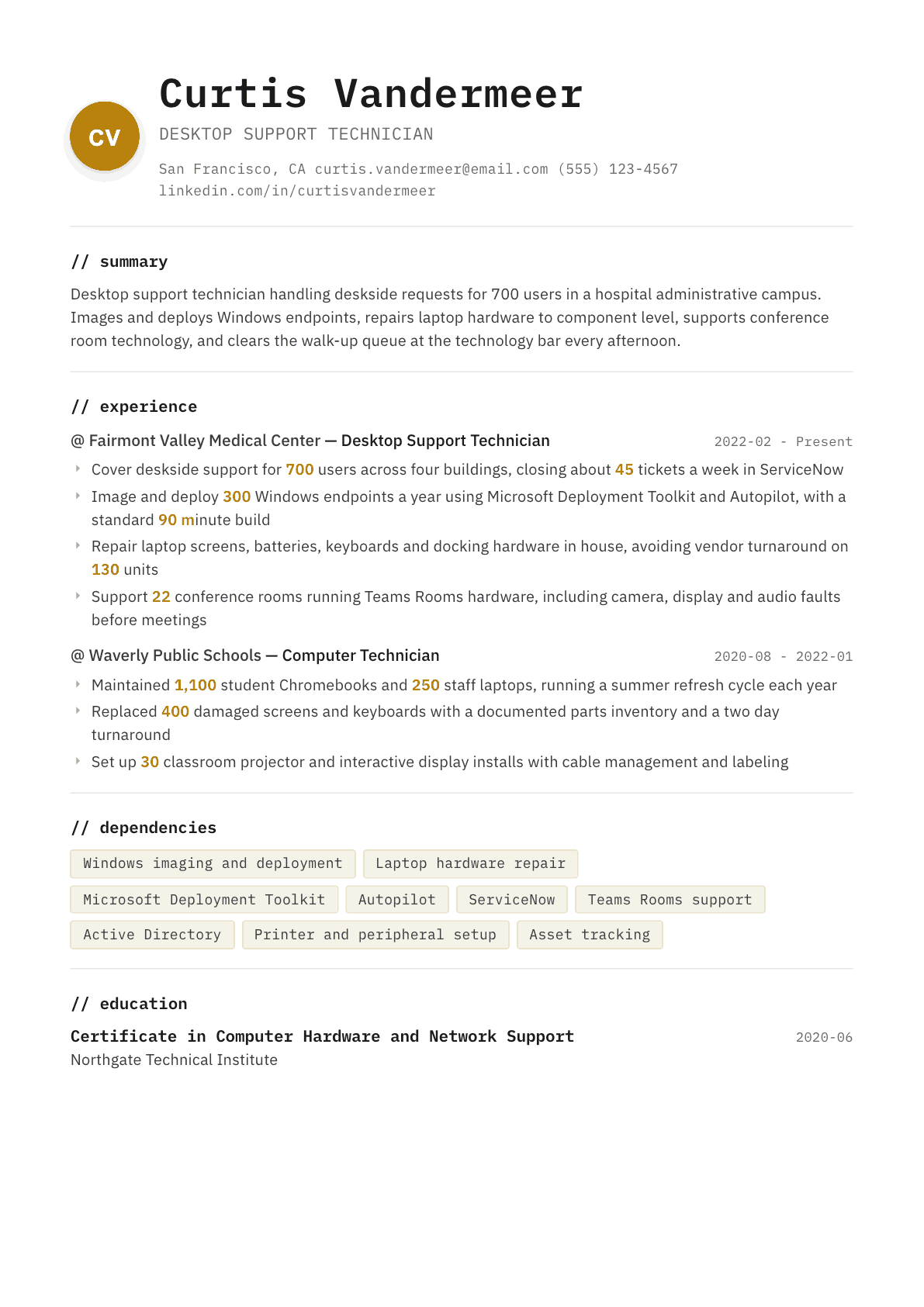
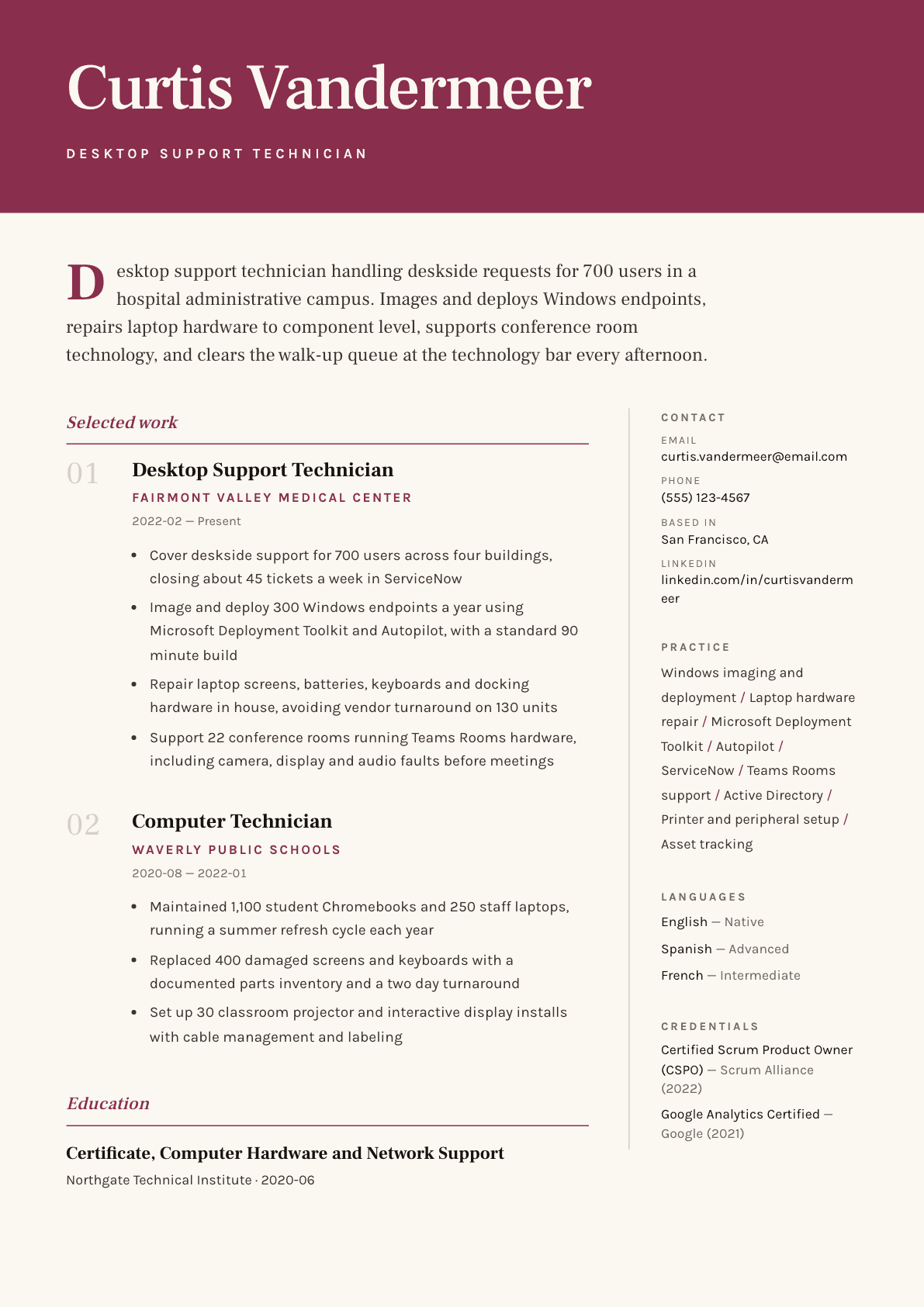
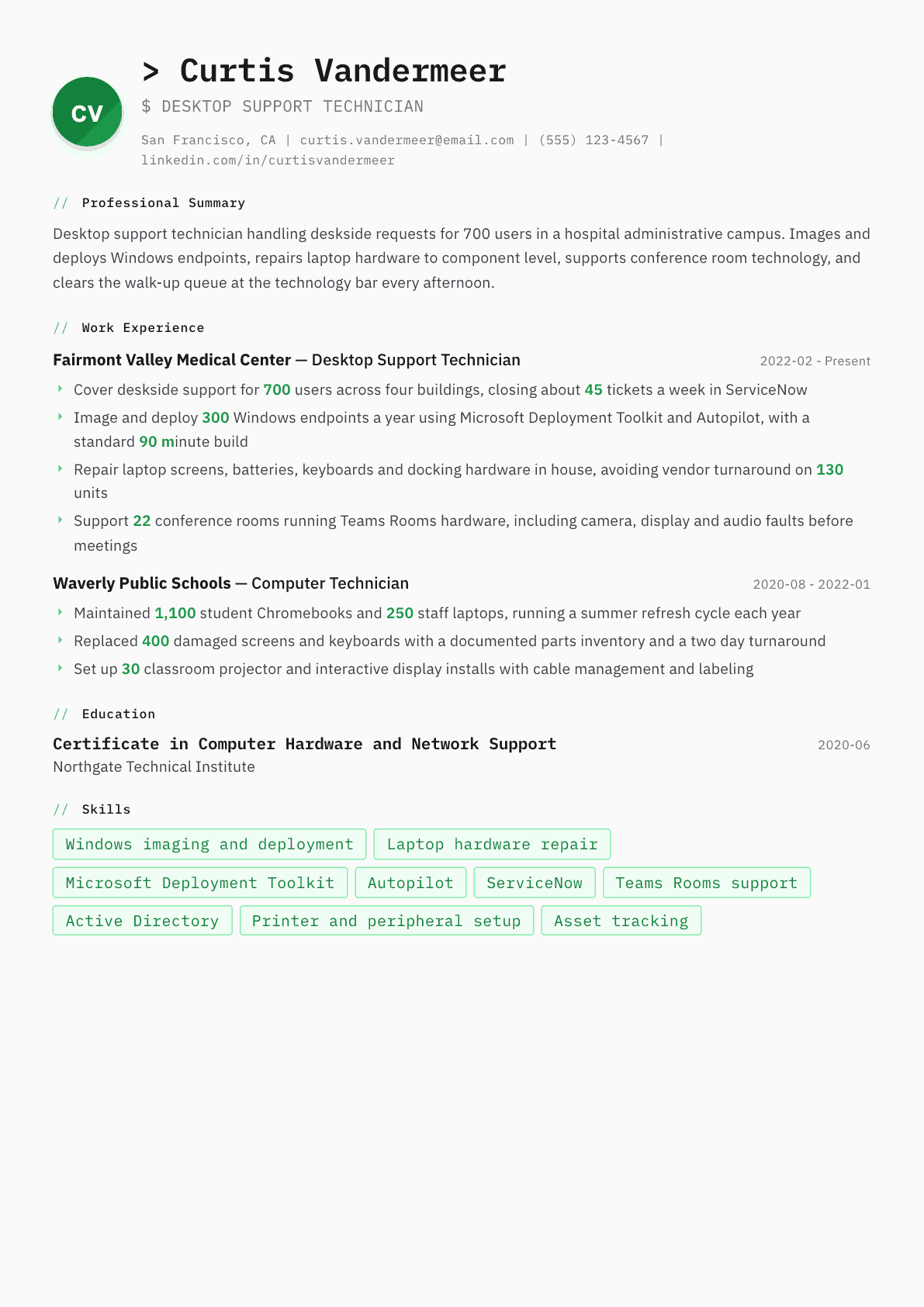
Example Desktop Support Technician summary
Desktop support technician with five years of deskside work, now covering 700 users across four buildings on a hospital campus. Images 300 Windows endpoints a year through Autopilot and the Microsoft Deployment Toolkit, repairs laptop hardware to component level, and keeps 22 Teams Rooms working before meetings start. CompTIA A+ certified and ready for a senior deskside or endpoint engineering role.
Skills to list on a Desktop Support Technician resume
- Deskside support
- Windows imaging and deployment
- Autopilot enrollment
- Microsoft Deployment Toolkit
- SCCM software distribution
- Laptop and desktop hardware repair
- Docking station and peripheral support
- Conference room and audio visual support
- Active Directory account tasks
- Printer installation and troubleshooting
- Asset inventory management
- Ticket documentation
- macOS and Jamf basics
- Cable management and labeling
What actually gets this resume read
- Say how many users and buildings you cover, since deskside work is judged on physical reach and response time.
- Name your imaging path, whether that is Autopilot, the Microsoft Deployment Toolkit, SCCM or Jamf for Macs.
- Call out component level repair explicitly if you do it, because many technicians only swap whole units.
- Include conference room and audio visual support, which is a hidden requirement in most corporate postings.
- Track hardware you touch by count: devices imaged, screens replaced, refresh cycles completed each year.
- Keep CompTIA A+ and any vendor hardware certification such as Dell or Lenovo in a visible certifications block.
How to write a desktop support technician resume
Desktop support is physical work. Someone has to walk to the fourth floor with a spare dock, get the executive's display working before a meeting starts, and rebuild the laptop that came back from a dropped bag. The manager hiring for it is thinking about coverage: how many buildings, how many devices, how fast someone can be standing in front of a user.
That is why a desktop support resume built purely on soft skills fails. The reader wants counts and reach. Devices imaged a year, screens replaced, floors covered, walk-up queue handled, meeting rooms kept working. Those numbers are easy to gather and almost nobody bothers.
This guide covers the layout a deskside manager expects, how to write hardware and imaging work with real volume, three example summaries from a first technician job to a senior deskside lead, before and after bullets, and the questions technicians ask when they want to move up rather than sideways.
Format: one page, hardware and imaging visible early
One page. Reverse chronological, with a short summary, a technical block, then experience. The technical block should name the imaging path, the endpoint management platform, the ticketing system and the hardware brands you service. Deskside postings are written from that list and a recruiter with no technical background matches on the exact words.
Keep the layout single column and plain. Many deskside roles sit inside hospitals, schools and government agencies whose applicant tracking systems are old, and a two-column resume with icons is the most common reason a good technician never appears in the shortlist.
- Header: name, city and state, phone, email, and driver license status if the role covers multiple sites.
- Order: summary, certifications, technical block, experience, education.
- List hardware vendors you are authorized to service, since warranty repair rights are a real hiring factor.
Summary: users, buildings, devices, and what you repair yourself
Three lines. Users covered, number of buildings or floors, annual device volume, and whether you repair to component level or swap whole units. That last distinction matters more than candidates realize: a technician who replaces screens, keyboards, batteries and thermal assemblies in house saves the employer vendor turnaround on every unit.
If you support conference rooms and audio visual equipment, say it in the summary. It is a hidden requirement in most corporate deskside postings and a common reason an otherwise strong candidate is passed over.
Experience: deployment volume, repair depth, and response
Give each role a scope line: users, buildings, device estate, ticketing platform. Then four or five bullets covering the four kinds of deskside work. Deployment and imaging with an annual count and a standard build time. Hardware repair with the components you replace and the units turned around. Ticket volume with a response or resolution measure. Meeting room and peripheral support with the room count.
Name the imaging path precisely. Autopilot with Intune, the Microsoft Deployment Toolkit with a task sequence, an endpoint configuration manager task sequence, or Jamf for Macs are four different skill sets and a manager can tell instantly whether you have run one or read about it.
Refresh cycles are worth their own bullet. A summer refresh in education, a three-year corporate replacement wave, or a plant rollout are project work in disguise: they have a count, a deadline and a logistics problem, and they show you can plan rather than only react.
- Deployment: devices imaged a year, build time, the deployment tool and the application set.
- Repair: components replaced, units turned around in house, average turnaround time.
- Coverage: buildings, floors, walk-up bar hours, response time to a desk.
Conference rooms, peripherals and the physical estate
Room technology support is quietly the highest visibility part of the job because it fails in front of an audience. Say how many rooms you cover, what platform they run, and what you handle: camera and display faults, audio routing, cable and connector standards, room controller resets, and the pre-meeting checks that stop the calls from happening at all.
The rest of the physical estate belongs here too. Network printers and multifunction devices, label printers in a warehouse, scanners in a records room, barcode devices on a plant floor, digital signage in a lobby. Naming the specific equipment families tells a hiring manager which environments you already know how to walk into.
Certifications, asset discipline and the keywords the filter wants
CompTIA A+ is the baseline and manufacturer certifications from Dell or Lenovo prove warranty repair authorization. The Microsoft endpoint administrator credential shows you can do modern management rather than only physical work. Keep them in a short block with the issuer.
Add one bullet on asset discipline: how you tracked serial numbers, recorded issue and return, handled stock levels for spares, and disposed of retired hardware with certified data destruction. Then mirror the phrases these postings reuse: imaging, deployment, break-fix, hardware refresh, peripherals, ticket queue, asset tag, warranty claim, deskside support, walk-up support.
Desktop Support Technician resume summary examples
First technician job
CompTIA A+ certified technician with a hardware and network support certificate and a year of paid work maintaining student devices. Replaced screens, keyboards and batteries on 400 units, imaged classroom machines from a task sequence, and tracked every device against an asset register. Seeking a corporate deskside role.
Three years deskside
Desktop support technician covering 700 users across four buildings on a hospital campus. Closes about 45 ServiceNow tickets a week, images 300 Windows endpoints a year on a standard ninety minute build, repairs laptop hardware to component level, and keeps 22 Teams Rooms working ahead of scheduled meetings.
Senior deskside lead
Senior desktop support technician leading a three person deskside team across a campus of 1,600 users. Owns the hardware refresh wave, the standard image and the spares inventory, runs vendor warranty claims, and cut average device turnaround from five days to under two by holding parts stock in house.
Work experience bullets: before and after
Before: Provided desktop support to employees.
After: Covered deskside support for 700 users across four buildings, closing about 45 tickets a week in ServiceNow with a same day response target for executive and clinical areas.
Users, buildings, weekly volume and a response commitment show the physical reach a deskside manager is staffing for.
Before: Installed operating systems and software on computers.
After: Imaged and deployed 300 Windows endpoints a year using the Microsoft Deployment Toolkit and Autopilot, with a standard ninety minute build carrying the full application set and department drivers.
The annual count, the named deployment tools and the build time prove you have run a real deployment process.
Before: Fixed broken laptops.
After: Repaired screens, batteries, keyboards, fans and docking hardware in house on 130 units, avoiding vendor turnaround and returning most devices to the user within two working days.
Component level detail and the turnaround time show repair depth rather than a swap and send routine.
Before: Supported conference room technology.
After: Maintained 22 meeting rooms running Teams Rooms hardware, running a Monday check on camera, display and audio routing that removed most in-meeting failures before they reached the queue.
The room count and the preventive check turn reactive support into a practice that reduced incidents.
Before: Kept track of IT equipment.
After: Maintained the asset register for 1,100 devices, recorded issue and return against each serial number, held a spares stock of 40 common parts, and processed retired hardware through certified data destruction.
Naming the register size, the spares level and the disposal process shows the audit discipline employers are exposed on.
Hard skills
- Windows imaging and task sequences
- Autopilot and Intune enrollment
- Microsoft Deployment Toolkit
- Endpoint configuration manager software distribution
- Laptop and desktop component repair
- Docking stations, displays and peripherals
- Teams Rooms and meeting room technology
- Network printer and multifunction device support
- Active Directory account and group tasks
- Ticket handling in ServiceNow or Jira Service Management
- Asset register and warranty claim handling
- macOS support and Jamf basics
- Structured cabling and connector standards
Soft skills
- Working calmly in front of an audience
- Prioritizing walk-ups against scheduled work
- Explaining a repair without jargon
- Physical organization of stock and spares
- Reliability on a fixed response commitment
- Handover notes that survive a shift change
Certifications worth listing
- CompTIA A+ (CompTIA)
- CompTIA Network+ (CompTIA)
- Microsoft Certified: Endpoint Administrator Associate (Microsoft)
- Apple Certified Support Professional (Apple)
Mistakes that cost desktop support technician candidates the interview
- Writing only about tickets when the job is judged on physical coverage, device volume and turnaround.
- Saying you image machines without naming the deployment tool, which leaves the reader unsure you have used one.
- Omitting whether you repair to component level, which is the single biggest cost difference between technicians.
- Leaving meeting room and audio visual support off the page when most corporate postings quietly require it.
- Ignoring asset and disposal work, which is exactly where an employer carries audit and data protection exposure.
- Listing every consumer application you have used instead of the enterprise platforms the team actually runs.
- Using a designed template with columns that scrambles dates in the older parsers common in public sector hiring.
Desktop Support Technician resume questions
What is the difference between desktop support and help desk?
Help desk is remote and queue driven, mostly phone, chat and remote sessions. Desktop support is physical: walking to the user, replacing hardware, deploying devices and covering meeting rooms. Many teams run both, so state which side of the work you actually did.
How many devices should I say I have worked on?
Use countable figures you can defend, such as devices imaged in a year, screens replaced, or the size of the estate on your asset register. If you never tracked it, estimate from your refresh cycle and be ready to explain the arithmetic in an interview.
Do I need CompTIA A+ for a desktop support job?
It is not always required but it clears automated filters and is often the tiebreaker between two similar applications. Manufacturer certifications from Dell or Lenovo matter more once you handle warranty repairs, because they authorize you to open the machine.
How do I move from desktop support into a higher paying role?
Push the management and automation half of your work forward: endpoint policy, image building, scripted deployments, asset governance. Then add a credential in the direction you want, whether that is endpoint engineering, networking or security, and rewrite the summary around it.
Should I mention that I can lift equipment and work on my feet?
Only if the posting names a physical requirement, in which case one short line confirming it is useful. Otherwise the space is better spent on device counts, repair depth and building coverage, which say the same thing more persuasively.
Related resume examples
- Technical Support Specialist Resume example
- IT Specialist Resume example
- IT Support Specialist Resume example
- Computer Repair Technician Resume example
- IT Intern Resume example
- Field Service Technician Resume example