Resume Header: What Goes In, What Stays Out
By Mustafa Tarabya, founder of CVBooster · Published · Updated
13 min read
A resume header holds a short list: your name, the role you are targeting, your city and country, one email address, one phone number, and any link worth clicking. Nothing else. Everything people add beyond that is either private data an employer has no business holding yet, or noise competing with your name.
It is worth getting exactly right for a reason the rest of your resume does not share. Every other section is read for meaning. The header is read for data. If the header fails, the strongest experience section in the pile never gets a phone call.
What goes in a resume header?
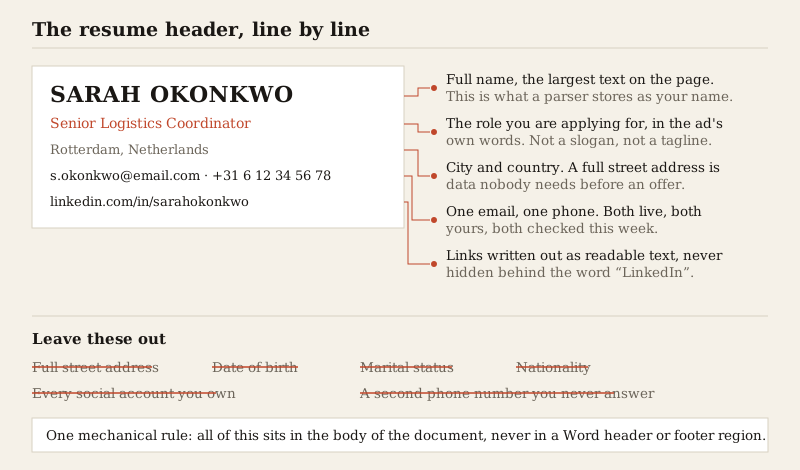
Five lines, in this order, is the format that has stopped needing to be defended:
- Your full name, as the largest text on the page. Use the name you want to be called in an interview, not a formal legal version you never use. Applying in the UK? The heading for a CV guide covers the British version, where your name replaces the words Curriculum Vitae.
- The role you are applying for, written the way the job ad writes it. This line is optional but it does more work than almost anything else in the header.
- City and country. Nothing more granular.
- One email address and one phone number, both live, both yours, both checked this week.
- A LinkedIn profile, and a portfolio or code repository if your field expects one.
The email deserves ten seconds of thought. Firstname.lastname at a mainstream provider is invisible in the good way. A handle you chose when you were fifteen is the first thing about you a stranger will read, and it is not a fair fight.
What should you leave out?
The cuts matter more than the additions, because most bad headers are bad by accumulation rather than by omission.
- Your full street address. City and country is enough to answer the only question the employer has, which is whether you can get to work. A house number is data you hand over after an offer, not before.
- Date of birth, and by extension your age. Common on some European CVs, unnecessary almost everywhere, and it introduces a fact about you that has nothing to do with the job.
- Marital status, dependants, and nationality, unless a visa requirement genuinely makes your right to work part of the application.
- A photo, in markets where photos are not sent. Which markets those are is a real question with a real answer, covered in the resume with a photo.
- The word "Resume" or "Curriculum Vitae" as a title above your name. The reader knows what they opened.
- A second phone number, a fax number, or a landline you cannot hear from the kitchen.
- Every social profile you own. An Instagram account earns its place on a resume only if it is the work.
How should you write LinkedIn and portfolio links?
As readable text, always. Write linkedin.com/in/sarahokonkwo, not the word "LinkedIn" with a hyperlink hidden behind it. Two reasons. A printed resume loses the hyperlink entirely and leaves the reader with a word they cannot use, and a text extraction keeps the visible characters rather than the underlying address.
Trim the noise while you are there. Drop https:// and www. Set a custom LinkedIn URL from your profile settings so the link is your name and not a string of digits, and make sure the profile it opens is not three job titles out of date.
Tip: Only include a link you would be happy for the reader to open in the next thirty seconds, because that is roughly when it will happen. A GitHub with one abandoned repository from 2019 argues against you more effectively than no GitHub at all.
Portfolio links follow the field. Designers, writers, developers, architects and researchers are expected to have one and are penalised for hiding it. In most other roles, a personal site is neutral at best and a distraction at worst.
Why does the header have to parse correctly?
Because it is the part of the document that gets converted into fields rather than read as prose. When your file is processed by an applicant tracking system, the software is looking for a name, an email, a phone number and a location to write into a candidate record. That record is what a recruiter searches later.
A body section that parses imperfectly costs you nuance. A header that parses imperfectly costs you the reply. An email address broken across two lines, a phone number split by a table cell, or a name that arrives as an image are each enough to leave a real candidate unreachable inside a system that believes it has them.
There is one specific trap worth naming, because it is invisible in the document you are looking at. In Word, the area at the very top of the page can either be part of the body or part of the page header region. They look identical on screen. Many parsers ignore the page header region entirely, so a resume whose contact block lives up there can arrive with no contact details at all.
Tip: The test takes fifteen seconds. Open your finished PDF, select all, copy, and paste into a plain text editor. If your name and email are not the first things in that paste, in a readable order, fix the header before you fix anything else. The wider version of this test is in ATS resumes in 2026.
Should the header carry a job title?
In most cases yes, and it should be the title in the ad rather than the title on your current contract. If the ad says Logistics Coordinator and your badge says Supply Chain Officer, the header line reads Logistics Coordinator. You are not claiming to hold the job. You are naming the job you are applying for, at the top of a document about why you can do it.
Keep it a title, not a slogan. "Senior Logistics Coordinator" works. "Passionate problem-solver turning chaos into flow" is a line the reader has to decode before they have learned anything about you.
How much design can a header take?
Less than the templates suggest. The header is where heavy design does the most damage, because it is where the machine-readable data lives.
- Make the name the largest text on the page, and let that single size difference do the hierarchy work.
- A thin horizontal rule under the block is fine. A coloured banner with reversed-out white text is where exports start behaving unpredictably.
- Do not replace labels with icons. A small envelope glyph is not the word "email" to anything reading the text layer.
- Keep the block in one column. A contact block split into three table cells can be extracted in an order that separates your name from your number.
- Left aligned or centred are both fine. Nothing else in the document should be centred.
Two finished examples
A career changer, applying to a named role: "SARAH OKONKWO / Senior Logistics Coordinator / Rotterdam, Netherlands / s.okonkwo@email.com · +31 6 12 34 56 78 / linkedin.com/in/sarahokonkwo". Five lines, no address, no photo, a title that matches the ad.
A recent graduate with a portfolio: "DANIEL MARSH / Junior Front-End Engineer / Manchester, UK / daniel.marsh@email.com · +44 7700 900123 / github.com/danielmarsh · danielmarsh.dev". Same shape. The two links are there because in that field they are the evidence, and because both of them are worth opening.
Header for resume examples from Canada
A header for a resume in Canada follows the same five lines with two local habits: the location is city and province, written with the two letter abbreviation, and the phone number uses the North American format with the area code in brackets or separated by spaces. Canadian employers do not expect a photo, a date of birth or a Social Insurance Number, and the SIN in particular is something you give only after you are hired. Three finished Canadian headers:
Entry level: new graduate in Halifax (12 words)
PRIYA SANDHU Marketing Coordinator Halifax, NS (902) 555 0147 | priya.sandhu@email.com linkedin.com/in/priyasandhu
Mid level: bilingual candidate in Montreal (18 words)
JULIEN TREMBLAY Customer Success Manager | Bilingual English and French Montreal, QC (514) 555 0182 | julien.tremblay@email.com linkedin.com/in/julientremblay
Newcomer: skilled worker applying from Calgary (23 words)
AMARA OKAFOR Civil Engineer in Training (EIT) Calgary, AB | Permanent resident, eligible to work in Canada (403) 555 0119 | amara.okafor@email.com linkedin.com/in/amaraokafor
The language line in the Montreal header belongs there because the job asks for both languages, and a bilingual title is the fastest way to answer it. The work status line in the Calgary header answers the question a recruiter has about any newcomer before they call. Leave both out when they do not apply to the job.
What does a parser actually do with your header?
It is worth knowing the mechanism, because once you know it the rules stop being arbitrary and you can work out the answer for a case this page does not cover.
When your file arrives, the first job is extraction: pulling a plain sequence of characters out of a PDF or a Word document. The second job is classification: deciding which parts of that sequence are the name, the email, the phone number, the location, the section headings, and the individual jobs.
Classification is where the header is treated differently from everything else. An email address and a phone number are found by pattern, because both have shapes a machine can recognise: something, an at sign, a domain, or a run of digits with optional country prefix and separators. Those two survive almost anything short of being split across a line break or rendered as a picture.
Your name has no pattern. It is found by position, which usually means the first substantial line of text that is not one of the things already recognised. That single fact explains most header advice. Put anything above your name and you have introduced a competitor for the position the parser is reading. A line that says "Curriculum Vitae", a tagline, a page of white space caused by a graphic — each one takes the top slot and pushes the real name down.
This is also why the name should appear exactly once in the header. A resume that puts the name at the top and again inside a decorative sidebar gives two candidates for the same field, and there is no way to know which one gets used.
Why the Word header region loses the whole block
A .docx file is a zip archive of XML parts. The body of the document lives in one part. Headers and footers live in their own separate parts, referenced from the section properties rather than sitting in the body stream. Extraction that walks the document body reads the body part, and a contact block placed in the page header region is simply not in the stream it is reading.
Nothing is broken and nothing warns you. The document looks correct in Word, prints correctly, and arrives with the name and email missing. It is the highest-cost, lowest-visibility mistake available in a resume, and it is entirely avoidable: type the header into the first lines of the body like ordinary text.
PDF has its own version of the same problem. A PDF does not store paragraphs, it stores instructions to draw text at coordinates. Reading order is reconstructed afterwards, and reconstruction follows the geometry it finds. A contact block laid out as three side-by-side cells can be read across the row rather than down each column, which is how an email address ends up sandwiched between half of a name and half of a city.
A cramped header, rewritten
Here is a real shape of header, in the form people actually send. Everything invented in it is labelled as an example.
Before: "CURRICULUM VITAE / Sarah Okonkwo, 34, married / 118 Kruisstraat, 3012 CJ Rotterdam, Netherlands / Home: +31 10 555 0134 | Mobile: +31 6 12 34 56 78 | Work: +31 10 555 0199 / Email: s.okonkwo1991@example.com | Skype: sarah.okonkwo.nl / LinkedIn | Facebook | Instagram | Twitter"
Seven lines, and the reader has learned her age, her marital status, her street, and that she has three phone numbers and four social accounts. What they have not learned is what job she does. The name is on line two, behind a title the reader did not need, and the four social platforms are words rather than addresses, so on paper they are unusable and in a text extraction they are four nouns.
After: "SARAH OKONKWO / Senior Logistics Coordinator / Rotterdam, Netherlands / s.okonkwo@example.com · +31 6 12 34 56 78 / linkedin.com/in/sarahokonkwo"
Five lines. The name is first and largest. The second line answers what she does, in the ad's own words. Two contact routes, both of which she will actually answer. One link, written as an address a printer can reproduce and a parser can read. Everything removed was either private, redundant, or a liability, and the block is now shorter than the space it used to take.
Four situations, four headers
The five-line shape holds across careers, but what fills the lines changes.
A first resume with no work history
The title line is the one you are applying for, not one you hold. "Marketing Intern" or "Graduate Trainee, Supply Chain" is honest, because it names the application rather than a claim about you. If a course or a qualification is the strongest thing you have, it belongs in an Education section directly beneath, not squeezed into the header.
Add a portfolio or project link only if there is something on the other end. A university email is fine while you still have it, but move to a permanent address before it expires, because a bounced reply six months later is a job you never heard about.
A twenty-year career
The temptation is to use the header to summarise the whole career: three specialisms separated by pipes, a seniority claim, a decade count. Resist it. The header is not the summary, and the summary section immediately below is better at that job because it can use sentences.
One title line, matched to the role. If you hold a licence or registration that is a hard requirement of the job — a nursing registration number, a chartered status, a licence to practise — that is the one extra item that has earned a place in the header, because it is a gate the reader is checking for.
A designer, where the portfolio is the argument
The portfolio URL is the most important character string in the document, so give it its own line rather than burying it in a run of contact details. If the portfolio is password protected, put the password next to it. A reviewer with thirty files to get through will not email you to ask.
This is also the case where two versions of the header make sense: a typographically expressive one for the file you send to a person, and a plain one for the version you upload to a portal.
A portal upload versus an email to a person
The header content is identical. What changes is your tolerance for risk. A file emailed to a named hiring manager is opened and read by a human, so a slightly adventurous layout costs you nothing but taste. A file uploaded to an application portal is extracted into fields first, and the fields are frequently pre-filled from that extraction for you to correct.
Tip: That pre-fill is a free diagnostic. When a portal reads your file and offers you a form with your name, email and phone already in it, look at what it filled in. It is showing you, for nothing, exactly how your header parsed. If the fields are empty or scrambled, fix the document before you fix the form.
The check before you send it
- Your name is the largest text on the page and appears exactly once.
- The email is one you will read on a Tuesday afternoon, and the voicemail on the phone number is set up.
- No street address, no date of birth, no marital status.
- Links are written out as text and every one of them opens something you are proud of.
- The whole block sits in the body of the document, not in the page header region.
- It survives copy and paste into a plain text editor, in the right order.
That is the whole job. The header is five lines of unglamorous work that decide whether the rest of the document ever gets used. If you are also deciding on the overall structure underneath it, the resume format guide covers which format to build on.
Related articles
- Resume Skills Section: Layout and Placement
- Best Resume Format: Chronological vs Functional vs Hybrid
- Accounting Executive Resume: 5 Examples by Career Level
- Administration Resume Examples: 8 Samples, Entry to Manager
More articles
- Resume Icons: When to Use Them and 5 Clean Examples
- How Long Should a Resume Be? The Honest Answer
- Bad Resume Examples: 10 Mistakes and the Fixed Version
Looking for a worked example for your job title? Browse the resume examples by job title.